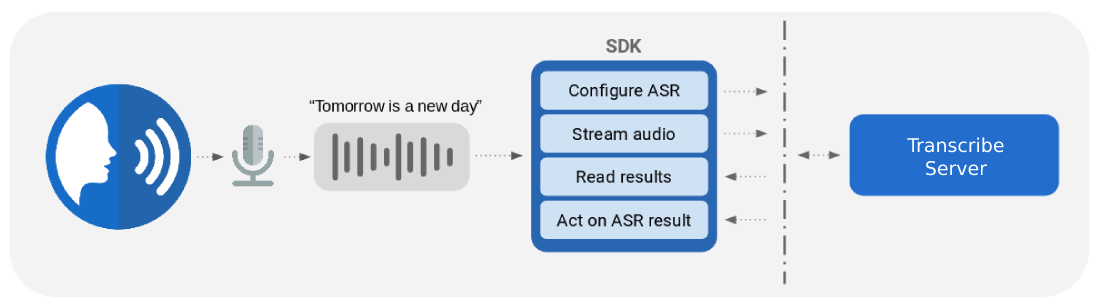
Each engine is documented the same way: what it does, how to generate a client,
how to connect to a server, then a page per streaming call and a generated API
reference.
If you are starting from scratch, follow
Transcribe’s getting started guide — the
other engines use the same connection and streaming patterns.
Cobalt’s Transcribe engine is a state-of-the-art speech recognition system. Cobalt Transcribe supports two different DNN architectures:
Hybrid models combine separately tunable Acoustic Models, Lexicons, and Language Models, making them highly customizable for specific use cases. Hybrid models support extremely low-latency partial results.
End-to-end models go straight from sounds to words in the same DNN. They tend to be more accurate for general use cases, particularly for systems in which sub-second response time is not required.
Cobalt Transcribe is a highly flexible system that can run on-premise, in your private cloud, or fully embedded on your device. Your data – both the audio and the transcripts – never leave your control.
The SDK is based on a gRPC API and client code can be easily generated for different languages using the proto definition, including C++, C#, Go, Java and Python, and can add support for more languages as required.
Once running, Transcribe’s API provides a method to which you can stream audio. This audio can either be from a microphone or a file. We recommend uncompressed WAV as the encoding, but support other formats such as MP3, ulaw etc.
Transcribe’s API provides a number of options for returning the speech recognition results. The results are passed back using Google’s protobuf library, allowing them to be handled natively by your application. Transcribe can estimate its confidence in the transcription result at the word or utterance level, along with timestamps of the words. Confidence scores are in the range 0-1. Transcribe’s output options are described below.
Automatic Transcription Results
The simplest result that Transcribe returns is its best guess at the transcription of your audio. Transcribe recognizes the audio you are streaming, listens for the end of each utterance, and returns the speech recognition result.
Transcribe maintains its transcriptions in an N-best list, i.e. is the top N transcriptions from the recognizer. The best ASR result is the first entry in this list.
Click here to see an example json representation of Transcribe’s N-best list with utterance-level confidence scores
{"alternatives":[{"transcript":"TOMORROW IS A NEW DAY","confidence":0.514},{"transcript":"TOMORROW IS NEW DAY","confidence":0.201},{"transcript":"TOMORROW IS A <UNK> DAY","confidence":0.105},{"transcript":"TOMORROW IS ISN'T NEW DAY","confidence":0.093},{"transcript":"TOMORROW IS A YOUR DAY","confidence":0.087}],}
A single stream may consist of multiple utterances separated by silence. Transcribe handles each utterance separately.
For longer utterances, it is often useful to see the partial speech recognition results while the audio is being streamed. For example, this allows you to see what the ASR system is predicting in real-time while someone is speaking. Transcribe supports both partial and final ASR results.
Confusion Network
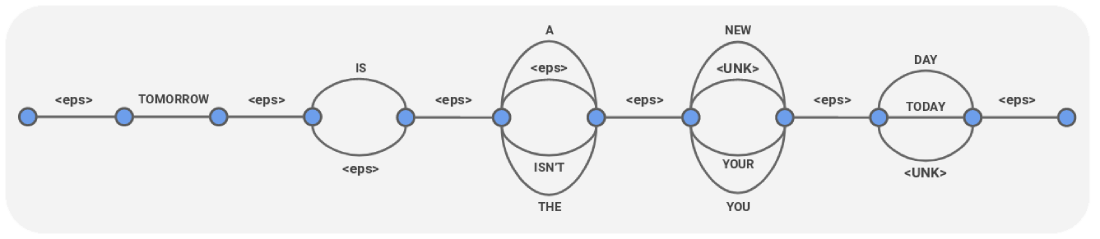
A Confusion Network is a form of speech recognition output that’s been turned into a compact graph representation of many possible transcriptions, as here:
Note that <eps> in this representation is silence.
Click here to see an example json representation of this Confusion Network object, with time stamps and word-level confidence scores
Many speech recognition systems typically output raw words exactly as spoken, without any formatting which can improve intelligibility. Cobalt Transcribe’s customizable formatting suite enables a variety of intelligent formatting options:
Capitalizing the first letter of the utterance
Numbers: “cobalt’s atomic number is twenty seven” -> “Cobalt’s atomic number is 27”
TrueCasing: “the iphone was launched in two thousand and seven” -> “The iPhone was launched in 2007”
Ordinals: “summer solstice is twenty first june” -> “Summer solstice is 21st June”
1.1.1 - Getting Started
How to get a Transcribe Server running on your system
Using Cobalt Transcribe
A typical Transcribe release, provided as a compressed archive, will contain a
linux binary (transcribe-server) for the required native CPU architecture,
appropriate Dockerfile and models.
Cobalt Transcribe runs either locally on linux or using Docker.
Cobalt Transcribe will serve the Transcribe GRPC API on port 2727. A web demo
will be enabled on port 8080.
To quickly try out Transcribe, first start the server as shown below
and open the web demo at http://localhost:8080 in your browser to send live
microphone input or upload an audio file for transcription. You can also use the
SDK to use Transcribe from within your application or just command line.
Info
The cobalt.license.key file will be provided separately that must be copied into
the directory resulting from decompressing the archive. Please do this before
running the steps below.
Running Transcribe Server Locally on Linux
./transcribe-server
By default, the binary assumes the presence of a configuration file, located in the same directory, named: transcribe-server.cfg.toml. A different config file may be specified using the --config argument.
Running Transcribe Server as a Docker Container
To build and run the Docker image for Transcribe, run:
The README.md file contains information about this release and instructions
for how to start the server on your system.
The transcribe-server is the server program which is configured using the
transcribe-server.cfg.toml file.
The Dockerfile can be used to create a container that will let you run
Transcribe server on non-linux systems such as MacOS and Windows.
The models and formatters directories contain your speech recognition and
text formatting models. The content of these directories will depend on the
models you downloaded.
System Requirements
Cobalt Transcribe runs on Linux. You can run it directly as a linux application, or using Docker.
You can evaluate the product on Windows or Linux using Docker
Desktop but we would not recommend this setup for
use in a production environment.
A Cobalt Transcribe release typically includes a single Transcribe model together with binaries and config files. The general purpose Transcribe models take up to 4GB disk space, and need a minimum of 4GB RAM when evaluating locally. For production workloads, we recommend configuring containerized applications with each instance allocated with 4 CPUs and 8GB RAM.
Cobalt Transcribe runs on x86_64 CPUs. We also support Arm64 CPUs, including processors such as the Graviton (AWS c7g EC2 instances). Transcribe is significantly more cost effective to run on C7g instances compared to similarly sized Intel or AMD processors, and we can provide you an Arm64 release on request.
To integrate Cobalt Transcribe into your application, please follow the next steps to Generate the SDK in a language of your choice.
1.1.2 - Running Quick Tests
How to use our prebuilt client application to test Cobalt Transcribe.
In the release package you received, we have bundled a prebuilt application, a
command-line client, that you can use to connect to the server you now have
running. You can use this client to send files to the server for saving the
transcription, either as a stream of text, or as JSON with additional
information.
Obtaining the Client Application
In the release package of Cobalt Transcribe, you should find a folder called transcribe-client, that contains client binaries for multiple platforms.
This client is implemented in Go, and the
code
is available for reference.
If you need to build the client yourself, instead of using the pre-packaged version in the release, you can install it using:
go install github.com/cobaltspeech/examples-go/transcribe/transcribe-client@latest
Running The Client
After you follow the Getting Started instructions, you should have Cobalt Transcribe server running and listening on port 2727 on the local machine.
You can run the transcribe client in various ways:
# Transcribe a file using the default address of the Cobalt Transcribe Server (localhost:2727)transcribe-client recognize input.wav
# Transcribe a file, pointing to some other server addresstranscribe-client recognize input.wav --server host:port
# Transcribe a file using the default server address, and save output as a JSON file.transcribe-client recognize input.wav --output-json output.json
# (Advanced use): List information about the models available on the server.transcribe-client list
# (Advanced use): Transcribe a file, get word level timestamps and confidences.transcribe-client recognize input.wav --output-json output.json --recognition-config '{"enable_word_details": true}'
For more details on the recognition-config struct, please see the API spec
The proto file allows a developer to auto-generate client SDKs for a number of different programming languages. Step by step instructions for generating your own SDK can be found below.
We provide pre-generated SDKs for a couple of languages. You can choose to use these instead of generating your own. These are listed here along with instructions on how to install / import them into your projects.
The Python SDK depends on Python >= 3.5. You may use pip to perform a system-wide install, or use virtualenv for a local install. To use it in your Python project, install it:
To work with proto files, we recommend using
buf, a user-friendly command line
tool that can be configured generate documentation, schemas and SDK code for
different languages.
# Latest version as of March 14th, 2023.COBALT="${HOME}/cobalt" mkdir -p "${COBALT}/bin"VERSION="1.15.1"URL="https://github.com/bufbuild/buf/releases/download/v${VERSION}/buf-$(uname -s)-$(uname -m)" curl -L ${URL} -o "${COBALT}/bin/buf"# Give executable permissions and adding to $PATH.chmod +x "${COBALT}/bin/buf"exportPATH="${PATH}:${COBALT}/bin"
COBALT="${HOME}/cobalt"mkdir -p "${COBALT}/git"# Change this to where you want to clone the repo to.PROTO_REPO="${COBALT}/git/proto"git clone https://github.com/cobaltspeech/proto "${PROTO_REPO}"
Step 3. Generating code
The cobaltspeech/proto repo provides a
buf.gen.yaml config
file to get you started with a couple of languages.
Other plugins can be added to the buf.gen.yaml file to
generate SDK code for more languages.
To generate the SDKs, simply run the following (assuming the buf binary is in your $PATH)
cd"${PROTO_REPO}"# Removing any previously generated files.rm -rf ./gen
# Generating code for all proto files inside the `proto` directory.buf generate proto
You should now have a folder called gen inside ${PROTO_REPO} that contains the generated code. The latest version of the transcribe API is v5. You can import / include / copy the generated files into your projects as per the conventions of different languages.
gen
├── ... other languages ...
└── py
└── cobaltspeech
├── ... other services ...
└── transcribe
└── v5
├── transcribe_pb2_grpc.py
├── transcribe_pb2.py
└── transcribe_pb2.pyi
gen
├── ... other languages ...
└── go
   ├── cobaltspeech
   │ ├── ...
   │   └── transcribe
   │   └── v5
   │   ├── transcribe_grpc.pb.go
   │   └── transcribe.pb.go
   └── gw
   └── cobaltspeech
   ├── ...
   └── transcribe
   └── v5
   └── transcribe.pb.gw.go
gen
├── ... other languages ...
└── cpp
   └── cobaltspeech
   ├── ...
   └── transcribe
   └── v5
   ├── transcribe.grpc.pb.cc
   ├── transcribe.grpc.pb.h
   ├── transcribe.pb.cc
   ├── transcribe.pb.h
   ├── transcribe.pb.validate.cc
   └── transcribe.pb.validate.h
Step 4. Installing gPRC and protobuf
A couple of gRPC and protobuf dependencies are required along with the code generated above. The method of installing them depends on the programming language being used.
These dependencies and the most common way of installing/ / including them are listed below for some chosen languages.
# It is encouraged to this inside a python virtual environment# to avoid creating version conflicts for other scripts that may# be using these libraries.pip install --upgrade protobuf
pip install --upgrade grpcio
pip install --upgrade google-api-python-client
go get google.golang.org/protobuf
go get google.golang.org/grpc
go get google.golang.org/genproto
# More details on grpc installation can be found at:# https://grpc.io/docs/languages/cpp/quickstart/COBALT="${HOME}/cobalt"mkdir -p "${COBALT}/git"# Latest version as of 14th March, 2023.VERSION="v1.52.0"GRPC_REPO="${COBALT}/git/grpc-${VERSION}"git clone \
--recurse-submodules --depth 1 --shallow-submodules \
-b "${VERSION}"\
https://github.com/grpc/grpc ${GRPC_REPO}cd"${GRPC_REPO}"mkdir -p cmake/build
# Change this to where you want to install libprotobuf and libgrpc.# It is encouraged to install gRPC locally as there is no easy way to# uninstall gRPC after you’ve installed it globally.INSTALL_DIR="${COBALT}"cd cmake/build
cmake \
-DgRPC_INSTALL=ON \
-DgRPC_BUILD_TESTS=OFF \
-DCMAKE_INSTALL_PREFIX=${INSTALL_DIR}\
../..
make -j
make install
1.1.4 - Connecting to the Server
Describes how to connect to a running Cobalt Transcribe server instance.
First, you need to know the address where the server is running: e.g. host:grpc_port. By default, this is localhost:2727 and should be logged to the terminal when you first start Transcribe server as grpcAddr:
The default binding address and port for the gRPC / http server (bundled webpage demo) can be configured in the transcribe-server config file.
Info
If you are hosting your server with Transport Layer Security (TLS) enabled, then please follow the instructions under Connection With TLS. Otherwise, you can follow the instructions for the Default Connection method.
Default Connection
The following code snippet connects to the server and queries its version. It connects to the server using an “insecure” gRPC channel. This would be the case if you have just started up a local instance of Transcribe server without TLS enabled.
importgrpcimportcobaltspeech.transcribe.v5.transcribe_pb2_grpcasstubimportcobaltspeech.transcribe.v5.transcribe_pb2astranscribeserverAddress="localhost:2727"# Using a channel without TLS enabled.channel=grpc.insecure_channel(serverAddress)client=stub.TranscribeServiceStub(channel)# Get server version.versionResp=client.Version(transcribe.VersionRequest())print(versionResp)
packagemainimport("context""fmt""os""time""google.golang.org/grpc""google.golang.org/grpc/credentials/insecure"transcribepb"github.com/cobaltspeech/go-genproto/cobaltspeech/transcribe/v5")funcmain(){const(serverAddress="localhost:2727")ctx,cancel:=context.WithCancel(context.Background())defercancel()opts:=[]grpc.DialOption{grpc.WithTransportCredentials(insecure.NewCredentials()),// Using a channel without TLS enabled.grpc.WithBlock(),grpc.WithReturnConnectionError(),grpc.FailOnNonTempDialError(true),}conn,err:=grpc.DialContext(ctx,serverAddress,opts...)iferr!=nil{fmt.Printf("failed to dial gRPC connection: %v\n",err)os.Exit(1)}client:=transcribepb.NewTranscribeServiceClient(conn)// Get server version.versionResp,err:=client.Version(ctx,&transcribepb.VersionRequest{})iferr!=nil{fmt.Printf("failed to get server version: %v\n",err)os.Exit(1)}fmt.Printf("%v\n",versionResp)}
Connect with TLS
In our recommended setup for deployment, TLS is enabled in the gRPC
connection, and when connecting to the server, clients validate the server’s SSL
certificate to make sure they are talking to the right party. This is similar to
how “https” connections work in web browsers.
The following snippets show how to connect to a Transcribe Server that has TLS
enabled. They use the cobalt’s self-hosted demo server at demo.cobaltspeech.com:2727,
but you obviously use your own server instance.
Note
Commercial use of the demo server at demo.cobaltspeech.com:2727 is not permitted.
This server is for testing and demonstration purposes only and is not guaranteed to
support high availability or high volume. Data uploaded to the server may be stored
for internal purposes.
importgrpcimportcobaltspeech.transcribe.v5.transcribe_pb2_grpcasstubimportcobaltspeech.transcribe.v5.transcribe_pb2astranscribeserverAddress="demo.cobaltspeech.com:2727"# Setup a gRPC connection with TLS. You can optionally provide your own# root certificates and private key to grpc.ssl_channel_credentials()# for mutually authenticated TLS.creds=grpc.ssl_channel_credentials()channel=grpc.secure_channel(serverAddress,creds)client=stub.TranscribeServiceStub(channel)# Get server version.versionResp=client.Version(transcribe.VersionRequest())print(versionResp)
packagemainimport("context""crypto/tls""fmt""os""time""google.golang.org/grpc""google.golang.org/grpc/credentials"transcribepb"github.com/cobaltspeech/go-genproto/cobaltspeech/transcribe/v5")funcmain(){const(serverAddress="demo.cobaltspeech.com:2727"connectTimeout=10*time.Second)// Setup a gRPC connection with TLS. You can optionally provide your own// root certificates and private key through tls.Config for mutually// authenticated TLS.tlsCfg:=tls.Config{}creds:=credentials.NewTLS(&tlsCfg)ctx,cancel:=context.WithTimeout(context.Background(),connectTimeout)defercancel()opts:=[]grpc.DialOption{grpc.WithTransportCredentials(creds),grpc.WithBlock(),grpc.WithReturnConnectionError(),grpc.FailOnNonTempDialError(true),}conn,err:=grpc.DialContext(ctx,serverAddress,opts...)iferr!=nil{fmt.Printf("failed to dial gRPC connection: %v\n",err)os.Exit(1)}client:=transcribepb.NewTranscribeServiceClient(conn)// Get server version.versionResp,err:=client.Version(ctx,&transcribepb.VersionRequest{})iferr!=nil{fmt.Printf("failed to get server version: %v\n",err)os.Exit(1)}fmt.Printf("%v\n",versionResp)}
Client Authentication
In some setups, it may be desired that the server should also validate clients
connecting to it and only respond to the ones it can verify. If your Transcribe
server is configured to do client authentication, you will need to present the
appropriate certificate and key when connecting to it.
Please note that in the client-authentication mode, the client will still also
verify the server’s certificate, and therefore this setup uses mutually
authenticated TLS.
The following snippets show how to present client certificates when setting up
the credentials. These could then be used in the same way as the examples above
to connect to a TLS enabled server.
creds=grpc.ssl_channel_credentials(root_certificates=root_certificates,# PEM certificate as byte stringprivate_key=private_key,# PEM client key as byte string certificate_chain=certificate_chain,# PEM client certificate as byte string)
packagemainimport(// ..."crypto/tls""crypto/x509""fmt""os"// ..)funcmain(){// ...// Root PEM certificate for validating self-signed server certificatevarrootCert[]byte// Client PEM certificate and private key.varcertPem,keyPem[]bytecaCertPool:=x509.NewCertPool()ifok:=caCertPool.AppendCertsFromPEM(rootCert);!ok{fmt.Printf("unable to use given caCert\n")os.Exit(1)}clientCert,err:=tls.X509KeyPair(certPem,keyPem)iferr!=nil{fmt.Printf("unable to use given client certificate and key: %v\n",err)os.Exit(1)}tlsCfg:=tls.Config{RootCAs:caCertPool,Certificates:[]tls.Certificate{clientCert},}creds:=credentials.NewTLS(&tlsCfg)// ...}
1.1.5 - Streaming Recognition
Describes how to stream audio to Transcribe server.
The following example shows how to transcribe a audio stream using Transcribe’s
StreamingRecognize request. The stream can come from a file on disk or be
directly from a microphone in real time.
Streaming from an audio file
We support several headered file formats including WAV, MP3, FLAC etc. For more details, please
see the protocol buffer specification here.
The examples below use a WAV file as input to the streaming recognition. We will
query the server for available models and use the first model to transcribe the
speech.
importgrpcimportcobaltspeech.transcribe.v5.transcribe_pb2_grpcasstubimportcobaltspeech.transcribe.v5.transcribe_pb2astranscribeserverAddress="localhost:2727"# Using a channel without TLS enabled.channel=grpc.insecure_channel(serverAddress)client=stub.TranscribeServiceStub(channel)# Get server version.versionResp=client.Version(transcribe.VersionRequest())print(versionResp)# Get list of models on the server.modelResp=client.ListModels(transcribe.ListModelsRequest())formodelinmodelResp.models:print(model)# Select a model ID from the list above. Going with the first model# in this example.modelID=modelResp.models[0].id# Set the recognition config. We don't set the audio format and let the# server auto-detect the format from the file header.cfg=transcribe.RecognitionConfig(model_id=modelID,)# Open audio file.audio=open("test.wav","rb")# The first request to the server should only contain the# recognition configuration. Subsequent requests should contain# audio bytes. We can write a simple generator to do this.defstream(cfg,audio,bufferSize=1024):yieldtranscribe.StreamingRecognizeRequest(config=cfg)data=audio.read(bufferSize)whilelen(data)>0:yieldtranscribe.StreamingRecognizeRequest(audio=transcribe.RecognitionAudio(data=data),)data=audio.read(bufferSize)# We also define a callback function to execute for each response.# The example below just prints the formatted transcript to stdout.defprocessResponse(resp):result=resp.resulthyp=result.alternatives[0]# 1-best hypothesis.transcript=hyp.transcript_formatted# Formatted transcript.start=hyp.start_time_ms/1000.0# Converting to seconds.end=start+hyp.duration_ms/1000.0# Converting to seconds.newLine="\r"ifresult.is_partialelse"\n\n"# Will not move to new line for partial results.print(f"[{start:0.2f}:{end:0.2f}] {transcript}",end=newLine)# Streaming requests to the server.forrespinclient.StreamingRecognize(stream(cfg,audio)):processResponse(resp)
packagemainimport("context""errors""fmt""io""os""sync""google.golang.org/grpc""google.golang.org/grpc/credentials/insecure"transcribe"github.com/cobaltspeech/go-genproto/cobaltspeech/transcribe/v5")funcmain(){const(serverAddress="localhost:2727")ctx,cancel:=context.WithCancel(context.Background())defercancel()opts:=[]grpc.DialOption{grpc.WithTransportCredentials(insecure.NewCredentials()),// Using a channel without TLS enabled.grpc.WithBlock(),grpc.WithReturnConnectionError(),grpc.FailOnNonTempDialError(true),}conn,err:=grpc.DialContext(ctx,serverAddress,opts...)iferr!=nil{fmt.Printf("failed to dial gRPC connection: %v\n",err)os.Exit(1)}client:=transcribe.NewTranscribeServiceClient(conn)// Get server version.versionResp,err:=client.Version(ctx,&transcribe.VersionRequest{})iferr!=nil{fmt.Printf("failed to get server version: %v\n",err)os.Exit(1)}fmt.Printf("%v\n",versionResp)// Get list model of models on the server.modelResp,err:=client.ListModels(ctx,&transcribe.ListModelsRequest{})iferr!=nil{fmt.Printf("failed to get model list: %v\n",err)os.Exit(1)}for_,m:=rangemodelResp.Models{fmt.Println(m)}fmt.Println()// Selecting the first model.cfg:=&transcribe.RecognitionConfig{ModelId:modelResp.Models[0].Id,}// Opening audio file.audio,err:=os.Open("test.wav")iferr!=nil{fmt.Printf("failed to open audio file: %v\n",err)os.Exit(1)}deferaudio.Close()// Starting recognition.err=StreamingRecognize(ctx,client,cfg,audio,printTranscript)iferr!=nil{fmt.Printf("failed to run streaming recognition: %v\n",err)os.Exit(1)}}// StreamingRecognize wraps the bidirectional streaming API for performing// speech recognition. It sets up recognition using the given cfg.//
// Data is read from the given audio reader into a buffer and streamed to cubic// server. The default buffer size may be overridden using Options when creating// the Client.//
// As results are received from Transcribe server, they will be sent to the// provided handlerFunc.//
// If any error occurs while reading the audio or sending it to the server, this// method will immediately exit, returning that error.//
// This function returns only after all results have been passed to the// resultHandler.funcStreamingRecognize(ctxcontext.Context,clienttranscribe.TranscribeServiceClient,cfg*transcribe.RecognitionConfig,audioio.Reader,handlerFuncfunc(*transcribe.StreamingRecognizeResponse),)error{const(streamingBufSize=1024)// Creating stream.stream,err:=client.StreamingRecognize(ctx)iferr!=nil{returnerr}// There are two concurrent processes going on. We will create a new// goroutine to read audio and stream it to the server. This goroutine// will receive results from the stream. Errors could occur in both// go routines. We therefore setup a channel, errCh, to hold these// errors. Both go routines are designed to send up to one error, and// return immediately. Therefore we use a buffered channel with a// capacity of two.errCh:=make(chanerror,2)// start streaming audio in a separate goroutinevarwgsync.WaitGroupwg.Add(1)gofunc(){iferr:=sendAudio(stream,cfg,audio,streamingBufSize);err!=nil&&!errors.Is(err,io.EOF){// if sendAudio encountered io.EOF, it's only a// notification that the stream has closed. The actual// status will be obtained in a subsequent Recv call, in// the other goroutine below. We therefore only forward// non-EOF errors.errCh<-err}wg.Done()}()// Receive results from the stream.for{in,err:=stream.Recv()iferrors.Is(err,io.EOF){break}iferr!=nil{errCh<-errbreak}handlerFunc(in)}wg.Wait()select{caseerr:=<-errCh:// There may be more than one error in the channel, but it is// very likely they are related (e.g. connection reset causing// both the send and recv to fail) and we therefore return the// first error and discard the other.returnerrdefault:returnnil}}// printTranscript is a callback function given to StreamingRecognize method to// print results that are returned though the gRPC stream.funcprintTranscript(resp*transcribe.StreamingRecognizeResponse){ifresp.Error!=nil{fmt.Printf("\n[ERROR] server returned an error: %v\n",resp.Error)return}hyp:=resp.Result.Alternatives[0]startTime:=float32(hyp.StartTimeMs)/1000.0endTime:=startTime+float32(hyp.DurationMs)/1000.0ifresp.Result.IsPartial{fmt.Printf("\r[%0.2f:%0.2f] %s",startTime,endTime,hyp.TranscriptFormatted)}else{fmt.Printf("[%0.2f:%0.2f] %s\n\n",startTime,endTime,hyp.TranscriptFormatted)}}// sendAudio sends audio to a stream.funcsendAudio(streamtranscribe.TranscribeService_StreamingRecognizeClient,cfg*transcribe.RecognitionConfig,audioio.Reader,bufSizeuint32,)error{// The first message needs to be a config message, and all subsequent// messages must be audio messages.// Send the recognition configiferr:=stream.Send(&transcribe.StreamingRecognizeRequest{Request:&transcribe.StreamingRecognizeRequest_Config{Config:cfg},});err!=nil{// if this failed, we don't need to CloseSendreturnerr}// Stream the audio.buf:=make([]byte,bufSize)for{n,err:=audio.Read(buf)ifn>0{iferr2:=stream.Send(&transcribe.StreamingRecognizeRequest{Request:&transcribe.StreamingRecognizeRequest_Audio{Audio:&transcribe.RecognitionAudio{Data:buf[:n]},},});err2!=nil{// if we couldn't Send, the stream has// encountered an error and we don't need to// CloseSend.returnerr2}}iferr!=nil{// err could be io.EOF, or some other error reading from// audio. In any case, we need to CloseSend, send the// appropriate error to errCh and return from the functioniferr2:=stream.CloseSend();err2!=nil{returnerr2}iferr!=io.EOF{returnerr}returnnil}}}
Streaming from microphone
Streaming audio from microphone input basically requires a reader interface
that can provided audio samples recorded from a microphone; typically this
requires interaction with system libraries. Another option is to use an external
command line tool like sox to record
and pipe audio into the client.
The examples below use the latter approach by using the rec command provided
with sox to record and stream the audio.
#!/usr/bin/env python3# This example assumes sox is installed on the system and is available# in the system's PATH variable. Instead of opening a regular file from# disk, we open a subprocess that executes sox's rec command to record# audio from the system's default microphone.importgrpcimportcobaltspeech.transcribe.v5.transcribe_pb2_grpcasstubimportcobaltspeech.transcribe.v5.transcribe_pb2astranscribeimportsubprocessserverAddress="localhost:2727"# Using a channel without TLS enabled.channel=grpc.insecure_channel(serverAddress)client=stub.TranscribeServiceStub(channel)# Get server version.versionResp=client.Version(transcribe.VersionRequest())print(versionResp)# Get list of models on the server.modelResp=client.ListModels(transcribe.ListModelsRequest())formodelinmodelResp.models:print(model)# Select a model ID from the list above. Going with the first model# in this example.m=modelResp.models[0]modelID=m.id# Setting audio format to be raw 16-bit signed little endian audio samples# recorded at the sample rate expected by the model.cfg=transcribe.RecognitionConfig(model_id=modelID,audio_format_raw=transcribe.AudioFormatRAW(encoding="AUDIO_ENCODING_SIGNED",bit_depth=16,byte_order="BYTE_ORDER_LITTLE_ENDIAN",sample_rate=m.attributes.sample_rate,channels=1,))# Open microphone stream using sox's rec command and record# audio using the config specified above.cmd=f"rec --no-show-progress -t raw -r {m.attributes.sample_rate} -e signed -b 16 -L -c 1 -"mic=subprocess.Popen(cmd.split(),stdout=subprocess.PIPE)audio=mic.stdouttry:_=audio.read(1024)# Trying to read some bytes as sanity check.exceptExceptionaserr:print(f"[ERROR] failed to read audio from mic stream: {err}")print("\n[INFO] recording from microphone ... Press ctrl + c to exit\n")# The first request to the server should only contain the# recognition configuration. Subsequent requests should contain# audio bytes. We can write a simple generator to do this.defstream(cfg,audio,bufferSize=1024):yieldtranscribe.StreamingRecognizeRequest(config=cfg)data=audio.read(bufferSize)whilelen(data)>0:yieldtranscribe.StreamingRecognizeRequest(audio=transcribe.RecognitionAudio(data=data),)data=audio.read(bufferSize)# We also define a callback function to execute for each response.# The example below just prints the formatted transcript to stdout.defprocessResponse(resp):result=resp.resulthyp=result.alternatives[0]# 1-best hypothesis.transcript=hyp.transcript_formatted# Formatted transcript.start=hyp.start_time_ms/1000.0# Converting to seconds.end=start+hyp.duration_ms/1000.0# Converting to seconds.newLine="\r"ifresult.is_partialelse"\n\n"# Will not move to new line for partial results.print(f"[{start:0.2f}:{end:0.2f}] {transcript}",end=newLine)# Streaming requests to the server.try:forrespinclient.StreamingRecognize(stream(cfg,audio)):processResponse(resp)exceptKeyboardInterrupt:# Stop streaming when ctrl + c pressed.passexceptExceptionaserr:print(f"[ERROR] failed to stream audio: {err}")audio.close()mic.kill()
packagemainimport("context""errors""fmt""io""os""os/exec""os/signal""strings""sync""syscall""golang.org/x/sync/errgroup""google.golang.org/grpc""google.golang.org/grpc/credentials/insecure"transcribe"github.com/cobaltspeech/go-genproto/cobaltspeech/transcribe/v5")funcmain(){const(serverAddress="localhost:2727")ctx,cancel:=context.WithCancel(context.Background())defercancel()opts:=[]grpc.DialOption{grpc.WithTransportCredentials(insecure.NewCredentials()),// Using a channel without TLS enabled.grpc.WithBlock(),grpc.WithReturnConnectionError(),grpc.FailOnNonTempDialError(true),}conn,err:=grpc.DialContext(ctx,serverAddress,opts...)iferr!=nil{fmt.Printf("failed to dial gRPC connection: %v\n",err)os.Exit(1)}client:=transcribe.NewTranscribeServiceClient(conn)// Get server version.versionResp,err:=client.Version(ctx,&transcribe.VersionRequest{})iferr!=nil{fmt.Printf("failed to get server version: %v\n",err)os.Exit(1)}fmt.Printf("%v\n",versionResp)// Get list model of models on the server.modelResp,err:=client.ListModels(ctx,&transcribe.ListModelsRequest{})iferr!=nil{fmt.Printf("failed to get model list: %v\n",err)os.Exit(1)}for_,m:=rangemodelResp.Models{fmt.Println(m)}fmt.Println()// Selecting first model.m:=modelResp.Models[0]// Setting audio format to be raw 16-bit signed little endian audio samples// recorded at the sample rate expected by the model.cfg:=&transcribe.RecognitionConfig{ModelId:m.Id,AudioFormat:&transcribe.RecognitionConfig_AudioFormatRaw{AudioFormatRaw:&transcribe.AudioFormatRAW{Encoding:transcribe.AudioEncoding_AUDIO_ENCODING_SIGNED,SampleRate:m.Attributes.SampleRate,BitDepth:16,ByteOrder:transcribe.ByteOrder_BYTE_ORDER_LITTLE_ENDIAN,Channels:1,},},}// Open microphone stream using sox's rec command and record// audio using the config specified above.args:=fmt.Sprintf("--no-show-progress -t raw -r %d -e signed -b 16 -L -c 1 -",m.Attributes.SampleRate)cmd:=exec.CommandContext(ctx,"rec",strings.Fields(args)...)audio,err:=cmd.StdoutPipe()iferr!=nil{fmt.Printf("failed to open microphone stream: %v\n",err)os.Exit(1)}// Starting routines to record from microphone and stream to server// using an errgroup.Group that returns if either one encounters an error.eg,ctx:=errgroup.WithContext(ctx)eg.Go(func()error{fmt.Printf("\n[INFO] recording from microphone ... Press ctrl + c to exit\n")iferr:=cmd.Run();err!=nil{returnfmt.Errorf("record from microphone: %w",err)}returnnil})eg.Go(func()error{returnStreamingRecognize(ctx,client,cfg,audio,printTranscript)})// Also using a routine to monitor for interrupts.eg.Go(func()error{constmaxInterrupts=10interrupt:=make(chanos.Signal,maxInterrupts)signal.Notify(interrupt,os.Interrupt,syscall.SIGTERM)<-interruptcancel()returnctx.Err()})iferr:=eg.Wait();err!=nil&&!errors.Is(err,ctx.Err()){fmt.Printf("failed to run streaming recognition: %v\n",err)}}// StreamingRecognize wraps the bidirectional streaming API for performing// speech recognition. It sets up recognition using the given cfg.//
// Data is read from the given audio reader into a buffer and streamed to cubic// server. The default buffer size may be overridden using Options when creating// the Client.//
// As results are received from Transcribe server, they will be sent to the// provided handlerFunc.//
// If any error occurs while reading the audio or sending it to the server, this// method will immediately exit, returning that error.//
// This function returns only after all results have been passed to the// resultHandler.funcStreamingRecognize(ctxcontext.Context,clienttranscribe.TranscribeServiceClient,cfg*transcribe.RecognitionConfig,audioio.Reader,handlerFuncfunc(*transcribe.StreamingRecognizeResponse),)error{const(streamingBufSize=1024)// Creating stream.stream,err:=client.StreamingRecognize(ctx)iferr!=nil{returnerr}// There are two concurrent processes going on. We will create a new// goroutine to read audio and stream it to the server. This goroutine// will receive results from the stream. Errors could occur in both// go routines. We therefore setup a channel, errCh, to hold these// errors. Both go routines are designed to send up to one error, and// return immediately. Therefore we use a buffered channel with a// capacity of two.errCh:=make(chanerror,2)// start streaming audio in a separate goroutinevarwgsync.WaitGroupwg.Add(1)gofunc(){iferr:=sendAudio(stream,cfg,audio,streamingBufSize);err!=nil&&!errors.Is(err,io.EOF){// if sendAudio encountered io.EOF, it's only a// notification that the stream has closed. The actual// status will be obtained in a subsequent Recv call, in// the other goroutine below. We therefore only forward// non-EOF errors.errCh<-err}wg.Done()}()// Receive results from the stream.for{in,err:=stream.Recv()iferrors.Is(err,io.EOF){break}iferr!=nil{errCh<-errbreak}handlerFunc(in)}wg.Wait()select{caseerr:=<-errCh:// There may be more than one error in the channel, but it is// very likely they are related (e.g. connection reset causing// both the send and recv to fail) and we therefore return the// first error and discard the other.returnerrdefault:returnnil}}// printTranscript is a callback function given to StreamingRecognize method to// print results that are returned though the gRPC stream.funcprintTranscript(resp*transcribe.StreamingRecognizeResponse){ifresp.Error!=nil{fmt.Printf("\n[ERROR] server returned an error: %v\n",resp.Error)return}hyp:=resp.Result.Alternatives[0]startTime:=float32(hyp.StartTimeMs)/1000.0endTime:=startTime+float32(hyp.DurationMs)/1000.0ifresp.Result.IsPartial{fmt.Printf("\r[%0.2f:%0.2f] %s",startTime,endTime,hyp.TranscriptFormatted)}else{fmt.Printf("[%0.2f:%0.2f] %s\n\n",startTime,endTime,hyp.TranscriptFormatted)}}// sendAudio sends audio to a stream.funcsendAudio(streamtranscribe.TranscribeService_StreamingRecognizeClient,cfg*transcribe.RecognitionConfig,audioio.Reader,bufSizeuint32,)error{// The first message needs to be a config message, and all subsequent// messages must be audio messages.// Send the recognition configiferr:=stream.Send(&transcribe.StreamingRecognizeRequest{Request:&transcribe.StreamingRecognizeRequest_Config{Config:cfg},});err!=nil{// if this failed, we don't need to CloseSendreturnerr}// Stream the audio.buf:=make([]byte,bufSize)for{n,err:=audio.Read(buf)ifn>0{iferr2:=stream.Send(&transcribe.StreamingRecognizeRequest{Request:&transcribe.StreamingRecognizeRequest_Audio{Audio:&transcribe.RecognitionAudio{Data:buf[:n]},},});err2!=nil{// if we couldn't Send, the stream has// encountered an error and we don't need to// CloseSend.returnerr2}}iferr!=nil{// err could be io.EOF, or some other error reading from// audio. In any case, we need to CloseSend, send the// appropriate error to errCh and return from the functioniferr2:=stream.CloseSend();err2!=nil{returnerr2}iferr!=io.EOF{returnerr}returnnil}}}
1.1.6 - Recognition Configurations
Describes how to configure requests to Transcribe server.
An in-depth explanation of the methods, data structures and types in the
auto-generated SDKs can be found in the API Reference
section. The sub-section on the
RecognitionConfig object is
particularly important here. This page discusses the common
combinations of values set in RecognitionConfig sent to the server.
First, here’s a quick overview of the fields in RecognitionConfig.
Field
Required
Default
Description
model_id
Yes
-
Unique ID of the model to use.
audio_format_raw
Yes for raw audio
-
Can be used to specify the details of raw audio samples recorded from a microphone stream, for example.
audio_format_headered
No
UNSPECIFIED
Can be used when audio has a self-describing header such as WAV, FLAC, MP3, OPUS etc. If not set, transcribe-server will try to auto-detect the audio encoding from the header.
selected_audio_channels
No
[0] (mono)
Specifies which channels of a multi-channel audio file to be transcribed, each as their own individual audio stream.
selected_audio_channels
No
[0] (mono)
Specifies which channels of a multi-channel audio file to be transcribed, each as their own individual audio stream.
audio_time_offset_ms
No
0
Can be used to indicate that the audio being streamed to the recognizer is offset from the original stream by the provided duration in milliseconds. This offset will be added to all timestamps in results returned by the recognizer.
enable_confusion_network
No
false
Toggles the inclusion of a confusion network, consisting of multiple alternative transcriptions. The specified model must also support confusion networks for this field to be populated.
metadata
No
""
Can be used to send any custom metadata associated with the audio being sent.The server may record this metadata when processing the request. The server does not use this field for any other purpose.
context
No
nil
Can be used to provide any context information that can aid speech recognition, such as probable phrases or words that may appear in the recognition output or even out of vocabulary words for the model being used. Currently all context information must first be pre-compiled via the CompileContext().
Use cases
Transcribing Headered Files
The most basic use case is getting a formatted transcript for a headered audio file such foo.wav. This would simply need a config such as the following:
{"model_id":"1",}
Transcribe will return one or more results depending on partial result frequency, end points in speech etc. each of which would like the following:
{"error":null,"result":{"alternatives":[{"transcript_formatted":"Tomorrow is a new day.","transcript_raw":"TOMORROW IS A NEW DAY","start_time_ms":180,"duration_ms":1425,"confidence":0.870,},{"transcript_formatted":"Tomorrow is a you day.","transcript_raw":"TOMORROW IS A YOU DAY","start_time_ms":180,"duration_ms":1425,"confidence":0.130,}// ...
// Other alternative hypotheses.
// ...
]}}
If some sort of non-fatal error was encountered, then Transcribe will populate
the error field. One such case maybe sending audio sampled at a lower sample
rate than what the model is configured for (e.g. sending 8 kHz audio to a 16 kHz model):
{"error":{"message":"potential accuracy loss: input sample rate (8000) is lower than required (16000)"},"results":{// ...
// Results
// ...
},}
Transcribing Raw Audio Stream
For transcribing raw audio streams, such as those coming in from a live
microphone, the details of the audio samples such as their sampling rate,
encoding etc. must be specified in the RecognitionConfig like so:
For various other encoding formats for raw samples, check
AudioFormatRaw in the API specification.
Getting Word-level Details
If you need to know the word-level details such as word timestamps, to align
subtitles with a video, for example, then you can use the following config to
enable those word-level timestamps.
{"model_id":"1","enable_word_details":true}
Each alternative hypothesis in the returned results will have a word_details field containing details for both formatted and raw words:
{"error":null,"result":{"alternatives":[{"transcript_formatted":"Tomorrow is a new day.","transcript_raw":"TOMORROW IS A NEW DAY","start_time_ms":180,"duration_ms":1425,"confidence":0.870,"word_details":{"formatted":[{"word":"Tomorrow","confidence":1.0,"start_time_ms":180,"duration_ms":800},{"word":"is","confidence":1.0,"start_time_ms":980,"duration_ms":120},{"word":"a","confidence":1.0,"start_time_ms":1100,"duration_ms":120},{"word":"new","confidence":0.870,"start_time_ms":1220,"duration_ms":210},{"word":"day.","confidence":1.0,"start_time_ms":1450,"duration_ms":155},],"raw":[{"word":"TOMORROW","confidence":1.0,"start_time_ms":180,"duration_ms":800},{"word":"IS","confidence":1.0,"start_time_ms":980,"duration_ms":120},{"word":"A","confidence":1.0,"start_time_ms":1100,"duration_ms":120},{"word":"NEW","confidence":0.870,"start_time_ms":1220,"duration_ms":210},{"word":"DAY","confidence":1.0,"start_time_ms":1450,"duration_ms":155},],}},// ...
// Other alternative hypotheses.
// ...
]}}
Getting Confusion Networks
For applications that need more than the one-best transcription, the most
comprehensive and detailed results are found in the confusion network. Please
refer to the in-depth confusion network documentation
to see what is included.
To enable the confusion network, the following config can be used:
{"model_id":"1","enable_confusion_network":true}
The confusion network will be accessible at the cnet field in the results returned:
{"error":null,"result":{"alternatives":[{"transcript_formatted":"Tomorrow is a new day.","transcript_raw":"TOMORROW IS A NEW DAY","start_time_ms":180,"duration_ms":1425,"confidence":0.870,},{"transcript_formatted":"Tomorrow is a you day.","transcript_raw":"TOMORROW IS A YOU DAY","start_time_ms":180,"duration_ms":1425,"confidence":0.130,}// ...
// Other alternative hypotheses.
// ...
],"cnet":{"links":[{"start_time_ms":180,"duration_ms":800,"arcs":[{"word":"TOMORROW","confidence":1.0}]},{"start_time_ms":980,"duration_ms":120,"arcs":[{"word":"IS","confidence":1.0}]},{"start_time_ms":1100,"duration_ms":120,"arcs":[{"word":"A","confidence":1.0}]},{"start_time_ms":1220,"duration_ms":210,"arcs":[{"word":"NEW","confidence":0.870},{"word":"YOU","confidence":0.130}]},{"start_time_ms":1450,"duration_ms":155,"arcs":[{"word":"DAY","confidence":1.0}]}]}}}
1.1.7 - Recognition Context
Describes how to provide context information for aiding speech recognition.
Cobalt Transcribe allows users to send context information with a recognition request
which may aid the speech recognition. For example, if you have a list of names
that you want to make sure the Transcribe model recognizes correctly, with the
correct spelling, then you may provide the list in the form of a
RecognitionContext object along with
the RecognitionConfig before streaming
data.
Transcribe models allow different sets of “context tokens” each of which can be
paired with a list of words or phrases. For example, a Transcribe model may have a
context token for airport names, and you can provide a list of airport names you
want to be recognized correctly for this context token. Likewise, models may
also be configured with tokens for “contact list names”, “menu items”, “medical jargon” etc.
To ensure that there is no added latency in processing the list of words or
phrases during a recognition request, we have a API method called
CompileContext() that allows the user to
compile the list into a compact, efficient format for passing to the
StreamingRecognize() method.
Compiling Recognition Context
The following snippet shows an example of how to compile context data and then
send it during a recognition request.
importgrpcimportcobaltspeech.transcribe.v5.transcribe_pb2_grpcasstubimportcobaltspeech.transcribe.v5.transcribe_pb2astranscribeserverAddress="localhost:2727"# Using a channel without TLS enabled.channel=grpc.insecure_channel(serverAddress)client=stub.TranscribeServiceStub(channel)# Get server version.versionResp=client.Version(transcribe.VersionRequest())print(versionResp)# Get list of models on the server. modelResp=client.ListModels(transcribe.ListModelsRequest())formodelinmodelResp.models:print(model)# Select a model ID from the list above. Going with the first model# in this example. Also printing list of allowed context tokens.m=modelResp.models[0]print(f"context tokens = {m.attributes.context_info.allowed_context_tokens}")# Let's say this model has an allowed context token called "airport_names" and# we have a list of airport names that we want to make sure the recognizer gets# right. We compile the list of names using the CompileContext(), save the compiled# data and send it back with subsequent recognize requests to customize and improve# the results.## More typically, general models have a "catch-all" token called "unk:default" which# can be used to boost the probabilities of any type word, as well as add words that# are not in the model's vocabulary.phrases=["NARITA","KUALA LUMPUR INTERNATIONAL","ISTANBUL ATATURK","LAGUARDIA"]token=m.attributes.context_info.allowed_context_tokens[0]# "unk:default" compileReq=transcribe.CompileContextRequest(model_id=m.id,token=token,phrases=[transcribe.ContextPhrase(text=t)fortinphrases],)# Sending compilation request. compiledResp=client.CompileContext(compileReq)# Saving the compiled result for later use; note this compiled data is only# compatible with the model whose ID was provided in the CompileContext callcompiledContexts=[]compiledContexts.append(compiledResp.context)# Set the recognition config. We don't set the audio format and let the# server auto-detect the format from the file header.cfg=transcribe.RecognitionConfig(model_id=m.id,context=transcribe.RecognitionContext(compiled=compiledContexts),)# Open audio file.audio=open("test.wav","rb")# The first request to the server should only contain the# recognition configuration. Subsequent requests should contain# audio bytes. We can write a simple generator to do this.defstream(cfg,audio,bufferSize=1024):yieldtranscribe.StreamingRecognizeRequest(config=cfg)data=audio.read(bufferSize)whilelen(data)>0:yieldtranscribe.StreamingRecognizeRequest(audio=transcribe.RecognitionAudio(data=data),)data=audio.read(bufferSize)# We also define a callback function to execute for each response.# The example below just prints the formatted transcript to stdout.defprocessResponse(resp):result=resp.resulthyp=result.alternatives[0]# 1-best hypothesis.transcript=hyp.transcript_formatted# Formatted transcript.start=hyp.start_time_ms/1000.0# Converting to seconds.end=start+hyp.duration_ms/1000.0# Converting to seconds.newLine="\r"ifresult.is_partialelse"\n\n"# Will not move to new line for partial results.print(f"[{start:0.2f}:{end:0.2f}] {transcript}",end=newLine)# Streaming requests to the server.forrespinclient.StreamingRecognize(stream(cfg,audio)):processResponse(resp)
packagemainimport("context""errors""fmt""io""log""os""sync""google.golang.org/grpc""google.golang.org/grpc/credentials/insecure"transcribe"github.com/cobaltspeech/go-genproto/cobaltspeech/transcribe/v5")funcmain(){const(serverAddress="localhost:2727")ctx,cancel:=context.WithCancel(context.Background())defercancel()opts:=[]grpc.DialOption{grpc.WithTransportCredentials(insecure.NewCredentials()),// Using a channel without TLS enabled.grpc.WithBlock(),grpc.WithReturnConnectionError(),grpc.FailOnNonTempDialError(true),}conn,err:=grpc.DialContext(ctx,serverAddress,opts...)iferr!=nil{fmt.Printf("failed to dial gRPC connection: %v\n",err)os.Exit(1)}client:=transcribe.NewTranscribeServiceClient(conn)// Get server version.versionResp,err:=client.Version(ctx,&transcribe.VersionRequest{})iferr!=nil{fmt.Printf("failed to get server version: %v\n",err)os.Exit(1)}fmt.Printf("%v\n",versionResp)// Get list model of models on the server.modelResp,err:=client.ListModels(ctx,&transcribe.ListModelsRequest{})iferr!=nil{fmt.Printf("failed to get model list: %v\n",err)os.Exit(1)}for_,m:=rangemodelResp.Models{fmt.Println(m)}fmt.Println()// Select a model ID from the list above. Going with the first model// in this example. Also printing list of allowed context tokens.m:=modelResp.Models[0]fmt.Printf("context tokens = %v\n",m.Attributes.ContextInfo.AllowedContextTokens)// Let's say this model has an allowed context token called "airport_names" and// we have a list of airport names that we want to make sure the recognizer gets// right. We compile the list of names using the CompileContext(), save the compiled// data and send it back with subsequent recognize requests to customize and improve// the results.//
// More typically, general models have a "catch-all" token called "unk:default" which// can be used to boost the probabilities of any type word, as well as add words that// are not in the model's vocabulary.phrases:=[]string{"NARITA","KUALA LUMPUR INTERNATIONAL","ISTANBUL ATATURK","LAGUARDIA"}token:=m.Attributes.ContextInfo.AllowedContextTokens[0]// "unk:default"compileReq:=&transcribe.CompileContextRequest{ModelId:m.Id,Token:token,Phrases:make([]*transcribe.ContextPhrase,0,len(phrases)),}for_,t:=rangephrases{compileReq.Phrases=append(compileReq.Phrases,&transcribe.ContextPhrase{Text:t,})}// Sending compilation request.compiledResp,err:=client.CompileContext(context.Background(),compileReq)iferr!=nil{log.Fatal(err)}// Saving the compiled result for later use; note this compiled data is only// compatible with the model whose ID was provided in the CompileContext callcompiledContexts:=[]*transcribe.CompiledContext{compiledResp.Context}// Set the recognition config. We don't set the audio format and let the// server auto-detect the format from the file header.cfg:=&transcribe.RecognitionConfig{ModelId:m.Id,Context:&transcribe.RecognitionContext{Compiled:compiledContexts,},}// Opening audio file.audio,err:=os.Open("test.wav")iferr!=nil{fmt.Printf("failed to open audio file: %v\n",err)os.Exit(1)}deferaudio.Close()// Starting recognition.err=StreamingRecognize(ctx,client,cfg,audio,printTranscript)iferr!=nil{fmt.Printf("failed to run streaming recognition: %v\n",err)os.Exit(1)}}// StreamingRecognize wraps the bidirectional streaming API for performing// speech recognition. It sets up recognition using the given cfg.//
// Data is read from the given audio reader into a buffer and streamed to cubic// server. The default buffer size may be overridden using Options when creating// the Client.//
// As results are received from Transcribe server, they will be sent to the// provided handlerFunc.//
// If any error occurs while reading the audio or sending it to the server, this// method will immediately exit, returning that error.//
// This function returns only after all results have been passed to the// resultHandler.funcStreamingRecognize(ctxcontext.Context,clienttranscribe.TranscribeServiceClient,cfg*transcribe.RecognitionConfig,audioio.Reader,handlerFuncfunc(*transcribe.StreamingRecognizeResponse),)error{const(streamingBufSize=1024)// Creating stream.stream,err:=client.StreamingRecognize(ctx)iferr!=nil{returnerr}// There are two concurrent processes going on. We will create a new// goroutine to read audio and stream it to the server. This goroutine// will receive results from the stream. Errors could occur in both// go routines. We therefore setup a channel, errCh, to hold these// errors. Both go routines are designed to send up to one error, and// return immediately. Therefore we use a buffered channel with a// capacity of two.errCh:=make(chanerror,2)// start streaming audio in a separate goroutinevarwgsync.WaitGroupwg.Add(1)gofunc(){iferr:=sendAudio(stream,cfg,audio,streamingBufSize);err!=nil&&!errors.Is(err,io.EOF){// if sendAudio encountered io.EOF, it's only a// notification that the stream has closed. The actual// status will be obtained in a subsequent Recv call, in// the other goroutine below. We therefore only forward// non-EOF errors.errCh<-err}wg.Done()}()// Receive results from the stream.for{in,err:=stream.Recv()iferrors.Is(err,io.EOF){break}iferr!=nil{errCh<-errbreak}handlerFunc(in)}wg.Wait()select{caseerr:=<-errCh:// There may be more than one error in the channel, but it is// very likely they are related (e.g. connection reset causing// both the send and recv to fail) and we therefore return the// first error and discard the other.returnerrdefault:returnnil}}// printTranscript is a callback function given to StreamingRecognize method to// print results that are returned though the gRPC stream.funcprintTranscript(resp*transcribe.StreamingRecognizeResponse){ifresp.Error!=nil{fmt.Printf("\n[ERROR] server returned an error: %v\n",resp.Error)return}hyp:=resp.Result.Alternatives[0]startTime:=float32(hyp.StartTimeMs)/1000.0endTime:=startTime+float32(hyp.DurationMs)/1000.0ifresp.Result.IsPartial{fmt.Printf("\r[%0.2f:%0.2f] %s",startTime,endTime,hyp.TranscriptFormatted)}else{fmt.Printf("[%0.2f:%0.2f] %s\n\n",startTime,endTime,hyp.TranscriptFormatted)}}// sendAudio sends audio to a stream.funcsendAudio(streamtranscribe.TranscribeService_StreamingRecognizeClient,cfg*transcribe.RecognitionConfig,audioio.Reader,bufSizeuint32,)error{// The first message needs to be a config message, and all subsequent// messages must be audio messages.// Send the recognition configiferr:=stream.Send(&transcribe.StreamingRecognizeRequest{Request:&transcribe.StreamingRecognizeRequest_Config{Config:cfg},});err!=nil{// if this failed, we don't need to CloseSendreturnerr}// Stream the audio.buf:=make([]byte,bufSize)for{n,err:=audio.Read(buf)ifn>0{iferr2:=stream.Send(&transcribe.StreamingRecognizeRequest{Request:&transcribe.StreamingRecognizeRequest_Audio{Audio:&transcribe.RecognitionAudio{Data:buf[:n]},},});err2!=nil{// if we couldn't Send, the stream has// encountered an error and we don't need to// CloseSend.returnerr2}}iferr!=nil{// err could be io.EOF, or some other error reading from// audio. In any case, we need to CloseSend, send the// appropriate error to errCh and return from the functioniferr2:=stream.CloseSend();err2!=nil{returnerr2}iferr!=io.EOF{returnerr}returnnil}}}
1.1.8 - Hybrid vs End-to-End Models
Differences between gen-1 and gen-2 models, and choosing the right model type
Cobalt’s Transcribe engine supports two types of models:
Hybrid (gen-1) - A Hybrid model consists of a sequence of independent models that when chained together can convert audio to words. This type of model no longer produces state-of-the art accuracy but still remains dominant in many commercial ASR applications.
End-to-End (gen-2) - An End-to-End (E2E) model is mostly a single large neural network that can convert audio directly to text transcripts (or something very close that requires little additional processing)
A hybrid model can be viewed as a sequence of several different models glued together in a particular sequence to convert audio to text. The cascade of models will (1) convert audio to features based on the amount of energy in different frequency ranges, (2) use a neural network to predict context-dependent sounds (phones) that are present for every ~10 milliseconds of audio, (3) convert the context-dependent phones to context-endependent phones (ex: the ’th’ sound in ’the’ would be an example phone), (4) convert the sequence of phones into a sequence of words using a lexicon model that is a manually curated dictionary of words and the expected sounds/pronunciations for each word, (5) convert the identified possible sequences of words into the most likely sequence of words using a Language Model trained on a large amount of text (helps to choose between ambiguity like “WRECK A NICE BEACH” vs “RECOGNIZE SPEECH”).
An End-to-End speech recognition model is fairly straightforward by comparison. Rather than a series of small models, the bulk of the transcript is performed by one large neural network model. Depending on the specific E2E architecture, there may be a small amount of light feature generation on the input side of E2E the neural network and a little bit of processing on the output side to put together the transcript, but the decoding process is much more straightforward than the hybrid approach and most of the word is performed in one large neural network.
Selecting between Hybrid and E2E Model Types
Advantages of E2E (gen-2) models:
High Accuracy - Our E2E models push the state-of-the art in speech recognition accuracy in a variety of diverse use cases, and typically produce 30-50% fewer errors than gen-1 models. You can take a look at the word error rates of both hybrid and E2E models on several industry-standard test datasets here.
Sample Rate Flexibility - All of our E2E models can transcribe both 8khz telephone audio and 16khz audio without any loss in accuracy.
Out-of-Vocabulary Word Support - Even words never seen during training can very often be recognized correctly.
Parallel Processing - The transcription of a single audio file can be easily run in parallel across multiple CPUs or on a GPU.
Easier Training - training models is more straightforward (if adapting or fully re-training a model to be optimized for a particular use case).
Low Resource Language Support - Less information is required about a new language to train a model for a new language. The phones/sounds, pronunciations of words, and vocabulary are not required. Usually, much less training data is also be needed to produce a suitable recognition model.
Advantages of Hybrid (gen-1) models:
Low Latency - Our hybrid models can achieve very low latency (<100ms). E2E models can be run with settings that reduce latency, but for those models there is an impact to Word-Error-Rate and the latency will not be as low as the hybrid model.
Efficient Transcription - Each CPU core can transcribe several audio streams at the same time.
Easy Customization - New words and/or pronunciations can be added at transcription time. We also offer tools that allow you to re-build models with your own text-only data that allows the Hybrid model to be more accurate on a target domain.
More suitable for Embedded Devices - Hybrid models can be trained to have relatively light CPU/memory/storage requirements if it needs to run on an embedded device
Constrained Use Cases - If transcription is being deployed in a use case that has a limited vocabulary and/or grammar (not general transcription), the hybrid model can be trained or adapted to target this use case and achieve extremely high accuracy. Examples would be voice command-and-control of a device, or users speaking from a list of commands. Multiple grammars can even be supported and swapped in/out of the recognizer when it is running.
Confidence - Per-word confidence estimates are more accurate for Hybrid models than E2E models.
Alternate Words - Hybrid models can return rich results beyond a 1-best transcript that contains potential alternate words/sentences for the transcribed audio.
Less Compute Required for Training - Training and adapting speech models requires fewer GPU/compute resources.
End-to-End models are likely to be the best choice for customers that are primarily concerned with maximizing accuracy for general transcription. However, the hybrid models may be more appropriate and even more accurate under some conditions: very low latency streaming, low compute/memory embedded transcription, highly custom/unique vocabulary, a very narrow domain (ex: speaking a small number of device directed commands), vocabulary or expected command sets that can change often (even between each audio stream passed as input). By supporting both types of models and offering several different options for model customization, Cobalt is able to satisfy nearly any use case that a customer may require. The support of multiple model types also future-proofs the service by ensuring that if an improved type of speech recognition model becomes available in the future, users of cobalt-transcribe will be able to start using it with minimal changes to their API.
Our gen-2 E2E models currently do not support word level confidence, confusion networks outputs, recognition context, or GPU support during decoding. However, these features will be added to the E2E models soon.
1.1.9 - API Reference
Detailed reference for API requests and types.
The API is defined as a protobuf spec, so native bindings can be generated in any language
with gRPC support. We recommend using buf
to generate the bindings.
This section of the documentation is auto-generated from the protobuf spec.
The service contains the methods that can be called, and the “messages” are the data structures
(objects, classes or structs in the generated code, depending on the language) passed to and from the methods.
TranscribeService
Service that implements the Cobalt Transcribe Speech Recognition API.
Performs bidirectional streaming speech recognition. Receive results while
sending audio. This method is only available via GRPC and not via
HTTP+JSON. However, a web browser may use websockets to use this service.
Compiles recognition context information, such as a specialized list of
words or phrases, into a compact, efficient form to send with subsequent
StreamingRecognize requests to customize speech recognition. For example,
a list of contact names may be compiled in a mobile app and sent with each
recognition request so that the app user’s contact names are more likely to
be recognized than arbitrary names. This pre-compilation ensures that there
is no added latency for the recognition request. It is important to note
that in order to compile context for a model, that model has to support
context in the first place, which can be verified by checking its
ModelAttributes.ContextInfo obtained via the ListModels method. Also,
the compiled data will be model specific; that is, the data compiled for
one model will generally not be usable with a different model.
Messages
If two or more fields in a message are labeled oneof,
then each method call using that message must have exactly one of the fields populated
If a field is labeled repeated, then the generated code will accept an array (or struct, or list depending on the language).
AudioFormatRAW
Details of audio in raw format
Fields
encoding (AudioEncoding )
Encoding of the samples. It must be specified explicitly and using the
default value of AUDIO_ENCODING_UNSPECIFIED will result in an error.
bit_depth (uint32 )
Bit depth of each sample (e.g. 8, 16, 24, 32, etc.). This is a required
field.
byte_order (ByteOrder )
Byte order of the samples. This field must be set to a value other than
BYTE_ORDER_UNSPECIFIED when the bit_depth is greater than 8.
sample_rate (uint32 )
Sampling rate in Hz. This is a required field.
channels (uint32 )
Number of channels present in the audio. E.g.: 1 (mono), 2 (stereo), etc.
This is a required field.
CompileContextRequest
The top-level message sent by the client for the CompileContext request. It
contains a list of phrases or words, paired with a context token included in
the model being used. The token specifies a category such as “menu_item”,
“airport”, “contact”, “product_name” etc. The context token is used to
determine the places in the recognition output where the provided list of
phrases or words may appear. The allowed context tokens for a given model can
be found in its ModelAttributes.ContextInfo obtained via the ListModels
method.
Fields
model_id (string )
Unique identifier of the model to compile the context information for. The
model chosen needs to support context which can be verified by checking its
ModelAttributes.ContextInfo obtained via ListModels.
token (string )
The token that is associated with the provided list of phrases or words
(e.g “menu_item”, “airport” etc.). Must be one of the tokens included in
the model being used, which can be retrieved by calling the ListModels
method.
phrases (ContextPhrase repeated)
List of phrases and/or words to be compiled.
CompileContextResponse
The message returned to the client by the CompileContext method.
Fields
context (CompiledContext )
Context information in a compact form that is efficient for use in
subsequent recognition requests. The size of the compiled form will depend
on the amount of text that was sent for compilation. For 1000 words it’s
generally less than 100 kilobytes.
CompiledContext
Context information in a compact form that is efficient for use in subsequent
recognition requests. The size of the compiled form will depend on the amount
of text that was sent for compilation. For 1000 words it’s generally less
than 100 kilobytes.
Fields
data (bytes )
The context information compiled by the CompileContext method.
start_time_ms (uint64 )
Time offset in milliseconds relative to the beginning of audio received by
the recognizer and corresponding to the start of this link
duration_ms (uint64 )
Duration in milliseconds of the current link in the confusion network
Model information specifc to supporting recognition context.
Fields
supports_context (bool )
If this is set to true, the model supports taking context information into
account to aid speech recognition. The information may be sent with with
recognition requests via RecognitionContext inside RecognitionConfig.
allowed_context_tokens (string repeated)
A list of tokens (e.g “name”, “airport” etc.) that serve has placeholders
in the model where a client provided list of phrases or words may be used
to aid speech recognition and produce the exact desired recognition output.
ContextPhrase
A phrase or word that is to be compiled into context information that can be
later used to improve speech recognition during a StreamingRecognize call.
Along with the phrase or word itself, there is an optional boost parameter
that can be used to boost the likelihood of the phrase or word in the
recognition output.
boost (float )
This is an optional field. The boost factor is a positive number which is
used to multiply the probability of the phrase or word appearing in the
output. This setting can be used to differentiate between similar sounding
words, with the desired word given a bigger boost factor.
By default, all phrases or words provided in the RecongitionContext are
given an equal probability of occurring. Boost factors larger than 1 make
the phrase or word more probable and boost factors less than 1 make it less
likely. A boost factor of 2 corresponds to making the phrase or word twice
as likely, while a boost factor of 0.5 means half as likely.
ListModelsRequest
The top-level message sent by the client for the ListModels method.
ListModelsResponse
The message returned to the client by the ListModels method.
Fields
models (Model repeated)
List of models available for use.
Model
Description of a Transcribe Model
Fields
id (string )
Unique identifier of the model. This identifier is used to choose the model
that should be used for recognition, and is specified in the
RecognitionConfig message.
name (string )
Model name. This is a concise name describing the model, and may be
presented to the end-user, for example, to help choose which model to use
for their recognition task.
sample_rate (uint32 )
Audio sample rate(native) supported by the model
context_info (ContextInfo )
Attributes specifc to supporting recognition context.
supported_sample_rates (uint32 repeated)
Audio sample rates other than the model’s native sample rate(sample_rate) that can be accommodated
RecognitionAlternative
A recognition hypothesis
Fields
transcript_formatted (string )
Text representing the transcription of the words that the user spoke.
The transcript will be formatted according to the servers formatting
configuration. If you want the raw transcript, please see the field
transcript_raw. If the server is configured to not use any formatting,
then this field will contain the raw transcript.
As an example, if the spoken utterance was “four people”, and the server
was configured to format numbers, this field would be set to “4 people”.
transcript_raw (string )
Text representing the transcription of the words that the user spoke,
without any formatting applied. If you want the formatted transcript,
please see the field transcript_formatted.
As an example, if the spoken utterance was four people, this field would
be set to “FOUR PEOPLE”.
start_time_ms (uint64 )
Time offset in milliseconds relative to the beginning of audio received by
the recognizer and corresponding to the start of this utterance.
duration_ms (uint64 )
Duration in milliseconds of the current utterance in the spoken audio.
confidence (double )
Confidence estimate between 0 and 1. A higher number represents a higher
likelihood of the output being correct.
word_details (WordDetails )
Word-level details corresponding to the transcripts. This is available only
if enable_word_details was set to true in the RecognitionConfig.
model_id (string )
Unique identifier of the model to use, as obtained from a Model message.
oneof audio_format.audio_format_raw (AudioFormatRAW )
Audio is raw data without any headers
oneof audio_format.audio_format_headered (AudioFormatHeadered )
Audio has a self-describing header. Headers are expected to be sent at
the beginning of the entire audio file/stream, and not in every
RecognitionAudio message.
The default value of this type is AUDIO_FORMAT_HEADERED_UNSPECIFIED. If
this value is used, the server may attempt to detect the format of the
audio. However, it is recommended that the exact format be specified.
selected_audio_channels (uint32 repeated)
This is an optional field. If the audio has multiple channels, this field
can be configured with the list of channel indices that should be
considered for the recognition task. These channels are 0-indexed.
Example: [0] for a mono file, [0, 1] for a stereo file.
Example: [1] to only transcribe the second channel of a stereo file.
If this field is not set, all the channels in the audio will be processed.
Channels that are present in the audio may be omitted, but it is an error
to include a channel index in this field that is not present in the audio.
Channels may be listed in any order but the same index may not be repeated
in this list.
BAD: [0, 2] for a stereo file; BAD: [0, 0] for a mono file.
audio_time_offset_ms (uint64 )
This is an optional field. It can be used to indicate that the audio being
streamed to the recognizer is offset from the original stream by the
provided duration in milliseconds. This offset will be added to all
timestamps in results returned by the recognizer.
The default value of this field is 0ms, so the timestamps in the
recognition result will not be modified.
Example use case where this field can be helpful: if a recognition session
was interrupted and audio needs to be sent to a new session from the point
where the session was previously interrupted, the offset could be set to
the point where the interruption had happened.
enable_word_details (bool )
This is an optional field. If this is set to true, each result will
include word level details of the transcript. These details are specified
in the WordDetails message. If set to false, no word-level details will
be returned. The default is false.
enable_confusion_network (bool )
This is an optional field. If this is set to true, each result will include
a confusion network. If set to false, no confusion network will be
returned. The default is false. If the model being used does not support
returning a confusion network, this field will have no effect. Tokens in
the confusion network always correspond to tokens in the transcript_raw
returned.
metadata (RecognitionMetadata )
This is an optional field. If there is any metadata associated with the
audio being sent, use this field to provide it to the recognizer. The
server may record this metadata when processing the request. The server
does not use this field for any other purpose.
context (RecognitionContext )
This is an optional field for providing any additional context information
that may aid speech recognition. This can also be used to add
out-of-vocabulary words to the model or boost recognition of specific
proper names or commands. Context information must be pre-compiled via the
CompileContext() method.
A collection of additional context information that may aid speech
recognition. This can be used to add out-of-vocabulary words to the model or
to boost recognition of specific proper names or commands.
Fields
compiled (CompiledContext repeated)
List of compiled context information, with each entry being compiled from a
list of words or phrases using the CompileContext method.
RecognitionError
Developer-facing error message about a non-fatal recognition issue.
Metadata associated with the audio to be recognized.
Fields
custom_metadata (string )
Any custom metadata that the client wants to associate with the recording.
This could be a simple string (e.g. a tracing ID) or structured data
(e.g. JSON).
custom_id (string )
This is an optional field to specify custom ID to identify the recognition
session. The custom ID must be a string of upto 64 bytes, and only alphabets,
digits, hyphens and underscores are allowed. This ID may be recorded by the
server in logs or other storage, and should therefore not include any
sensitive information.
RecognitionResult
A recognition result corresponding to a portion of audio.
Fields
alternatives (RecognitionAlternative repeated)
An n-best list of recognition hypotheses alternatives
is_partial (bool )
If this is set to true, it denotes that the result is an interim partial
result, and could change after more audio is processed. If unset, or set to
false, it denotes that this is a final result and will not change.
Servers are not required to implement support for returning partial
results, and clients should generally not depend on their availability.
cnet (RecognitionConfusionNetwork )
If enable_confusion_network was set to true in the RecognitionConfig,
and if the model supports it, a confusion network will be available in the
results.
audio_channel (uint32 )
Channel of the audio file that this result was transcribed from. Channels
are 0-indexed, so the for mono audio data, this value will always be 0.
StreamingRecognizeRequest
The top-level messages sent by the client for the StreamingRecognize
method. In this streaming call, multiple StreamingRecognizeRequest messages
should be sent. The first message must contain a RecognitionConfig message
only, and all subsequent messages must contain RecognitionAudio only. All
RecognitionAudio messages must contain non-empty audio. If audio content is
empty, the server may choose to interpret it as end of stream and stop
accepting any further messages.
The messages returned by the server for the StreamingRecognize request.
Multiple messages of this type will be delivered on the stream, for multiple
results, as soon as results are available from the audio submitted so far. If
the audio has multiple channels, the results of all channels will be
interleaved. Results of each individual channel will be chronological.
However, there is no guarantee of the order of results across channels.
Clients should process both the result and error fields in each message.
At least one of these fields will be present in the message. If both result
and error are present, the result is still valid.
Fields
result (RecognitionResult )
A new recognition result. This field will be unset if a new result is not
yet available.
error (RecognitionError )
A non-fatal error message. If a server encountered a non-fatal error when
processing the recognition request, it will be returned in this message.
The server will continue to process audio and produce further results.
Clients can continue streaming audio even after receiving these messages.
This error message is meant to be informational.
An example of when these errors maybe produced: audio is sampled at a lower
rate than expected by model, producing possibly less accurate results.
This field will be unset if there is no error to report.
VersionRequest
The top-level message sent by the client for the Version method.
VersionResponse
The message sent by the server for the Version method.
Fields
version (string )
Version of the server handling these requests.
WordDetails
Fields
formatted (WordInfo repeated)
Word-level information corresponding to the transcript_formatted field.
raw (WordInfo repeated)
Word-level information corresponding to the transcript_raw field.
WordInfo
Word level details for recognized words in a transcript
confidence (double )
Confidence estimate between 0 and 1. A higher number represents a higher
likelihood that the word was correctly recognized.
start_time_ms (uint64 )
Time offset in milliseconds relative to the beginning of audio received by
the recognizer and corresponding to the start of this spoken word.
duration_ms (uint64 )
Duration in milliseconds of the current word in the spoken audio.
Enums
AudioEncoding
The encoding of the audio data to be sent for recognition.
Name
Number
Description
AUDIO_ENCODING_UNSPECIFIED
0
AUDIO_ENCODING_UNSPECIFIED is the default value of this type and will result in an error.
AUDIO_ENCODING_SIGNED
1
PCM signed-integer
AUDIO_ENCODING_UNSIGNED
2
PCM unsigned-integer
AUDIO_ENCODING_IEEE_FLOAT
3
PCM IEEE-Float
AUDIO_ENCODING_ULAW
4
G.711 mu-law
AUDIO_ENCODING_ALAW
5
G.711 a-law
AudioFormatHeadered
Name
Number
Description
AUDIO_FORMAT_HEADERED_UNSPECIFIED
0
AUDIO_FORMAT_HEADERED_UNSPECIFIED is the default value of this type.
AUDIO_FORMAT_HEADERED_WAV
1
WAV with RIFF headers
AUDIO_FORMAT_HEADERED_MP3
2
MP3 format with a valid frame header at the beginning of data
AUDIO_FORMAT_HEADERED_FLAC
3
FLAC format
AUDIO_FORMAT_HEADERED_OGG_OPUS
4
Opus format with OGG header
ByteOrder
Byte order of multi-byte data
Name
Number
Description
BYTE_ORDER_UNSPECIFIED
0
BYTE_ORDER_UNSPECIFIED is the default value of this type.
Yes, you can run Cobalt Transcribe on Linux natively or via Docker. Check out
the documentation to get started.
Does Cobalt Transcribe run on macOS?
Yes, you can run Cobalt Transcribe on macOS via Docker Desktop for evaluation
purpose. Check out the documentation to get started. However, we don’t recommend
running Cobalt Transcribe on macOS in production.
Does Cobalt Transcribe run on Windows?
Yes, Windows is supported via Docker Desktop for evaluation. We don’t recommend
running Cobalt Transcribe on Windows in production.
Does Cobalt Transcribe run on embedded devices?
Yes, Cobalt Transcribe supports embedded devices such as Raspberry Pi, Tegra
etc. However, you’ll probably want to contact
us for a smaller model due to memory
limitations.
Does Cobalt Transcribe run on Android or iOS?
Android and iOS require a specific implementation strategy. Please contact us
for support working with Android or iOS.
What are the technical requirements for a scaled on-premise deployment?
Each containerized instance of Cobalt Transcribe should be provided with 4 cores
and 8 GB RAM when using for streaming recognition.
Product Features
Which languages does Cobalt Transcribe support?
Cobalt offers speech recognition in English (US & UK), Spanish, French,
German, Russian, Brazilian Portuguese, Korean, Japanese, Swahili, Cambodian. Please contact
sales@cobaltspeech.com to learn more. Cobalt is
always looking for partners to develop, sell, and/or market speech
technology in other languages.
Can I use Cobalt Transcribe in the field of telephony such as contact centers?
Yes, Cobalt Transcribe uses low latency and/or 8kHz telephony models for transcribing telephone calls and contact
center conversations. Additional insight is retrivable through high-precision timestamps and n-best transcripts.
Cobalt technology provides solutions for contact centers including summarization,
redaction, and sentiment analysis of conversations.
Can I redact Personal Identifiable Inforamtion (PII) from the output transcript?
PII redaction is a separate service that can be integrated with Cobalt
Transcribe. Please contact us for
details.
Does Cobalt Transcribe support real-time transcription?
Yes, Cobalt Transcribe can accept audio samples as they are recorded and will
provide streaming output with relatively low latency. It also supports output of
partial results, which is available almost immediately during decoding. This
feature is useful in real-time interfaces where users can see what is being
recognized nearly immediately as they speak, but some words in the preliminary
output may be corrected in a final result as more audio and context is
available. Cobalt transcribe performs automatic end-pointing to determine the
end of utterance.
Recognition Accuracy
How accurate is Cobalt Transcribe?
Cobalt Transcribe is available in two different architectures: Hybrid and
End-to-End. We have evaluated the word error rate (WER) of both versions of
Cobalt Transcribe on several industry-standard test datasets:
Dataset
Domain
Hybrid WER
End-to-End WER
CommonVoice-test
Read Speech, Crowd Sourced
11.5%
5.0%
Librispeech-test
Read Speech, Audiobooks, Crowd Sourced
6.2%
2.2%
Tedlium-test
Spontaneous Speech, Presentations
7.5%
3.9%
WallStreetJournal-test
Read Speech, News
7.4%
5.8%
MultilingualLibriSpeech-test
Read Speech, Audiobooks, Crowd Sourced
8.8%
4.0%
OHSU-test
Spontaneous Speech, Children’s Speech
16.9%
12.4%
The WER is dependent on a number of factors such as the train-test split,
formatting of the decoded transcript, accuracy vs. latency trade-offs, etc.
Therefore, these numbers are not directly comparable to the WERs reported by
other service providers, even on the same dataset.
How do I further improve audio transcription accuracy?
Our base models are trained on a large amount of audio and text to ensure robust
accuracy on a variety of use cases. The configurable nature of Cobalt Transcribe’s models
allows for updates that can improve transcription accuracy specific to your use-case:
Adding vocabulary and context via the RecognitionContext
API: This will help you to capture proper names and
domain-specific terminology correctly.
End-to-end (E2E) models typically have better accuracy and more robust
recognition performance for different accents and dialects. However, E2E
models are more computationally expensive, and tend to have higher latency
when compared to hybrid models. If you would like to try one out please
contact us at
sales@cobaltspeech.com
Continuous adaptation of acoustic models (AMs) using Cobalt Transcribe Tuner.
This continuous learning framework automatically updates the acoustic model
using your production data. For more information, contact
sales@cobaltspeech.com.
Cobalt’s speech scientists can work with you to optimize accuracy for
your conditions and application: For speech recognition in a specific acoustic
environment or domain-specific use case (e.g. noisy factory floor, airport,
surgical lab, patient-doctor conversations, quarterly earnings calls, etc.) we
can adapt the acoustic and language models using relevant audio and text data.
I am starting a new speech project. How can I get the best transcription accuracy?
The transcription accuracy depends on several factors such as:
Appropriate sampling rate (8kHz / 16kHz) and matching model
Audio format : Lossless codecs like wav or flac may be better over mp3 or ogg
Consider constrained grammar or providing recognition context
AM and LM adaptation
Recognition Speed/Performance
How do I further improve audio transcription latency?
One way to improve the latency is to make the streaming buffer size smaller. We
recommend setting the streaming buffer size between 512 bytes and 4096 bytes. We
can also work with you to tune model parameters such as beam search width to
reduce the latency. Our speech scientists can also make a smaller model for your
application, or tune parameters and model size for optimal latency and accuracy
trade-offs. If you’re interested in this, contact
sales@cobaltspeech.com.
How long does it take to transcribe audio?
The processing speed of speech to text conversion is measured by the real time
factor (RTF) which is the ratio of time taken to transcribe an audio file to the
duration of the audio. Cobalt Transcribe has an RTF of 0.16 and 0.4 using our
general purpose hybrid and E2E models, respectively. That means transcribing one
hour of speech typically takes approximately 10 minutes for the hybrid model and
about 24 minutes for the E2E model.
Are there limits on the number of jobs that can be processed concurrently?
Number of concurrent audio channels depends on the models being used and the
CPU. Our general purpose models typically support 6 channels per core for
realtime streams when running on a CPU such as C6i EC2 instances.
What does it cost, in terms of CPU resources, to transcribe a million minutes of speech?
With our standard models, Cobalt Transcribe can run 6 channels per core for
realtime speech input, assuming a c6i EC2 processor. A 4-core processor can
therefore transcribe 24 minutes of audio per minute of wall-clock time. At
current AWS pricing, an EC2 instance costs $0.17 per hour. Therefore, the cost
for a million minutes of speech is approximately $120.
Costs can be significantly lower when using c7g instances on EC2. Contact
us for more information.
How scalable is Cobalt Transcribe? How can I carry out large deployments?
Cobalt Transcribe can scale between large-scale servers and low-power embedded
hardware. For large-scale deployments, you can increase the number of concurrent
audio channels for faster decoding. Cobalt Transcribe has the capability to
decode using separate threads. Our general purpose models typically support 6
channels per core when running on a CPU such as C6i EC2 instances. Moreover, you
can deploy Cobalt Transcribe via docker and kubernetes to automatically scale up
(or down) your resources according to your demand in a cost effective manner
without causing a decline in performance.
Recognition accuracy vs speed/performance
How do I choose between hybrid and end-to-end models?
End-to-End models are likely to be the best choice for customers that are primarily concerned with maximizing accuracy for general transcription. However, the hybrid models may be more appropriate and even more accurate under some conditions: very low latency streaming, low compute/memory embedded transcription, highly custom/unique vocabulary, a very narrow domain (ex: speaking a small number of device directed commands), vocabulary or expected command sets that can change often (even between each audio stream passed as input). For detailed comparison between hybrid and end-to-end models, you may take a look at Hybrid vs End-to-End Models.
Supported Audio Formats
What type of media files does Cobalt Transcribe support?
Cobalt Transcribe supports common media formats, such as WAV, MP3, FLAC, Ogg and
audio encoding like PCM, mu-law, and a-law. Raw audio format is also supported.
My audio source is 48kHz/44.1kHz. Does Cobalt Transcribe support that?
Yes, we resample the audio to an appropriate sampling rate automatically. Please
note that our default sampling rates are 16kHz for wideband models and 8kHz for
telephony models. Accuracy improvements for higher sampling rates (than 16kHz)
are minimal, and not generally worth the associated increase in data rates and
data transfer requirements, or the additional overhead for resampling.
API and Integration
How do I test Cobalt Transcribe?
We are happy to offer free trials under a software evaluation license of Cobalt
Transcribe with all available features. Typically, our software evaluation
licenses are for a period of 30 days. To get started with Cobalt Transcribe,
please check the quick start.
Please try our Cobalt Transcribe Speech Recognition
Demo for simple evaluation purposes.
This demo server is for testing and demonstration purposes only and is not
guaranteed to support high availability or high volume.
Which SDKs are available to integrate Cobalt Transcribe into my project?
Cobalt Transcribe uses gRPC to define its APIs. The API is
defined as a protobuf schema, and grpc tools can be used to generate client SDKs
in several languages, including Python, Go, C++, Java, C#, etc.
Can I use my own models with Cobalt Transcribe?
Cobalt Transcribe models are trained on thousands of hours of data and produce
very accurate transcripts over a wide range of different conditions. We provide
tools and services that allow our models to be tailored towards your particular
use case if additional accuracy is desired. If customers have their own existing
Kaldi or
wav2vec 2.0 models, Cobalt Transcribe
supports the use of those external models.
Product Comparison
What are the benefits of Cobalt Transcribe over other speech-to-text services?
Compared to other services, Cobalt Transcribe offers the following advantages:
You can host the Cobalt Transcribe server on your system locally or in your
virtual private cloud. This enables you to keep your data private and secure.
Cobalt Transcribe has low latency. It is particularly useful for embedded
devices and real-time applications.
Cobalt Transcribe is highly customizable. Adaptaing the language and acoustic models to your specific
terminology will improve performance.
Cobalt’s experienced speech scientists are available to adapt the LM and AM to
your target domain for the best recognition results.
The Cobalt Transcribe API supports several outputs: 1-best results, per-word start times
and durations, per-word confidences, n-best transcripts, confusion networks, and
lattices.
2 - Voice Intelligence
2.1 - VoiceBio
Low latency, high accuracy on-prem / on-cloud solutions for speaker verification and identification.
VoiceBio turns speech into a voiceprint — a compact representation of what a
speaker’s voice sounds like, independent of what they said. Once you hold a
voiceprint you can answer two questions:
Is this the person they claim to be?StreamingVerify compares live audio
against one voiceprint and returns a similarity score and a match decision.
Which of these people is speaking?StreamingIdentify compares live audio
against a list of voiceprints and returns the best match, or none.
Voiceprints come from StreamingEnroll, which reports how much more audio it
needs before enrollment is complete. They can be stored and reused: to compare
voiceprints you already hold, without sending audio again, use
CompareVoiceprints, and to store them as numerical vectors for your own
indexing, use VectorizeVoiceprints.
The engine runs on your own hardware, so the audio and the voiceprints stay
inside your infrastructure.
2.1.1 - Getting Started
How to get a VoiceBio Server running on your system
Using Cobalt VoiceBio
A typical VoiceBio release, provided as a compressed archive, will contain a
linux binary (voicebio-server) for the required native CPU architecture,
appropriate Dockerfile and models.
Cobalt VoiceBio runs either locally on linux or using Docker.
Cobalt VoiceBio will serve the VoiceBio GRPC API on port 2727.
The cobalt.license.key file will be provided separately that must be copied into
the directory resulting from decompressing the archive. Please do this before
running the steps below.
Running VoiceBio Server Locally on Linux
./voicebio-server
By default, the binary assumes the presence of a configuration file, located in the same directory, named: voicebio-server.cfg.toml. A different config file may be specified using the --config argument.
Running VoiceBio Server as a Docker Container
To build and run the Docker image for VoiceBio, run:
How to Get a Copy of the VoiceBio Server and Models
Contact us for getting a release best suited to your requirements.
The release you will receive is a compressed archive (tar.bz2) and is generally structured accordingly:
release.tar.bz2
├── COPYING
├── README.md
├── voicebio-server
├── voicebio-server.cfg.toml
├── Dockerfile
├── models
│   └── en_US-16khz
│
└── cobalt.license.key [ provided separately, needs to be copied over ]
The README.md file contains information about this release and instructions
for how to start the server on your system.
The voicebio-server is the server program which is configured using the
voicebio-server.cfg.toml file.
The Dockerfile can be used to create a container that will let you run
VoiceBio server on non-linux systems such as MacOS and Windows.
The models directory contains the speaker ID models. The content of these
directory will depend on the models you are provided.
System Requirements
Cobalt VoiceBio runs on Linux. You can run it directly as a linux application.
You can evaluate the product on Windows or Linux using Docker
Desktop but we would not recommend this setup for
use in a production environment.
A Cobalt VoiceBio release typically includes a single VoiceBio model together with binaries and config files. The general purpose VoiceBio models take up to 100MB of disk space, and need a minimum of 2GB RAM when evaluating locally. For production workloads, we recommend configuring containerized applications with each instance allocated with 4 CPUs and 4GB RAM.
Cobalt VoiceBio runs on x86_64 CPUs. We also support Arm64 CPUs, including processors such as the Graviton (AWS c7g EC2 instances). VoiceBio is significantly more cost effective to run on C7g instances compared to similarly sized Intel or AMD processors, and we can provide you an Arm64 release on request.
To integrate Cobalt VoiceBio into your application, please follow the next steps to install or generate the SDK in a language of your choice.
2.1.2 - Generating SDKs
Gives instructions about how to generate an SDK for your project from the proto API definition.
The proto file allows a developer to auto-generate client SDKs for a number of different programming languages. Step by step instructions for generating your own SDK can be found below.
We provide pre-generated SDKs for a couple of languages. You can choose to use these instead of generating your own. These are listed here along with instructions on how to install / import them into your projects.
The Python SDK depends on Python >= 3.5. You may use pip to perform a system-wide install, or use virtualenv for a local install. To use it in your Python project, install it:
To work with proto files, we recommend using
buf, a user-friendly command line
tool that can be configured generate documentation, schemas and SDK code for
different languages.
# Latest version as of March 14th, 2023.COBALT="${HOME}/cobalt" mkdir -p "${COBALT}/bin"VERSION="1.15.1"URL="https://github.com/bufbuild/buf/releases/download/v${VERSION}/buf-$(uname -s)-$(uname -m)" curl -L ${URL} -o "${COBALT}/bin/buf"# Give executable permissions and adding to $PATH.chmod +x "${COBALT}/bin/buf"exportPATH="${PATH}:${COBALT}/bin"
COBALT="${HOME}/cobalt"mkdir -p "${COBALT}/git"# Change this to where you want to clone the repo to.PROTO_REPO="${COBALT}/git/proto"git clone https://github.com/cobaltspeech/proto "${PROTO_REPO}"
Step 3. Generating code
The cobaltspeech/proto repo provides a
buf.gen.yaml config
file to get you started with a couple of languages.
Other plugins can be added to the buf.gen.yaml file to
generate SDK code for more languages.
To generate the SDKs, simply run the following (assuming the buf binary is in your $PATH)
cd"${PROTO_REPO}"# Removing any previously generated files.rm -rf ./gen
# Generating code for all proto files inside the `proto` directory.buf generate proto
You should now have a folder called gen inside ${PROTO_REPO} that contains the generated code. The latest version of the VoiceBio API is v1. You can import / include / copy the generated files into your projects as per the conventions of different languages.
gen
├── ... other languages ...
└── py
  └── cobaltspeech
    ├── ... other services ...
    └── voicebio
      └── v1
        ├── voicebio_pb2_grpc.py
        ├── voicebio_pb2.py
        └── voicebio_pb2.pyi
gen
├── ... other languages ...
└── go
   ├── cobaltspeech
   │ ├── ...
   │   └── voicebio
   │      └── v1
   │        ├── voicebio_grpc.pb.go
   │        └── voicebio.pb.go
   └── gw
     └── cobaltspeech
       ├── ...
       └── voicebio
         └── v1
            └── voicebio.pb.gw.go
Step 4. Installing gPRC and protobuf
A couple of gRPC and protobuf dependencies are required along with the code generated above. The method of installing them depends on the programming language being used.
These dependencies and the most common way of installing/ / including them are listed below for some chosen languages.
# It is encouraged to this inside a python virtual environment# to avoid creating version conflicts for other scripts that may# be using these libraries.pip install --upgrade protobuf
pip install --upgrade grpcio
pip install --upgrade google-api-python-client
go get google.golang.org/protobuf
go get google.golang.org/grpc
go get google.golang.org/genproto
# More details on grpc installation can be found at:# https://grpc.io/docs/languages/cpp/quickstart/COBALT="${HOME}/cobalt"mkdir -p "${COBALT}/git"# Latest version as of 14th March, 2023.VERSION="v1.52.0"GRPC_REPO="${COBALT}/git/grpc-${VERSION}"git clone \
--recurse-submodules --depth 1 --shallow-submodules \
-b "${VERSION}"\
https://github.com/grpc/grpc ${GRPC_REPO}cd"${GRPC_REPO}"mkdir -p cmake/build
# Change this to where you want to install libprotobuf and libgrpc.# It is encouraged to install gRPC locally as there is no easy way to# uninstall gRPC after you’ve installed it globally.INSTALL_DIR="${COBALT}"cd cmake/build
cmake \
-DgRPC_INSTALL=ON \
-DgRPC_BUILD_TESTS=OFF \
-DCMAKE_INSTALL_PREFIX=${INSTALL_DIR}\
../..
make -j
make install
2.1.3 - Connecting to the Server
Describes how to connect to a running Cobalt VoiceBio server instance.
First, you need to know the address where the server is running: e.g.
host:grpc_port. By default, this is localhost:2727 and should be logged to
the terminal when you first start VoiceBio server as grpcAddr:
If you are hosting your server with Transport Layer Security (TLS) enabled, then please follow the instructions under Connection With TLS. Otherwise, you can follow the instructions for the Default Connection method.
Default Connection
The following code snippet connects to the server and queries its version. It
connects to the server using an “insecure” gRPC channel. This would be the case
if you have just started up a local instance of VoiceBio server without TLS
enabled.
importgrpcimportcobaltspeech.voicebio.v1.voicebio_pb2_grpcasstubimportcobaltspeech.voicebio.v1.voicebio_pb2asvoicebioserverAddress="localhost:2727"# Using a channel without TLS enabled.channel=grpc.insecure_channel(serverAddress)client=stub.VoiceBioServiceStub(channel)# Get server version.versionResp=client.Version(voicebio.VersionRequest())print(versionResp)
packagemainimport("context""fmt""os""google.golang.org/grpc""google.golang.org/grpc/credentials/insecure"voicebiopb"github.com/cobaltspeech/go-genproto/cobaltspeech/voicebio/v1")funcmain(){const(serverAddress="localhost:2727")ctx,cancel:=context.WithCancel(context.Background())defercancel()opts:=[]grpc.DialOption{grpc.WithTransportCredentials(insecure.NewCredentials()),// Using a channel without TLS enabled.grpc.WithBlock(),grpc.WithReturnConnectionError(),grpc.FailOnNonTempDialError(true),}conn,err:=grpc.DialContext(ctx,serverAddress,opts...)iferr!=nil{fmt.Printf("failed to dial gRPC connection: %v\n",err)os.Exit(1)}client:=voicebiopb.NewVoiceBioServiceClient(conn)// Get server version.versionResp,err:=client.Version(ctx,&voicebiopb.VersionRequest{})iferr!=nil{fmt.Printf("failed to get server version: %v\n",err)os.Exit(1)}fmt.Printf("%v\n",versionResp)}
Connect with TLS
In our recommended setup for deployment, TLS is enabled in the gRPC
connection, and when connecting to the server, clients validate the server’s SSL
certificate to make sure they are talking to the right party. This is similar to
how “https” connections work in web browsers.
The following snippets show how to connect to a VoiceBio Server that has TLS
enabled. They use the cobalt’s self-hosted demo server at demo.cobaltspeech.com:2727,
but you obviously use your own server instance.
Note
Commercial use of the demo server at demo.cobaltspeech.com:2727 is not permitted.
This server is for testing and demonstration purposes only and is not guaranteed to
support high availability or high volume. Data uploaded to the server may be stored
for internal purposes.
importgrpcimportcobaltspeech.voicebio.v1.voicebio_pb2_grpcasstubimportcobaltspeech.voicebio.v1.voicebio_pb2asvoicebioserverAddress="demo.cobaltspeech.com:2727"# Setup a gRPC connection with TLS. You can optionally provide your own# root certificates and private key to grpc.ssl_channel_credentials()# for mutually authenticated TLS.creds=grpc.ssl_channel_credentials()channel=grpc.secure_channel(serverAddress,creds)client=stub.VoiceBioServiceStub(channel)# Get server version.versionResp=client.Version(voicebio.VersionRequest())print(versionResp)
packagemainimport("context""crypto/tls""fmt""os""time""google.golang.org/grpc""google.golang.org/grpc/credentials"voicebiopb"github.com/cobaltspeech/go-genproto/cobaltspeech/voicebio/v1")funcmain(){const(serverAddress="demo.cobaltspeech.com:2727"connectTimeout=10*time.Second)// Setup a gRPC connection with TLS. You can optionally provide your own// root certificates and private key through tls.Config for mutually// authenticated TLS.tlsCfg:=tls.Config{}creds:=credentials.NewTLS(&tlsCfg)ctx,cancel:=context.WithTimeout(context.Background(),connectTimeout)defercancel()opts:=[]grpc.DialOption{grpc.WithTransportCredentials(creds),grpc.WithBlock(),grpc.WithReturnConnectionError(),grpc.FailOnNonTempDialError(true),}conn,err:=grpc.DialContext(ctx,serverAddress,opts...)iferr!=nil{fmt.Printf("failed to dial gRPC connection: %v\n",err)os.Exit(1)}client:=voicebiopb.NewVoiceBioServiceClient(conn)// Get server version.versionResp,err:=client.Version(ctx,&voicebiopb.VersionRequest{})iferr!=nil{fmt.Printf("failed to get server version: %v\n",err)os.Exit(1)}fmt.Printf("%v\n",versionResp)}
Client Authentication
In some setups, it may be desired that the server should also validate clients
connecting to it and only respond to the ones it can verify. If your VoiceBio
server is configured to do client authentication, you will need to present the
appropriate certificate and key when connecting to it.
Please note that in the client-authentication mode, the client will still also
verify the server’s certificate, and therefore this setup uses mutually
authenticated TLS.
The following snippets show how to present client certificates when setting up
the credentials. These could then be used in the same way as the examples above
to connect to a TLS enabled server.
creds=grpc.ssl_channel_credentials(root_certificates=root_certificates,# PEM certificate as byte stringprivate_key=private_key,# PEM client key as byte string certificate_chain=certificate_chain,# PEM client certificate as byte string)
packagemainimport(// ..."crypto/tls""crypto/x509""fmt""os"// ..)funcmain(){// ...// Root PEM certificate for validating self-signed server certificatevarrootCert[]byte// Client PEM certificate and private key.varcertPem,keyPem[]bytecaCertPool:=x509.NewCertPool()ifok:=caCertPool.AppendCertsFromPEM(rootCert);!ok{fmt.Printf("unable to use given caCert\n")os.Exit(1)}clientCert,err:=tls.X509KeyPair(certPem,keyPem)iferr!=nil{fmt.Printf("unable to use given client certificate and key: %v\n",err)os.Exit(1)}tlsCfg:=tls.Config{RootCAs:caCertPool,Certificates:[]tls.Certificate{clientCert},}creds:=credentials.NewTLS(&tlsCfg)// ...}
2.1.4 - Streaming Enrollment
Describes how to stream audio to VoiceBio server for enrollment.
The following example shows how to stream audio using VoiceBio’s
StreamingEnroll request and generate a voiceprint. The stream can come from a
file on disk or be directly from a microphone in real time.
Streaming from an audio file
We support several headered file formats including WAV, MP3, FLAC etc. For more details, please
see the protocol buffer specification here. For best accuracy,
it is recommended to use an uncompressed / loss-less compression audio format like WAV or FLAC.
The examples below use a WAV file as input. We will query the server for
available models and use the first model to generate the voiceprint.
Generated Voiceprints can be updated and made more robust by re-enrolling them with
additional audio. Please see the re-enrollment section.
importgrpcimportcobaltspeech.voicebio.v1.voicebio_pb2_grpcasstubimportcobaltspeech.voicebio.v1.voicebio_pb2asvoicebioserverAddress="localhost:2727"# Using a channel without TLS enabled.channel=grpc.insecure_channel(serverAddress)client=stub.VoiceBioServiceStub(channel)# Get server version.versionResp=client.Version(voicebio.VersionRequest())print(versionResp)# Get list of models on the server.modelResp=client.ListModels(voicebio.ListModelsRequest())print("Models:")formodelinmodelResp.models:print(model)# Select a model ID from the list above. Going with the first model# in this example.modelID=modelResp.models[0].id# Set the enrollment config. We don't set the audio format and let the# server auto-detect the format from the file header.cfg=voicebio.EnrollmentConfig(model_id=modelID,previous_voiceprint=None,)# The first request to the server should only contain the# configuration. Subsequent requests should contain audio# bytes. We can write a simple generator to do this.defstream(cfg,audio,bufferSize=1024):yieldvoicebio.StreamingEnrollRequest(config=cfg)data=audio.read(bufferSize)whilelen(data)>0:yieldvoicebio.StreamingEnrollRequest(audio=voicebio.Audio(data=data))data=audio.read(bufferSize)# Streaming audio to the server.withopen("test.wav","rb")asaudio:result=client.StreamingEnroll(stream(cfg,audio))# A certain minimum duration of speech is required for completing enrollment.# The enrollment status contains information on Whether that has been met or# whether additional audio is required. print(f"enrollment Status:\n{result.enrollment_status}\n")# Saving the voiceprint data to a file. This can be provided again# in another StreamingEnroll request (for continuing enrollment) or# submitted for verification / identification requests.withopen("voiceprint.bin",'w')asf:f.write(result.voiceprint.data)
packagemainimport("context""errors""fmt""io""os""google.golang.org/grpc""google.golang.org/grpc/credentials/insecure"voicebio"github.com/cobaltspeech/go-genproto/cobaltspeech/voicebio/v1")funcmain(){const(serverAddress="localhost:2727")ctx,cancel:=context.WithCancel(context.Background())defercancel()opts:=[]grpc.DialOption{grpc.WithTransportCredentials(insecure.NewCredentials()),// Using a channel without TLS enabled.grpc.WithBlock(),grpc.WithReturnConnectionError(),grpc.FailOnNonTempDialError(true),}conn,err:=grpc.DialContext(ctx,serverAddress,opts...)iferr!=nil{fmt.Printf("failed to dial gRPC connection: %v\n",err)os.Exit(1)}client:=voicebio.NewVoiceBioServiceClient(conn)// Get server version.versionResp,err:=client.Version(ctx,&voicebio.VersionRequest{})iferr!=nil{fmt.Printf("failed to get server version: %v\n",err)os.Exit(1)}fmt.Printf("%v\n",versionResp)// Get list model of models on the server.modelResp,err:=client.ListModels(ctx,&voicebio.ListModelsRequest{})iferr!=nil{fmt.Printf("failed to get model list: %v\n",err)os.Exit(1)}fmt.Println("Models:")for_,m:=rangemodelResp.Models{fmt.Println(m)}fmt.Println()// Selecting the first model.cfg:=&voicebio.EnrollmentConfig{ModelId:modelResp.Models[0].Id,PreviousVoiceprint:nil,}// Opening audio file.audio,err:=os.Open("test.wav")iferr!=nil{fmt.Printf("failed to open audio file: %v\n",err)os.Exit(1)}deferaudio.Close()// Starting enrollment.result,err:=StreamingEnroll(ctx,client,cfg,audio)iferr!=nil{fmt.Printf("failed to run streaming enrollment: %v\n",err)os.Exit(1)}// A certain minimum duration of speech is required for completing enrollment.// The enrollment status contains information on Whether that has been met or// whether additional audio is required.fmt.Printf("Enrollment Status: %v\n",result.EnrollmentStatus)// Saving the voiceprint data to a file. This can be provided again// in another StreamingEnroll request (for continuing enrollment) or// submitted for verification / identification requests.iferr:=os.WriteFile("voiceprint.bin",[]byte(result.Voiceprint.Data),os.ModePerm);err!=nil{fmt.Printf("failed to write voiceprint data: %v\n",err)os.Exit(1)}}// StreamingEnroll wraps the streaming API for performing speaker enrollment// (i.e. voiceprint generation) using the given cfg.//
// Data is read from the given audio reader into a buffer and streamed to VoiceBio// server. The default buffer size may be overridden using Options when creating// the Client.//
// If any error occurs while reading the audio or sending it to the server, this// method will immediately exit, returning that error.funcStreamingEnroll(ctxcontext.Context,clientvoicebio.VoiceBioServiceClient,cfg*voicebio.EnrollmentConfig,audioio.Reader,)(*voicebio.StreamingEnrollResponse,error){const(streamingBufSize=1024)// Creating stream.stream,err:=client.StreamingEnroll(ctx)iferr!=nil{returnnil,err}// Sending audio.iferr:=sendAudio(stream,cfg,audio,streamingBufSize);err!=nil&&!errors.Is(err,io.EOF){// if sendAudio encountered io.EOF, it's only a// notification that the stream has closed. The actual// status will be obtained in the CloseAndRecv call. We// therefore return on non-EOF errors here.returnnil,err}// Returning result.returnstream.CloseAndRecv()}// sendAudio sends the config and audio to a stream.funcsendAudio(streamvoicebio.VoiceBioService_StreamingEnrollClient,cfg*voicebio.EnrollmentConfig,audioio.Reader,bufSizeuint32,)error{// The first message needs to be a config message, and all subsequent// messages must be audio messages.// Send the config.iferr:=stream.Send(&voicebio.StreamingEnrollRequest{Request:&voicebio.StreamingEnrollRequest_Config{Config:cfg},});err!=nil{// if this failed, we don't need to CloseSendreturnerr}// Stream the audio.buf:=make([]byte,bufSize)for{n,err:=audio.Read(buf)ifn>0{iferr2:=stream.Send(&voicebio.StreamingEnrollRequest{Request:&voicebio.StreamingEnrollRequest_Audio{Audio:&voicebio.Audio{Data:buf[:n]},},});err2!=nil{// if we couldn't Send, the stream has// encountered an error and we don't need to// CloseSend.returnerr2}}iferr!=nil{// err could be io.EOF, or some other error reading from// audio. In any case, we need to CloseSend, send the// appropriate error to errCh and return from the functioniferr2:=stream.CloseSend();err2!=nil{returnerr2}iferr!=io.EOF{returnerr}returnnil}}}
Streaming from microphone
Streaming audio from microphone input basically requires a reader interface
that can provided audio samples recorded from a microphone; typically this
requires interaction with system libraries. Another option is to use an external
command line tool like sox to record
and pipe audio into the client.
The examples below use the latter approach by using the rec command provided
with sox to record and stream the audio.
#!/usr/bin/env python3# This example assumes sox is installed on the system and is available# in the system's PATH variable. Instead of opening a regular file from# disk, we open a subprocess that executes sox's rec command to record# audio from the system's default microphone.importsubprocessimportgrpcimportcobaltspeech.voicebio.v1.voicebio_pb2_grpcasstubimportcobaltspeech.voicebio.v1.voicebio_pb2asvoicebioserverAddress="localhost:2727"# Using a channel without TLS enabled.channel=grpc.insecure_channel(serverAddress)client=stub.VoiceBioServiceStub(channel)# Get server version.versionResp=client.Version(voicebio.VersionRequest())print(versionResp)# Get list of models on the server.modelResp=client.ListModels(voicebio.ListModelsRequest())print("Models:")formodelinmodelResp.models:print(model)# Select a model ID from the list above. Going with the first model# in this example.m=modelResp.models[0]modelID=m.id# Setting audio format to be raw 16-bit signed little endian audio samples# recorded at the sample rate expected by the model.cfg=voicebio.EnrollmentConfig(model_id=modelID,previous_voiceprint=None,audio_format=voicebio.AudioFormat(audio_format_raw=voicebio.AudioFormatRAW(encoding="AUDIO_ENCODING_SIGNED",bit_depth=16,byte_order="BYTE_ORDER_LITTLE_ENDIAN",sample_rate=m.attributes.sample_rate,channels=1,)),)# Open microphone stream using sox's rec command and record# audio using the config specified above for *10 seconds*.maxDuration=10cmd=f"rec -t raw -r {m.attributes.sample_rate} -e signed -b 16 -L -c 1 - trim 0 {maxDuration}"mic=subprocess.Popen(cmd.split(),stdout=subprocess.PIPE)audio=mic.stdouttry:_=audio.read(1024)# Trying to read some bytes as sanity check.exceptExceptionaserr:print(f"[ERROR] failed to read audio from mic stream: {err}")print(f"\n[INFO] recording {maxDuration} seconds of audio microphone ... \n")# The first request to the server should only contain the# recognition configuration. Subsequent requests should contain# audio bytes. We can write a simple generator to do this.defstream(cfg,audio,bufferSize=1024):yieldvoicebio.StreamingEnrollRequest(config=cfg)data=audio.read(bufferSize)whilelen(data)>0:yieldvoicebio.StreamingEnrollRequest(audio=voicebio.Audio(data=data))data=audio.read(bufferSize)# Streaming audio to the server.result=client.StreamingEnroll(stream(cfg,audio))# A certain minimum duration of speech is required for completing enrollment.# The enrollment status contains information on Whether that has been met or# whether additional audio is required. print(f"enrollment Status:\n{result.enrollment_status}\n")# Saving the voiceprint data to a file. This can be provided again# in another StreamingEnroll request (for continuing enrollment) or# submitted for verification / identification requests.withopen("voiceprint.bin",'w')asf:f.write(result.voiceprint.data)audio.close()mic.kill()
packagemainimport("context""errors""fmt""io""os""os/exec""strings""golang.org/x/sync/errgroup""google.golang.org/grpc""google.golang.org/grpc/credentials/insecure"voicebio"github.com/cobaltspeech/go-genproto/cobaltspeech/voicebio/v1")funcmain(){const(serverAddress="localhost:2727")ctx,cancel:=context.WithCancel(context.Background())defercancel()opts:=[]grpc.DialOption{grpc.WithTransportCredentials(insecure.NewCredentials()),// Using a channel without TLS enabled.grpc.WithBlock(),grpc.WithReturnConnectionError(),grpc.FailOnNonTempDialError(true),}conn,err:=grpc.DialContext(ctx,serverAddress,opts...)iferr!=nil{fmt.Printf("failed to dial gRPC connection: %v\n",err)os.Exit(1)}client:=voicebio.NewVoiceBioServiceClient(conn)// Get server version.versionResp,err:=client.Version(ctx,&voicebio.VersionRequest{})iferr!=nil{fmt.Printf("failed to get server version: %v\n",err)os.Exit(1)}fmt.Printf("%v\n",versionResp)// Get list model of models on the server.modelResp,err:=client.ListModels(ctx,&voicebio.ListModelsRequest{})iferr!=nil{fmt.Printf("failed to get model list: %v\n",err)os.Exit(1)}fmt.Println("Models:")for_,m:=rangemodelResp.Models{fmt.Println(m)}fmt.Println()// Selecting first model.m:=modelResp.Models[0]// Setting audio format to be raw 16-bit signed little endian audio samples// recorded at the sample rate expected by the model.cfg:=&voicebio.EnrollmentConfig{ModelId:m.Id,PreviousVoiceprint:nil,AudioFormat:&voicebio.AudioFormat{AudioFormat:&voicebio.AudioFormat_AudioFormatRaw{AudioFormatRaw:&voicebio.AudioFormatRAW{Encoding:voicebio.AudioEncoding_AUDIO_ENCODING_SIGNED,SampleRate:m.Attributes.SampleRate,BitDepth:16,ByteOrder:voicebio.ByteOrder_BYTE_ORDER_LITTLE_ENDIAN,Channels:1,},},},}// Open microphone stream using sox's rec command and record// audio using the config specified above for *10 seconds*.maxDuration:=10args:=fmt.Sprintf("-t raw -r %d -e signed -b 16 -L -c 1 - trim 0 %d",m.Attributes.SampleRate,maxDuration)cmd:=exec.CommandContext(ctx,"rec",strings.Fields(args)...)cmd.Stderr=os.Stderraudio,err:=cmd.StdoutPipe()iferr!=nil{fmt.Printf("failed to open microphone stream: %v\n",err)os.Exit(1)}// Starting routines to record from microphone and stream to server// using an errgroup.Group that returns if either one encounters an error.eg,ctx:=errgroup.WithContext(ctx)eg.Go(func()error{fmt.Printf("\n[INFO] recording %d seconds from microphone \n",maxDuration)iferr:=cmd.Run();err!=nil{returnfmt.Errorf("record from microphone: %w",err)}returnnil})// Starting enrollment.result,err:=StreamingEnroll(ctx,client,cfg,audio)iferr!=nil{fmt.Printf("failed to run streaming enrollment: %v\n",err)os.Exit(1)}iferr:=eg.Wait();err!=nil{fmt.Printf("%v\n",err)os.Exit(1)}// A certain minimum duration of speech is required for completing enrollment.// The enrollment status contains information on Whether that has been met or// whether additional audio is required.fmt.Printf("Enrollment Status: %v\n",result.EnrollmentStatus)// Saving the voiceprint data to a file. This can be provided again// in another StreamingEnroll request (for continuing enrollment) or// submitted for verification / identification requests.iferr:=os.WriteFile("voiceprint.bin",[]byte(result.Voiceprint.Data),os.ModePerm);err!=nil{fmt.Printf("failed to wriet voiceprint data: %v\n",err)os.Exit(1)}}// StreamingEnroll wraps the streaming API for performing speaker enrollment// (i.e. voiceprint generation) using the given cfg.//
// Data is read from the given audio reader into a buffer and streamed to VoiceBio// server. The default buffer size may be overridden using Options when creating// the Client.//
// If any error occurs while reading the audio or sending it to the server, this// method will immediately exit, returning that error.funcStreamingEnroll(ctxcontext.Context,clientvoicebio.VoiceBioServiceClient,cfg*voicebio.EnrollmentConfig,audioio.Reader,)(*voicebio.StreamingEnrollResponse,error){const(streamingBufSize=1024)// Creating stream.stream,err:=client.StreamingEnroll(ctx)iferr!=nil{returnnil,err}// Sending audio.iferr:=sendAudio(stream,cfg,audio,streamingBufSize);err!=nil&&!errors.Is(err,io.EOF){// if sendAudio encountered io.EOF, it's only a// notification that the stream has closed. The actual// status will be obtained in the CloseAndRecv call. We// therefore return on non-EOF errors here.returnnil,err}// Returning result.returnstream.CloseAndRecv()}// sendAudio sends audio to a stream.funcsendAudio(streamvoicebio.VoiceBioService_StreamingEnrollClient,cfg*voicebio.EnrollmentConfig,audioio.Reader,bufSizeuint32,)error{// The first message needs to be a config message, and all subsequent// messages must be audio messages.// Send the config.iferr:=stream.Send(&voicebio.StreamingEnrollRequest{Request:&voicebio.StreamingEnrollRequest_Config{Config:cfg},});err!=nil{// if this failed, we don't need to CloseSendreturnerr}// Stream the audio.buf:=make([]byte,bufSize)for{n,err:=audio.Read(buf)ifn>0{iferr2:=stream.Send(&voicebio.StreamingEnrollRequest{Request:&voicebio.StreamingEnrollRequest_Audio{Audio:&voicebio.Audio{Data:buf[:n]},},});err2!=nil{// if we couldn't Send, the stream has// encountered an error and we don't need to// CloseSend.returnerr2}}iferr!=nil{// err could be io.EOF, or some other error reading from// audio. In any case, we need to CloseSend, send the// appropriate error to errCh and return from the functioniferr2:=stream.CloseSend();err2!=nil{returnerr2}iferr!=io.EOF{returnerr}returnnil}}}
Re-enrollment
Voiceprints can be updated and made more robust by re-enrolling them with
additional audio. This can be easily done by providing previous voiceprint
data in the EnrollmentConfig along with additional audio in a new
StreamingEnroll request.
# Connect to server ...withopen("voiceprint.bin",'r')asf:voiceprint=f.read().strip()cfg=voicebio.EnrollmentConfig(model_id=modelID,previous_voiceprint=voicebio.Voiceprint(data=voiceprint),)# Send audio to server ...
packagemainimport("context""errors""fmt""io""os""google.golang.org/grpc""google.golang.org/grpc/credentials/insecure"voicebio"github.com/cobaltspeech/go-genproto/cobaltspeech/voicebio/v1")funcmain(){// Connect to server ...// Reading old voiceprint data.data,err:=os.ReadFile("voiceprint.bin")iferr!=nil{fmt.Printf("\nfailed to read voiceprint data: %v\n",err)os.Exit(1)}cfg:=&voicebio.EnrollmentConfig{ModelId:modelResp.Models[0].Id,PreviousVoiceprint:&voicebio.Voiceprint{Data:string(data)},}// Send audio to server ...}
2.1.5 - Streaming Verification
Describes how to stream audio to VoiceBio server for verification against a voiceprint.
The following example shows how to stream audio using VoiceBio’s
StreamingVerify request and verify whether the audio matches the provided
voiceprint. The stream can come from a file on disk or be directly from a
microphone in real time.
Streaming from an audio file
We support several headered file formats including WAV, MP3, FLAC etc. For more details, please
see the protocol buffer specification here. For best accuracy,
it is recommended to use an uncompressed / loss-less compression audio format like WAV or FLAC.
The examples below use a WAV file as input. We will query the server for
available models and use the first model to score and verify given audio against
a given voiceprint.
Info
Voiceprints provided in StreamingVerify requests must be generated using the
same or compatible model via StreamingEnroll.
importgrpcimportcobaltspeech.voicebio.v1.voicebio_pb2_grpcasstubimportcobaltspeech.voicebio.v1.voicebio_pb2asvoicebioserverAddress="localhost:2727"# Using a channel without TLS enabled.channel=grpc.insecure_channel(serverAddress)client=stub.VoiceBioServiceStub(channel)# Get server version.versionResp=client.Version(voicebio.VersionRequest())print(versionResp)# Get list of models on the server.modelResp=client.ListModels(voicebio.ListModelsRequest())print("Models:")formodelinmodelResp.models:print(model)# Select a model ID from the list above. Going with the first model# in this example.modelID=modelResp.models[0].id# Loading reference voiceprint.withopen("voiceprint.bin",'r')asf:voiceprint=voicebio.Voiceprint(data=f.read().strip())# Set the verification config. We don't set the audio format and let the# server auto-detect the format from the file header.cfg=voicebio.VerificationConfig(model_id=modelID,voiceprint=voiceprint,)# The first request to the server should only contain the# configuration. Subsequent requests should contain audio# bytes. We can write a simple generator to do this.defstream(cfg,audio,bufferSize=1024):yieldvoicebio.StreamingVerifyRequest(config=cfg)data=audio.read(bufferSize)whilelen(data)>0:yieldvoicebio.StreamingVerifyRequest(audio=voicebio.Audio(data=data))data=audio.read(bufferSize)# Streaming audio to the server.withopen("test.wav","rb")asaudio:resp=client.StreamingVerify(stream(cfg,audio))# Server returns a similarity score along with whether the score# exceeded the server-configured threshold for being a match.print(f"Verification Score: {resp.result.similarity_score:1.3f}, Match: {resp.result.is_match}")
packagemainimport("context""errors""fmt""io""os""google.golang.org/grpc""google.golang.org/grpc/credentials/insecure"voicebio"github.com/cobaltspeech/go-genproto/cobaltspeech/voicebio/v1")funcmain(){const(serverAddress="localhost:2727")ctx,cancel:=context.WithCancel(context.Background())defercancel()opts:=[]grpc.DialOption{grpc.WithTransportCredentials(insecure.NewCredentials()),// Using a channel without TLS enabled.grpc.WithBlock(),grpc.WithReturnConnectionError(),grpc.FailOnNonTempDialError(true),}conn,err:=grpc.DialContext(ctx,serverAddress,opts...)iferr!=nil{fmt.Printf("failed to dial gRPC connection: %v\n",err)os.Exit(1)}client:=voicebio.NewVoiceBioServiceClient(conn)// Get server version.versionResp,err:=client.Version(ctx,&voicebio.VersionRequest{})iferr!=nil{fmt.Printf("failed to get server version: %v\n",err)os.Exit(1)}fmt.Printf("%v\n",versionResp)// Get list model of models on the server.modelResp,err:=client.ListModels(ctx,&voicebio.ListModelsRequest{})iferr!=nil{fmt.Printf("failed to get model list: %v\n",err)os.Exit(1)}fmt.Println("Models:")for_,m:=rangemodelResp.Models{fmt.Println(m)}fmt.Println()// Reading voiceprint data.data,err:=os.ReadFile("voiceprint.bin")iferr!=nil{fmt.Printf("\nfailed to read voiceprint data: %v\n",err)os.Exit(1)}// Selecting the first model.cfg:=&voicebio.VerificationConfig{ModelId:modelResp.Models[0].Id,Voiceprint:&voicebio.Voiceprint{Data:string(data)},}// Opening audio file.audio,err:=os.Open("test.wav")iferr!=nil{fmt.Printf("failed to open audio file: %v\n",err)os.Exit(1)}deferaudio.Close()// Starting verification.resp,err:=StreamingVerify(ctx,client,cfg,audio)iferr!=nil{fmt.Printf("failed to run streaming verification: %v\n",err)os.Exit(1)}// Server returns a similarity score along with whether the score// exceeded the server-configured threshold for being a match.fmt.Printf("Verification Score: %1.3f, Match: %v\n",resp.Result.SimilarityScore,resp.Result.IsMatch)}// StreamingVerify wraps the streaming API for performing speaker verification// using the given cfg.//
// Data is read from the given audio reader into a buffer and streamed to VoiceBio// server. The default buffer size may be overridden using Options when creating// the Client.//
// If any error occurs while reading the audio or sending it to the server, this// method will immediately exit, returning that error.funcStreamingVerify(ctxcontext.Context,clientvoicebio.VoiceBioServiceClient,cfg*voicebio.VerificationConfig,audioio.Reader,)(*voicebio.StreamingVerifyResponse,error){const(streamingBufSize=1024)// Creating stream.stream,err:=client.StreamingVerify(ctx)iferr!=nil{returnnil,err}// Sending audio.iferr:=sendAudio(stream,cfg,audio,streamingBufSize);err!=nil&&!errors.Is(err,io.EOF){// if sendAudio encountered io.EOF, it's only a// notification that the stream has closed. The actual// status will be obtained in the CloseAndRecv call. We// therefore return on non-EOF errors here.returnnil,err}// Returning result.returnstream.CloseAndRecv()}// sendAudio sends the config and audio to a stream.funcsendAudio(streamvoicebio.VoiceBioService_StreamingVerifyClient,cfg*voicebio.VerificationConfig,audioio.Reader,bufSizeuint32,)error{// The first message needs to be a config message, and all subsequent// messages must be audio messages.// Send the config.iferr:=stream.Send(&voicebio.StreamingVerifyRequest{Request:&voicebio.StreamingVerifyRequest_Config{Config:cfg},});err!=nil{// if this failed, we don't need to CloseSendreturnerr}// Stream the audio.buf:=make([]byte,bufSize)for{n,err:=audio.Read(buf)ifn>0{iferr2:=stream.Send(&voicebio.StreamingVerifyRequest{Request:&voicebio.StreamingVerifyRequest_Audio{Audio:&voicebio.Audio{Data:buf[:n]},},});err2!=nil{// if we couldn't Send, the stream has// encountered an error and we don't need to// CloseSend.returnerr2}}iferr!=nil{// err could be io.EOF, or some other error reading from// audio. In any case, we need to CloseSend, send the// appropriate error to errCh and return from the functioniferr2:=stream.CloseSend();err2!=nil{returnerr2}iferr!=io.EOF{returnerr}returnnil}}}
Streaming from microphone
Streaming audio from microphone input basically requires a reader interface
that can provided audio samples recorded from a microphone; typically this
requires interaction with system libraries. Another option is to use an external
command line tool like sox to record
and pipe audio into the client.
The examples below use the latter approach by using the rec command provided
with sox to record and stream the audio.
#!/usr/bin/env python3# This example assumes sox is installed on the system and is available# in the system's PATH variable. Instead of opening a regular file from# disk, we open a subprocess that executes sox's rec command to record# audio from the system's default microphone.importsubprocessimportgrpcimportcobaltspeech.voicebio.v1.voicebio_pb2_grpcasstubimportcobaltspeech.voicebio.v1.voicebio_pb2asvoicebioserverAddress="localhost:2727"# Using a channel without TLS enabled.channel=grpc.insecure_channel(serverAddress)client=stub.VoiceBioServiceStub(channel)# Get server version.versionResp=client.Version(voicebio.VersionRequest())print(versionResp)# Get list of models on the server.modelResp=client.ListModels(voicebio.ListModelsRequest())print("Models:")formodelinmodelResp.models:print(model)# Select a model ID from the list above. Going with the first model# in this example.m=modelResp.models[0]modelID=m.id# Loading reference voiceprint.withopen("voiceprint.bin",'r')asf:voiceprint=voicebio.Voiceprint(data=f.read().strip())# Setting audio format to be raw 16-bit signed little endian audio samples# recorded at the sample rate expected by the model.cfg=voicebio.VerificationConfig(model_id=modelID,voiceprint=voiceprint,audio_format=voicebio.AudioFormat(audio_format_raw=voicebio.AudioFormatRAW(encoding="AUDIO_ENCODING_SIGNED",bit_depth=16,byte_order="BYTE_ORDER_LITTLE_ENDIAN",sample_rate=m.attributes.sample_rate,channels=1,)),)# Open microphone stream using sox's rec command and record# audio using the config specified above for *10 seconds*.maxDuration=10cmd=f"rec -t raw -r {m.attributes.sample_rate} -e signed -b 16 -L -c 1 - trim 0 {maxDuration}"mic=subprocess.Popen(cmd.split(),stdout=subprocess.PIPE)audio=mic.stdouttry:_=audio.read(1024)# Trying to read some bytes as sanity check.exceptExceptionaserr:print(f"[ERROR] failed to read audio from mic stream: {err}")print(f"\n[INFO] recording {maxDuration} seconds of audio microphone ... \n")# The first request to the server should only contain the# recognition configuration. Subsequent requests should contain# audio bytes. We can write a simple generator to do this.defstream(cfg,audio,bufferSize=1024):yieldvoicebio.StreamingVerifyRequest(config=cfg)data=audio.read(bufferSize)whilelen(data)>0:yieldvoicebio.StreamingVerifyRequest(audio=voicebio.Audio(data=data))data=audio.read(bufferSize)# Streaming audio to the server.resp=client.StreamingVerify(stream(cfg,audio))# Server returns a similarity score along with whether the score# exceeded the server-configured threshold for being a match.print(f"Verification Score: {resp.result.similarity_score:1.3f}, Match: {resp.result.is_match}")audio.close()mic.kill()
packagemainimport("context""errors""fmt""io""os""os/exec""strings""golang.org/x/sync/errgroup""google.golang.org/grpc""google.golang.org/grpc/credentials/insecure"voicebio"github.com/cobaltspeech/go-genproto/cobaltspeech/voicebio/v1")funcmain(){const(serverAddress="localhost:2727")ctx,cancel:=context.WithCancel(context.Background())defercancel()opts:=[]grpc.DialOption{grpc.WithTransportCredentials(insecure.NewCredentials()),// Using a channel without TLS enabled.grpc.WithBlock(),grpc.WithReturnConnectionError(),grpc.FailOnNonTempDialError(true),}conn,err:=grpc.DialContext(ctx,serverAddress,opts...)iferr!=nil{fmt.Printf("failed to dial gRPC connection: %v\n",err)os.Exit(1)}client:=voicebio.NewVoiceBioServiceClient(conn)// Get server version.versionResp,err:=client.Version(ctx,&voicebio.VersionRequest{})iferr!=nil{fmt.Printf("failed to get server version: %v\n",err)os.Exit(1)}fmt.Printf("%v\n",versionResp)// Get list model of models on the server.modelResp,err:=client.ListModels(ctx,&voicebio.ListModelsRequest{})iferr!=nil{fmt.Printf("failed to get model list: %v\n",err)os.Exit(1)}fmt.Println("Models:")for_,m:=rangemodelResp.Models{fmt.Println(m)}fmt.Println()// Selecting first model.m:=modelResp.Models[0]// Reading voiceprint data.data,err:=os.ReadFile("voiceprint.bin")iferr!=nil{fmt.Printf("\nfailed to read voiceprint data: %v\n",err)os.Exit(1)}// Setting audio format to be raw 16-bit signed little endian audio samples// recorded at the sample rate expected by the model.cfg:=&voicebio.VerificationConfig{ModelId:m.Id,Voiceprint:&voicebio.Voiceprint{Data:string(data)},AudioFormat:&voicebio.AudioFormat{AudioFormat:&voicebio.AudioFormat_AudioFormatRaw{AudioFormatRaw:&voicebio.AudioFormatRAW{Encoding:voicebio.AudioEncoding_AUDIO_ENCODING_SIGNED,SampleRate:m.Attributes.SampleRate,BitDepth:16,ByteOrder:voicebio.ByteOrder_BYTE_ORDER_LITTLE_ENDIAN,Channels:1,},},},}// Open microphone stream using sox's rec command and record// audio using the config specified above for *10 seconds*.maxDuration:=10args:=fmt.Sprintf("-t raw -r %d -e signed -b 16 -L -c 1 - trim 0 %d",m.Attributes.SampleRate,maxDuration)cmd:=exec.CommandContext(ctx,"rec",strings.Fields(args)...)cmd.Stderr=os.Stderraudio,err:=cmd.StdoutPipe()iferr!=nil{fmt.Printf("failed to open microphone stream: %v\n",err)os.Exit(1)}// Starting routines to record from microphone and stream to server// using an errgroup.Group that returns if either one encounters an error.eg,ctx:=errgroup.WithContext(ctx)eg.Go(func()error{fmt.Printf("\n[INFO] recording %d seconds from microphone \n",maxDuration)iferr:=cmd.Run();err!=nil{returnfmt.Errorf("record from microphone: %w",err)}returnnil})// Starting verification.resp,err:=StreamingVerify(ctx,client,cfg,audio)iferr!=nil{fmt.Printf("failed to run streaming verification: %v\n",err)os.Exit(1)}// Server returns a similarity score along with whether the score// exceeded the server-configured threshold for being a match.fmt.Printf("Verification Score: %1.3f, Match: %v\n",resp.Result.SimilarityScore,resp.Result.IsMatch)}// StreamingVerify wraps the streaming API for performing speaker verification// using the given cfg.//
// Data is read from the given audio reader into a buffer and streamed to VoiceBio// server. The default buffer size may be overridden using Options when creating// the Client.//
// If any error occurs while reading the audio or sending it to the server, this// method will immediately exit, returning that error.funcStreamingVerify(ctxcontext.Context,clientvoicebio.VoiceBioServiceClient,cfg*voicebio.VerificationConfig,audioio.Reader,)(*voicebio.StreamingVerifyResponse,error){const(streamingBufSize=1024)// Creating stream.stream,err:=client.StreamingVerify(ctx)iferr!=nil{returnnil,err}// Sending audio.iferr:=sendAudio(stream,cfg,audio,streamingBufSize);err!=nil&&!errors.Is(err,io.EOF){// if sendAudio encountered io.EOF, it's only a// notification that the stream has closed. The actual// status will be obtained in the CloseAndRecv call. We// therefore return on non-EOF errors here.returnnil,err}// Returning result.returnstream.CloseAndRecv()}// sendAudio sends the config and audio to a stream.funcsendAudio(streamvoicebio.VoiceBioService_StreamingVerifyClient,cfg*voicebio.VerificationConfig,audioio.Reader,bufSizeuint32,)error{// The first message needs to be a config message, and all subsequent// messages must be audio messages.// Send the config.iferr:=stream.Send(&voicebio.StreamingVerifyRequest{Request:&voicebio.StreamingVerifyRequest_Config{Config:cfg},});err!=nil{// if this failed, we don't need to CloseSendreturnerr}// Stream the audio.buf:=make([]byte,bufSize)for{n,err:=audio.Read(buf)ifn>0{iferr2:=stream.Send(&voicebio.StreamingVerifyRequest{Request:&voicebio.StreamingVerifyRequest_Audio{Audio:&voicebio.Audio{Data:buf[:n]},},});err2!=nil{// if we couldn't Send, the stream has// encountered an error and we don't need to// CloseSend.returnerr2}}iferr!=nil{// err could be io.EOF, or some other error reading from// audio. In any case, we need to CloseSend, send the// appropriate error to errCh and return from the functioniferr2:=stream.CloseSend();err2!=nil{returnerr2}iferr!=io.EOF{returnerr}returnnil}}}
2.1.6 - Streaming Identification
Describes how to stream audio to VoiceBio server for identification using given voiceprints.
The following example shows how to stream audio using VoiceBio’s
StreamingIdentify request and identify the speaker in the audio using provided
voiceprints. The stream can come from a file on disk or be directly from a
microphone in real time.
Info
If you want to compare against a large
number of voiceprints in multiple batches, it will be more efficient to extract
the voiceprint from the audio once using the
StreamingEnroll request, and then compare
voiceprints directly without audio via the
CompareVoiceprints request.
Streaming from an audio file
We support several headered file formats including WAV, MP3, FLAC etc. For more details, please
see the protocol buffer specification here. For best accuracy,
it is recommended to use an uncompressed / loss-less compression audio format like WAV or FLAC.
The examples below use a WAV file as input. We will query the server for
available models and use the first model to score and identify the given audio
against a given set of voiceprints.
Info
Voiceprints provided in StreamingIdentify requests must be generated using the
same or compatible model via StreamingEnroll.
importgrpcimportcobaltspeech.voicebio.v1.voicebio_pb2_grpcasstubimportcobaltspeech.voicebio.v1.voicebio_pb2asvoicebioserverAddress="localhost:2727"# Using a channel without TLS enabled.channel=grpc.insecure_channel(serverAddress)client=stub.VoiceBioServiceStub(channel)# Get server version.versionResp=client.Version(voicebio.VersionRequest())print(versionResp)# Get list of models on the server.modelResp=client.ListModels(voicebio.ListModelsRequest())print("Models:")formodelinmodelResp.models:print(model)# Select a model ID from the list above. Going with the first model# in this example.modelID=modelResp.models[0].id# Loading reference voiceprints.voiceprints=[]forpin["user1.bin","user2.bin","user3.bin"]:withopen(p,'r')asf:voiceprints.append(voicebio.Voiceprint(data=f.read().strip()))# Set the identification config. We don't set the audio format and let the# server auto-detect the format from the file header.cfg=voicebio.IdentificationConfig(model_id=modelID,voiceprints=voiceprints,)# The first request to the server should only contain the# configuration. Subsequent requests should contain audio# bytes. We can write a simple generator to do this.defstream(cfg,audio,bufferSize=1024):yieldvoicebio.StreamingIdentifyRequest(config=cfg)data=audio.read(bufferSize)whilelen(data)>0:yieldvoicebio.StreamingIdentifyRequest(audio=voicebio.Audio(data=data))data=audio.read(bufferSize)# Streaming audio to the server.withopen("test.wav","rb")asaudio:result=client.StreamingIdentify(stream(cfg,audio))# Server returns the index of the voiceprint that matches the best, a similarity# score for each voiceprint along with whether the score exceeded the server-configured# threshold for being a match.## If none of the voiceprints were a good match, the best match index will be negative.matched="❌ No Match found"ifresult.best_match_index>=0:best_score=result.voiceprint_comparison_results[result.best_match_index].similarity_scorematched=f"✅ Match found: Index: {result.best_match_index}, Score: {best_score:1.3f}"print(f"\nIdentification Result:\n")print("Scores:")fori,rinenumerate(result.voiceprint_comparison_results):print(f"Index: {i}, Score: {r.similarity_score:1.3f}, IsMatch: {r.is_match}")print(f"\n{matched}")
packagemainimport("context""errors""fmt""io""os""google.golang.org/grpc""google.golang.org/grpc/credentials/insecure"voicebio"github.com/cobaltspeech/go-genproto/cobaltspeech/voicebio/v1")funcmain(){const(serverAddress="localhost:2727")ctx,cancel:=context.WithCancel(context.Background())defercancel()opts:=[]grpc.DialOption{grpc.WithTransportCredentials(insecure.NewCredentials()),// Using a channel without TLS enabled.grpc.WithBlock(),grpc.WithReturnConnectionError(),grpc.FailOnNonTempDialError(true),}conn,err:=grpc.DialContext(ctx,serverAddress,opts...)iferr!=nil{fmt.Printf("failed to dial gRPC connection: %v\n",err)os.Exit(1)}client:=voicebio.NewVoiceBioServiceClient(conn)// Get server version.versionResp,err:=client.Version(ctx,&voicebio.VersionRequest{})iferr!=nil{fmt.Printf("failed to get server version: %v\n",err)os.Exit(1)}fmt.Printf("%v\n",versionResp)// Get list model of models on the server.modelResp,err:=client.ListModels(ctx,&voicebio.ListModelsRequest{})iferr!=nil{fmt.Printf("failed to get model list: %v\n",err)os.Exit(1)}fmt.Println("Models:")for_,m:=rangemodelResp.Models{fmt.Println(m)}fmt.Println()// Reading voiceprint data.voiceprints:=make([]*voicebio.Voiceprint,0)fori,p:=range[]string{"user1.bin","user2.bin","user3.bin"}{data,err:=os.ReadFile(p)iferr!=nil{fmt.Printf("\nfailed to read voiceprint[%d] data: %v\n",i,err)os.Exit(1)}voiceprints=append(voiceprints,&voicebio.Voiceprint{Data:string(data)})}// Selecting the first model.cfg:=&voicebio.IdentificationConfig{ModelId:modelResp.Models[0].Id,Voiceprints:voiceprints,}// Opening audio file.audio,err:=os.Open("test.wav")iferr!=nil{fmt.Printf("failed to open audio file: %v\n",err)os.Exit(1)}deferaudio.Close()// Starting identification.result,err:=StreamingIdentify(ctx,client,cfg,audio)iferr!=nil{fmt.Printf("failed to run streaming identification: %v\n",err)os.Exit(1)}// Server returns the index of the voiceprint that matches the best, a similarity// score for each voiceprint along with whether the score exceeded the server-configured// threshold for being a match.//
// If none of the voiceprints were a good match, the best match index will be negative.matched:="❌ No Match found"ifresult.BestMatchIndex>=0{bestScore:=result.VoiceprintComparisonResults[result.BestMatchIndex].SimilarityScorematched=fmt.Sprintf("✅ Match found: Index: %d, Score: %1.3f",result.BestMatchIndex,bestScore)}fmt.Printf("\nIdentification Result:\n")fmt.Printf("Scores:\n")fori,r:=rangeresult.VoiceprintComparisonResults{fmt.Printf("Index: %d, Score: %1.3f, IsMatch: %v\n",i,r.SimilarityScore,r.IsMatch)}fmt.Printf("\n%s\n",matched)}// StreamingIdentify wraps the streaming API for performing speaker identification// using the given cfg.//
// Data is read from the given audio reader into a buffer and streamed to VoiceBio// server. The default buffer size may be overridden using Options when creating// the Client.//
// If any error occurs while reading the audio or sending it to the server, this// method will immediately exit, returning that error.funcStreamingIdentify(ctxcontext.Context,clientvoicebio.VoiceBioServiceClient,cfg*voicebio.IdentificationConfig,audioio.Reader,)(*voicebio.StreamingIdentifyResponse,error){const(streamingBufSize=1024)// Creating stream.stream,err:=client.StreamingIdentify(ctx)iferr!=nil{returnnil,err}// Sending audio.iferr:=sendAudio(stream,cfg,audio,streamingBufSize);err!=nil&&!errors.Is(err,io.EOF){// if sendAudio encountered io.EOF, it's only a// notification that the stream has closed. The actual// status will be obtained in the CloseAndRecv call. We// therefore return on non-EOF errors here.returnnil,err}// Returning result.returnstream.CloseAndRecv()}// sendAudio sends the config and audio to a stream.funcsendAudio(streamvoicebio.VoiceBioService_StreamingIdentifyClient,cfg*voicebio.IdentificationConfig,audioio.Reader,bufSizeuint32,)error{// The first message needs to be a config message, and all subsequent// messages must be audio messages.// Send the config.iferr:=stream.Send(&voicebio.StreamingIdentifyRequest{Request:&voicebio.StreamingIdentifyRequest_Config{Config:cfg},});err!=nil{// if this failed, we don't need to CloseSendreturnerr}// Stream the audio.buf:=make([]byte,bufSize)for{n,err:=audio.Read(buf)ifn>0{iferr2:=stream.Send(&voicebio.StreamingIdentifyRequest{Request:&voicebio.StreamingIdentifyRequest_Audio{Audio:&voicebio.Audio{Data:buf[:n]},},});err2!=nil{// if we couldn't Send, the stream has// encountered an error and we don't need to// CloseSend.returnerr2}}iferr!=nil{// err could be io.EOF, or some other error reading from// audio. In any case, we need to CloseSend, send the// appropriate error to errCh and return from the functioniferr2:=stream.CloseSend();err2!=nil{returnerr2}iferr!=io.EOF{returnerr}returnnil}}}
Streaming from microphone
Streaming audio from microphone input basically requires a reader interface
that can provided audio samples recorded from a microphone; typically this
requires interaction with system libraries. Another option is to use an external
command line tool like sox to record
and pipe audio into the client.
The examples below use the latter approach by using the rec command provided
with sox to record and stream the audio.
#!/usr/bin/env python3# This example assumes sox is installed on the system and is available# in the system's PATH variable. Instead of opening a regular file from# disk, we open a subprocess that executes sox's rec command to record# audio from the system's default microphone.importsubprocessimportgrpcimportcobaltspeech.voicebio.v1.voicebio_pb2_grpcasstubimportcobaltspeech.voicebio.v1.voicebio_pb2asvoicebioserverAddress="localhost:2727"# Using a channel without TLS enabled.channel=grpc.insecure_channel(serverAddress)client=stub.VoiceBioServiceStub(channel)# Get server version.versionResp=client.Version(voicebio.VersionRequest())print(versionResp)# Get list of models on the server.modelResp=client.ListModels(voicebio.ListModelsRequest())print("Models:")formodelinmodelResp.models:print(model)# Select a model ID from the list above. Going with the first model# in this example.m=modelResp.models[0]modelID=m.id# Loading reference voiceprints.voiceprints=[]forpin["user1.bin","user2.bin","user3.bin"]:withopen(p,'r')asf:voiceprints.append(voicebio.Voiceprint(data=f.read().strip()))# Setting audio format to be raw 16-bit signed little endian audio samples# recorded at the sample rate expected by the model.cfg=voicebio.IdentificationConfig(model_id=modelID,voiceprints=voiceprints,audio_format=voicebio.AudioFormat(audio_format_raw=voicebio.AudioFormatRAW(encoding="AUDIO_ENCODING_SIGNED",bit_depth=16,byte_order="BYTE_ORDER_LITTLE_ENDIAN",sample_rate=m.attributes.sample_rate,channels=1,)),)# Open microphone stream using sox's rec command and record# audio using the config specified above for *10 seconds*.maxDuration=10cmd=f"rec -t raw -r {m.attributes.sample_rate} -e signed -b 16 -L -c 1 - trim 0 {maxDuration}"mic=subprocess.Popen(cmd.split(),stdout=subprocess.PIPE)audio=mic.stdouttry:_=audio.read(1024)# Trying to read some bytes as sanity check.exceptExceptionaserr:print(f"[ERROR] failed to read audio from mic stream: {err}")print(f"\n[INFO] recording {maxDuration} seconds of audio microphone ... \n")# The first request to the server should only contain the# recognition configuration. Subsequent requests should contain# audio bytes. We can write a simple generator to do this.defstream(cfg,audio,bufferSize=1024):yieldvoicebio.StreamingIdentifyRequest(config=cfg)data=audio.read(bufferSize)whilelen(data)>0:yieldvoicebio.StreamingIdentifyRequest(audio=voicebio.Audio(data=data))data=audio.read(bufferSize)# Streaming audio to the server.result=client.StreamingIdentify(stream(cfg,audio))# Server returns the index of the voiceprint that matches the best, a similarity# score for each voiceprint along with whether the score exceeded the server-configured# threshold for being a match.## If none of the voiceprints were a good match, the best match index will be negative.matched="❌ No Match found"ifresult.best_match_index>=0:best_score=result.voiceprint_comparison_results[result.best_match_index].similarity_scorematched=f"✅ Match found: Index: {result.best_match_index}, Score: {best_score:1.3f}"print(f"\nIdentification Result:\n")print("Scores:")fori,rinenumerate(result.voiceprint_comparison_results):print(f"Index: {i}, Score: {r.similarity_score:1.3f}, IsMatch: {r.is_match}")print(f"\n{matched}")audio.close()mic.kill()
packagemainimport("context""errors""fmt""io""os""os/exec""strings""golang.org/x/sync/errgroup""google.golang.org/grpc""google.golang.org/grpc/credentials/insecure"voicebio"github.com/cobaltspeech/go-genproto/cobaltspeech/voicebio/v1")funcmain(){const(serverAddress="localhost:2727")ctx,cancel:=context.WithCancel(context.Background())defercancel()opts:=[]grpc.DialOption{grpc.WithTransportCredentials(insecure.NewCredentials()),// Using a channel without TLS enabled.grpc.WithBlock(),grpc.WithReturnConnectionError(),grpc.FailOnNonTempDialError(true),}conn,err:=grpc.DialContext(ctx,serverAddress,opts...)iferr!=nil{fmt.Printf("failed to dial gRPC connection: %v\n",err)os.Exit(1)}client:=voicebio.NewVoiceBioServiceClient(conn)// Get server version.versionResp,err:=client.Version(ctx,&voicebio.VersionRequest{})iferr!=nil{fmt.Printf("failed to get server version: %v\n",err)os.Exit(1)}fmt.Printf("%v\n",versionResp)// Get list model of models on the server.modelResp,err:=client.ListModels(ctx,&voicebio.ListModelsRequest{})iferr!=nil{fmt.Printf("failed to get model list: %v\n",err)os.Exit(1)}fmt.Println("Models:")for_,m:=rangemodelResp.Models{fmt.Println(m)}fmt.Println()// Selecting first model.m:=modelResp.Models[0]// Reading voiceprint data.voiceprints:=make([]*voicebio.Voiceprint,0)fori,p:=range[]string{"user1.bin","user2.bin","user3.bin"}{data,err:=os.ReadFile(p)iferr!=nil{fmt.Printf("\nfailed to read voiceprint[%d] data: %v\n",i,err)os.Exit(1)}voiceprints=append(voiceprints,&voicebio.Voiceprint{Data:string(data)})}// Setting audio format to be raw 16-bit signed little endian audio samples// recorded at the sample rate expected by the model.cfg:=&voicebio.IdentificationConfig{ModelId:m.Id,Voiceprints:voiceprints,AudioFormat:&voicebio.AudioFormat{AudioFormat:&voicebio.AudioFormat_AudioFormatRaw{AudioFormatRaw:&voicebio.AudioFormatRAW{Encoding:voicebio.AudioEncoding_AUDIO_ENCODING_SIGNED,SampleRate:m.Attributes.SampleRate,BitDepth:16,ByteOrder:voicebio.ByteOrder_BYTE_ORDER_LITTLE_ENDIAN,Channels:1,},},},}// Open microphone stream using sox's rec command and record// audio using the config specified above for *10 seconds*.maxDuration:=10args:=fmt.Sprintf("-t raw -r %d -e signed -b 16 -L -c 1 - trim 0 %d",m.Attributes.SampleRate,maxDuration)cmd:=exec.CommandContext(ctx,"rec",strings.Fields(args)...)cmd.Stderr=os.Stderraudio,err:=cmd.StdoutPipe()iferr!=nil{fmt.Printf("failed to open microphone stream: %v\n",err)os.Exit(1)}// Starting routines to record from microphone and stream to server// using an errgroup.Group that returns if either one encounters an error.eg,ctx:=errgroup.WithContext(ctx)eg.Go(func()error{fmt.Printf("\n[INFO] recording %d seconds from microphone \n",maxDuration)iferr:=cmd.Run();err!=nil{returnfmt.Errorf("record from microphone: %w",err)}returnnil})// Starting identification.result,err:=StreamingIdentify(ctx,client,cfg,audio)iferr!=nil{fmt.Printf("failed to run streaming identification: %v\n",err)os.Exit(1)}// Server returns the index of the voiceprint that matches the best, a similarity// score for each voiceprint along with whether the score exceeded the server-configured// threshold for being a match.//
// If none of the voiceprints were a good match, the best match index will be negative.matched:="❌ No Match found"ifresult.BestMatchIndex>=0{bestScore:=result.VoiceprintComparisonResults[result.BestMatchIndex].SimilarityScorematched=fmt.Sprintf("✅ Match found: Index: %d, Score: %1.3f",result.BestMatchIndex,bestScore)}fmt.Printf("\nIdentification Result:\n")fmt.Printf("Scores:\n")fori,r:=rangeresult.VoiceprintComparisonResults{fmt.Printf("Index: %d, Score: %1.3f, IsMatch: %v\n",i,r.SimilarityScore,r.IsMatch)}fmt.Printf("\n%s\n",matched)}// StreamingIdentify wraps the streaming API for performing speaker identification// using the given cfg.//
// Data is read from the given audio reader into a buffer and streamed to VoiceBio// server. The default buffer size may be overridden using Options when creating// the Client.//
// If any error occurs while reading the audio or sending it to the server, this// method will immediately exit, returning that error.funcStreamingIdentify(ctxcontext.Context,clientvoicebio.VoiceBioServiceClient,cfg*voicebio.IdentificationConfig,audioio.Reader,)(*voicebio.StreamingIdentifyResponse,error){const(streamingBufSize=1024)// Creating stream.stream,err:=client.StreamingIdentify(ctx)iferr!=nil{returnnil,err}// Sending audio.iferr:=sendAudio(stream,cfg,audio,streamingBufSize);err!=nil&&!errors.Is(err,io.EOF){// if sendAudio encountered io.EOF, it's only a// notification that the stream has closed. The actual// status will be obtained in the CloseAndRecv call. We// therefore return on non-EOF errors here.returnnil,err}// Returning result.returnstream.CloseAndRecv()}// sendAudio sends the config and audio to a stream.funcsendAudio(streamvoicebio.VoiceBioService_StreamingIdentifyClient,cfg*voicebio.IdentificationConfig,audioio.Reader,bufSizeuint32,)error{// The first message needs to be a config message, and all subsequent// messages must be audio messages.// Send the config.iferr:=stream.Send(&voicebio.StreamingIdentifyRequest{Request:&voicebio.StreamingIdentifyRequest_Config{Config:cfg},});err!=nil{// if this failed, we don't need to CloseSendreturnerr}// Stream the audio.buf:=make([]byte,bufSize)for{n,err:=audio.Read(buf)ifn>0{iferr2:=stream.Send(&voicebio.StreamingIdentifyRequest{Request:&voicebio.StreamingIdentifyRequest_Audio{Audio:&voicebio.Audio{Data:buf[:n]},},});err2!=nil{// if we couldn't Send, the stream has// encountered an error and we don't need to// CloseSend.returnerr2}}iferr!=nil{// err could be io.EOF, or some other error reading from// audio. In any case, we need to CloseSend, send the// appropriate error to errCh and return from the functioniferr2:=stream.CloseSend();err2!=nil{returnerr2}iferr!=io.EOF{returnerr}returnnil}}}
2.1.7 - Comparing Voiceprints
Describes how to compare pre-extracted voiceprints using VoiceBio’s CompareVoiceprints API.
The CompareVoiceprints endpoint allows the user to compare pre-extracted
voiceprints and get similarity scores and match results without needing to
send audio data.
This is useful in cases where the user wants to compare a given voiceprint
against a large number of other voiceprints, and sending audio data for each
comparison would be inefficient. The client can enroll the voiceprint once using
the StreamingEnroll method, and then use this method to compare it against a
large number of other voiceprints in batches.
The following example shows how to compare pre-extracted voiceprints using VoiceBio’s
CompareVoiceprints API, without streaming audio. The voiceprints can be loaded from files
on disk or obtained from previous enrollment sessions.
Info
Voiceprints provided in CompareVoiceprints requests must be generated using the
same or compatible model via StreamingEnroll.
importgrpcimportcobaltspeech.voicebio.v1.voicebio_pb2_grpcasstubimportcobaltspeech.voicebio.v1.voicebio_pb2asvoicebioserverAddress="localhost:2727"# Using a channel without TLS enabled.channel=grpc.insecure_channel(serverAddress)client=stub.VoiceBioServiceStub(channel)# Get server version.versionResp=client.Version(voicebio.VersionRequest())print(versionResp)# Get list of models on the server.modelResp=client.ListModels(voicebio.ListModelsRequest())print("Models:")formodelinmodelResp.models:print(model)# Select a model ID from the list above. Going with the first model# in this example. The model ID should be the same as the one used to# generate the voiceprints being compared.modelID=modelResp.models[0].id# Loading reference voiceprints.reference_voiceprints=[]forpin["user1.bin","user2.bin","user3.bin"]:withopen(p,'r')asf:reference_voiceprints.append(voicebio.Voiceprint(data=f.read().strip()))# Load the target voiceprint that we want to compare against the reference voiceprints.withopen("unknown.bin",'r')asf:target_voiceprint=voicebio.Voiceprint(data=f.read().strip())# Set the comparison config.req=voicebio.CompareVoiceprintsRequest(model_id=modelID,target_voiceprint=target_voiceprint,reference_voiceprints=reference_voiceprints,)# Compare voiceprints.result=client.CompareVoiceprints(req)# Server returns the index of the voiceprint that matches the best, a similarity# score for each voiceprint along with whether the score exceeded the server-configured# threshold for being a match.## If none of the voiceprints were a good match, the best match index will be negative.matched="❌ No Match found"ifresult.best_match_index>=0:best_score=result.voiceprint_comparison_results[result.best_match_index].similarity_scorematched=f"✅ Match found: Index: {result.best_match_index}, Score: {best_score:1.3f}"print(f"\nComparison Result:\n")print("Scores:")fori,rinenumerate(result.voiceprint_comparison_results):print(f"Index: {i}, Score: {r.similarity_score:1.3f}, IsMatch: {r.is_match}")print(f"\n{matched}")
packagemainimport("context""fmt""os""google.golang.org/grpc""google.golang.org/grpc/credentials/insecure"voicebio"github.com/cobaltspeech/go-genproto/cobaltspeech/voicebio/v1")funcmain(){const(serverAddress="localhost:2727")ctx,cancel:=context.WithCancel(context.Background())defercancel()opts:=[]grpc.DialOption{grpc.WithTransportCredentials(insecure.NewCredentials()),// Using a channel without TLS enabled.grpc.WithBlock(),grpc.WithReturnConnectionError(),grpc.FailOnNonTempDialError(true),}conn,err:=grpc.DialContext(ctx,serverAddress,opts...)iferr!=nil{fmt.Printf("failed to dial gRPC connection: %v\n",err)os.Exit(1)}client:=voicebio.NewVoiceBioServiceClient(conn)// Get server version.versionResp,err:=client.Version(ctx,&voicebio.VersionRequest{})iferr!=nil{fmt.Printf("failed to get server version: %v\n",err)os.Exit(1)}fmt.Printf("%v\n",versionResp)// Get list model of models on the server.modelResp,err:=client.ListModels(ctx,&voicebio.ListModelsRequest{})iferr!=nil{fmt.Printf("failed to get model list: %v\n",err)os.Exit(1)}fmt.Println("Models:")for_,m:=rangemodelResp.Models{fmt.Println(m)}fmt.Println()// Reading voiceprint data.reference_voiceprints:=make([]*voicebio.Voiceprint,0)fori,p:=range[]string{"user1.bin","user2.bin","user3.bin"}{data,err:=os.ReadFile(p)iferr!=nil{fmt.Printf("\nfailed to read voiceprint[%d] data: %v\n",i,err)os.Exit(1)}reference_voiceprints=append(reference_voiceprints,&voicebio.Voiceprint{Data:string(data)})}// Load the target voiceprint that we want to compare against the reference voiceprints.data,err:=os.ReadFile("unknown.bin")iferr!=nil{fmt.Printf("failed to read target voiceprint data: %v\n",err)os.Exit(1)}target_voiceprint:=&voicebio.Voiceprint{Data:string(data)}// Selecting the first model. The model ID should be the same as the one used to generate the// voiceprints being compared.req:=&voicebio.CompareVoiceprintsRequest{ModelId:modelResp.Models[0].Id,TargetVoiceprint:target_voiceprint,ReferenceVoiceprints:reference_voiceprints,}// Compare voiceprints.result,err:=client.CompareVoiceprints(ctx,req)iferr!=nil{fmt.Printf("failed to compare voiceprints: %v\n",err)os.Exit(1)}// Server returns the index of the voiceprint that matches the best, a similarity// score for each voiceprint along with whether the score exceeded the server-configured// threshold for being a match.//
// If none of the voiceprints were a good match, the best match index will be negative.matched:="❌ No Match found"ifresult.BestMatchIndex>=0{bestScore:=result.VoiceprintComparisonResults[result.BestMatchIndex].SimilarityScorematched=fmt.Sprintf("✅ Match found: Index: %d, Score: %1.3f",result.BestMatchIndex,bestScore)}fmt.Printf("\n Comparison Result:\n")fmt.Printf("Scores:\n")fori,r:=rangeresult.VoiceprintComparisonResults{fmt.Printf("Index: %d, Score: %1.3f, IsMatch: %v\n",i,r.SimilarityScore,r.IsMatch)}fmt.Printf("\n%s\n",matched)}
2.1.8 - Vectorizing Voiceprints
Describes how to convert voiceprints into vector representations using VoiceBio’s VectorizeVoiceprints API.
Voiceprints can also be vectorized using the VectorizeVoiceprints API, which
returns a vector representation of each voiceprint that can be used for
downstream tasks such as clustering, custom scoring, other machine learning
models or even semantic searching in vector databases.
The following example shows how to use the VectorizeVoiceprints API to vectorize voiceprints.
The voiceprints can be loaded from files on disk or obtained from previous enrollment sessions.
Info
Voiceprints provided in VectorizeVoiceprints requests must be generated using the
same or compatible model via StreamingEnroll.
importnumpyasnpimportgrpcimportcobaltspeech.voicebio.v1.voicebio_pb2_grpcasstubimportcobaltspeech.voicebio.v1.voicebio_pb2asvoicebioserverAddress="localhost:2727"# Using a channel without TLS enabled.channel=grpc.insecure_channel(serverAddress)client=stub.VoiceBioServiceStub(channel)# Get server version.versionResp=client.Version(voicebio.VersionRequest())print(versionResp)# Get list of models on the server.modelResp=client.ListModels(voicebio.ListModelsRequest())print("Models:")formodelinmodelResp.models:print(model)# Select a model ID from the list above. Going with the first model# in this example. The model ID should be the same as the one used to# generate the voiceprints being vectorized.modelID=modelResp.models[0].id# Loading voiceprints.voiceprints=[]forpin["user1.bin","user2.bin","user3.bin"]:withopen(p,'r')asf:voiceprints.append(voicebio.Voiceprint(data=f.read().strip()))# Set the vectorization config.req=voicebio.VectorizeVoiceprintsRequest(model_id=modelID,voiceprints=voiceprints,)# Vectorize voiceprints.result=client.VectorizeVoiceprints(req)# The server returns a list of vectorized voiceprints in the same order as the input voiceprints.## In most cases, the vectorized voiceprints can be compared using simple distance metrics such as# cosine similarity or euclidean distance. This is not guaranteed, however, and depends on the model# used to generate the voiceprints and vectorize them.# Example using cosine similarity.n=len(result.voiceprints)similarity=np.zeros((n,n),dtype=np.float32)fori,viinenumerate(result.voiceprints):forj,vjinenumerate(result.voiceprints):similarity[i,j]=np.dot(vi.data,vj.data)/(np.linalg.norm(vi.data)*np.linalg.norm(vj.data))print("Cosine Similarity Matrix:")print(similarity)
packagemainimport("context""fmt""os""google.golang.org/grpc""google.golang.org/grpc/credentials/insecure"voicebio"github.com/cobaltspeech/go-genproto/cobaltspeech/voicebio/v1")funcmain(){const(serverAddress="localhost:2727")ctx,cancel:=context.WithCancel(context.Background())defercancel()opts:=[]grpc.DialOption{grpc.WithTransportCredentials(insecure.NewCredentials()),// Using a channel without TLS enabled.grpc.WithBlock(),grpc.WithReturnConnectionError(),grpc.FailOnNonTempDialError(true),}conn,err:=grpc.DialContext(ctx,serverAddress,opts...)iferr!=nil{fmt.Printf("failed to dial gRPC connection: %v\n",err)os.Exit(1)}client:=voicebio.NewVoiceBioServiceClient(conn)// Get server version.versionResp,err:=client.Version(ctx,&voicebio.VersionRequest{})iferr!=nil{fmt.Printf("failed to get server version: %v\n",err)os.Exit(1)}fmt.Printf("%v\n",versionResp)// Get list model of models on the server.modelResp,err:=client.ListModels(ctx,&voicebio.ListModelsRequest{})iferr!=nil{fmt.Printf("failed to get model list: %v\n",err)os.Exit(1)}fmt.Println("Models:")for_,m:=rangemodelResp.Models{fmt.Println(m)}fmt.Println()// Reading voiceprint data.voiceprints:=make([]*voicebio.Voiceprint,0)fori,p:=range[]string{"user1.bin","user2.bin","user3.bin"}{data,err:=os.ReadFile(p)iferr!=nil{fmt.Printf("\nfailed to read voiceprint[%d] data: %v\n",i,err)os.Exit(1)}voiceprints=append(voiceprints,&voicebio.Voiceprint{Data:string(data)})}// Selecting the first model. The model ID should be the same as the one used to generate the// voiceprints being compared.req:=&voicebio.VectorizeVoiceprintsRequest{ModelId:modelResp.Models[0].Id,Voiceprints:voiceprints,}// Vectorize voiceprints.result,err:=client.VectorizeVoiceprints(ctx,req)iferr!=nil{fmt.Printf("failed to vectorize voiceprints: %v\n",err)os.Exit(1)}// The server returns a list of vectorized voiceprints in the same order as the input voiceprints.//
// In almost cases, the vectorized voiceprints can be compared using simple distance metrics such as// cosine similarity or euclidean distance. This is not guaranteed, however, and depends on the model// used to generate the voiceprints and vectorize them.// Example using cosine similarity.n:=len(result.Voiceprints)similarity:=make([][]float32,n)fori:=rangesimilarity{similarity[i]=make([]float32,n)}fori,vi:=rangeresult.Voiceprints{forj,vj:=rangeresult.Voiceprints{dotProduct:=float32(0.0)normVi:=float32(0.0)normVj:=float32(0.0)fork:=rangevi.Data{dotProduct+=vi.Data[k]*vj.Data[k]normVi+=vi.Data[k]*vi.Data[k]normVj+=vj.Data[k]*vj.Data[k]}denom:=float32(math.Sqrt(float64(normVi))*math.Sqrt(float64(normVj)))similarity[i][j]=dotProduct/denom}}fmt.Printf("Cosine Similarity Matrix:\n")fori:=rangesimilarity{forj:=rangesimilarity[i]{fmt.Printf("%1.3f ",similarity[i][j])}fmt.Println()}}
2.1.9 - API Reference
Detailed reference for API requests and types.
The API is defined as a protobuf spec, so native bindings can be generated in any language
with gRPC support. We recommend using buf
to generate the bindings.
This section of the documentation is auto-generated from the protobuf spec.
The service contains the methods that can be called, and the “messages” are the data structures
(objects, classes or structs in the generated code, depending on the language) passed to and from the methods.
Uses new audio data to perform enrollment of new users, or to update
enrollment of existing users. Returns a new or updated voiceprint.
Clients should store the returned voiceprint against the ID of the user
that provided the audio. This voiceprint can be provided later, with the
Verify or Identify requests to match new audio against known speakers.
If this call is used to update an existing user’s voiceprint, the old
voiceprint can be discarded and only the new one can be stored for that
user.
Compares audio data against the provided list of voiceprints and identifies
which (or none) of the voiceprints is a match for the given audio.
If you have a large list of voiceprints that you want to compare against in
batches, and you want to avoid sending audio data for each comparison, you
can use the CompareVoiceprints method instead, which operates on
pre-extracted voiceprints without requiring any audio data. You would first
need to extract the voiceprint from the audio using the StreamingEnroll
method, and then use that voiceprint in the CompareVoiceprints method as
the target voiceprint.
Converts the given voiceprints into numerical vector representations that
can be used for various downstream tasks such as clustering, visualization,
or as input features for other machine learning models. The specific format
and dimensionality of these vectors may vary depending on the model used.
Compares pre-extracted voiceprints and returns similarity scores and match
results without needing to send audio data. This is useful in cases where
the user wants to compare a given voiceprint against a large number of
other voiceprints, and sending audio data for each comparison would be
inefficient. The client can enroll the voiceprint once using the
StreamingEnroll method, and then use this method to compare it against a
large number of other voiceprints in batches.
Messages
If two or more fields in a message are labeled oneof,
then each method call using that message must have exactly one of the fields populated
If a field is labeled repeated, then the generated code will accept an array (or struct, or list depending on the language).
Depending on how they are configured, server instances of this service may
not support all the formats provided in the API. One format that is
guaranteed to be supported is the RAW format with little-endian 16-bit
signed samples with the sample rate matching that of the model being
requested.
Fields
oneof audio_format.audio_format_raw (AudioFormatRAW )
Audio is raw data without any headers
oneof audio_format.audio_format_headered (AudioFormatHeadered )
Audio has a self-describing header. Headers are expected to be sent at
the beginning of the entire audio file/stream, and not in every
Audio message.
The default value of this type is AUDIO_FORMAT_HEADERED_UNSPECIFIED. If
this value is used, the server may attempt to detect the format of the
audio. However, it is recommended that the exact format be specified.
AudioFormatRAW
Details of audio in raw format
Fields
encoding (AudioEncoding )
Encoding of the samples. It must be specified explicitly and using the
default value of AUDIO_ENCODING_UNSPECIFIED will result in an error.
bit_depth (uint32 )
Bit depth of each sample (e.g. 8, 16, 24, 32, etc.). This is a required
field.
byte_order (ByteOrder )
Byte order of the samples. This field must be set to a value other than
BYTE_ORDER_UNSPECIFIED when the bit_depth is greater than 8.
sample_rate (uint32 )
Sampling rate in Hz. This is a required field.
channels (uint32 )
Number of channels present in the audio. E.g.: 1 (mono), 2 (stereo), etc.
This is a required field.
CompareVoiceprintsRequest
The top level message sent by the client for the CompareVoiceprints method.
This is similar to StreamingIdentifyRequest, but operates on pre-extracted
voiceprints without sending any audio data.
Fields
model_id (string )
ID of the model to use for comparison. The model used for comparison must
match with the model used for enrollment of the voiceprints. A list of
supported IDs can be found using the ListModels call.
target_voiceprint (Voiceprint )
The voiceprint to compare against the reference voiceprints.
reference_voiceprints (Voiceprint repeated)
Voiceprints that should be compared against the target voiceprint.
CompareVoiceprintsResponse
The message returned by the server for the CompareVoiceprints method. This
contains the similarity scores and match results for comparing the target
voiceprint against each of the reference voiceprints, as well as the index of
the best matching voiceprint in the reference list, if any of them is a
match. This is similar to StreamingIdentifyResponse, but operates on
pre-extracted voiceprints without sending any audio data.
Fields
best_match_index (int32 )
Index (0-based) of the best matching voiceprint in the list of reference
voiceprints provided in the CompareVoiceprintsRequest message. If none of
the voiceprints was a match, a negative value is returned.
voiceprint_comparison_results (VoiceprintComparisonResult repeated)
Result of comparing the given the target voiceprint against each of the
reference voiceprints. The order of this list is the same as the reference
voiceprint list provided in the CompareVoiceprintsRequest message.
EnrollmentConfig
Configuration for Enrollment of speakers.
Fields
model_id (string )
ID of the model to use for enrollment. A list of supported IDs can be found
using the ListModels call.
audio_format (AudioFormat )
Format of the audio to be sent for enrollment.
previous_voiceprint (Voiceprint )
Empty string for new users. For re-enrolling additional users with new
audio data, set this to that user’s previous voiceprint. The previous
voiceprint needs to have been generated using the same model as specified
in this config.
EnrollmentStatus
The message returned as part of StreamingEnrollResponse, to provide
information about whether voiceprint is sufficiently trained.
Fields
enrollment_complete (bool )
Whether sufficient data has been provided as part of this user’s
enrollment. If this is false, more audio should be collected from the user
and re-enrollment should be done. If this is true, it is still OK to enroll
more data for the same user to update the voiceprint.
additional_audio_required_seconds (uint32 )
If enrollment is not yet complete, how many more seconds of user’s speech
are required to complete the enrollment. If enrollment is completed
successfully, this value will be set to 0.
IdentificationConfig
Configuration for Identification of a speaker.
Fields
model_id (string )
ID of the model to use for identification. A list of supported IDs can be
found using the ListModels call. The model used for identification must
match with the model used for enrollment.
audio_format (AudioFormat )
Format of the audio to be sent for enrollment.
voiceprints (Voiceprint repeated)
Voiceprints of potential speakers that need to be identified in the given
audio.
ListModelsRequest
The top-level message sent by the client for the ListModels method.
ListModelsResponse
The message returned to the client by the ListModels method.
Fields
models (Model repeated)
List of models available for use.
Model
Description of a VoiceBio model.
Fields
id (string )
Unique identifier of the model. This identifier is used to choose the model
that should be used for enrollment, verification or identification
requests. This ID needs to be specified in the respective config messages
for these requests.
name (string )
Model name. This is a concise name describing the model, and may be
presented to the end-user, for example, to help choose which model to use
for their voicebio task.
sample_rate (uint32 )
Audio sample rate (native) supported by the model
StreamingEnrollRequest
The top level messages sent by the client for the StreamingEnroll method.
In this streaming call, multiple StreamingEnrollRequest messages should be
sent. The first message must contain a EnrollmentConfig message, and all
subsequent messages must contain Audio only. All Audio messages must
contain non-empty audio. If audio content is empty, the server may choose to
interpret it as end of stream and stop accepting any further messages.
The top level messages sent by the client for the StreamingIdentify method.
In this streaming call, multiple StreamingIdentifyRequest messages should
be sent. The first message must contain a IdentificationConfig message, and
all subsequent messages must contain Audio only. All Audio messages must
contain non-empty audio. If audio content is empty, the server may choose to
interpret it as end of stream and stop accepting any further messages.
The message returned by the server for the StreamingIdentify method.
Fields
best_match_index (int32 )
Index (0-based) of the best matching voiceprint in the list of input
voiceprints provided in the IdentificationConfig message. If none of the
voiceprints was a match, a negative value is returned.
voiceprint_comparison_results (VoiceprintComparisonResult repeated)
Result of comparing the given audio against each of the input voiceprints.
The order of this list is the same as the input voiceprint list provided in
the IdentificationConfig message.
StreamingVerifyRequest
The top level messages sent by the client for the StreamingVerify method.
In this streaming call, multiple StreamingVerifyRequest messages should be
sent. The first message must contain a VerificationConfig message, and all
subsequent messages must contain Audio only. All Audio messages must
contain non-empty audio. If audio content is empty, the server may choose to
interpret it as end of stream and stop accepting any further messages.
Voiceprint represented in vector form. The specific format and dimensionality
of this vector may vary depending on the model used. The VectorizeVoiceprints
method can be used to convert a Voiceprint into a VectorVoiceprint
representation.
Fields
data (float repeated)
List of floating point values representing the voiceprint in vector form.
VectorizeVoiceprintsRequest
The top level message sent by the client for the VectorizeVoiceprints method.
Fields
model_id (string )
ID of the model to use for vectorization. The model used for vectorization must
match with the model used for enrollment of the voiceprints. A list of
supported IDs can be found using the ListModels call.
voiceprints (Voiceprint repeated)
Voiceprints to be vectorized.
VectorizeVoiceprintsResponse
The message returned by the server for the VectorizeVoiceprints method.
Fields
voiceprints (VectorVoiceprint repeated)
Voiceprint data converted into a vector representation, which can be used
for various downstream tasks such as clustering, visualization, or as input
features for other machine learning models. The specific format and
dimensionality of these vectors may vary depending on the model used.
The order of this list is the same as the input voiceprint list provided in
the VectorizeVoiceprintsRequest message.
VerificationConfig
Configuration for Verification of a speaker.
Fields
model_id (string )
ID of the model to use for verification. A list of supported IDs can be
found using the ListModels call. The model used for verification must
match with the model used for enrollment.
audio_format (AudioFormat )
Format of the audio to be sent for enrollment.
voiceprint (Voiceprint )
Voiceprint with which audio should be compared.
VersionRequest
The top-level message sent by the client for the Version method.
VersionResponse
The message sent by the server for the Version method.
Fields
version (string )
Version of the server handling these requests.
Voiceprint
Voiceprint extracted from user’s audio.
Fields
data (string )
Voiceprint data serialized to a string.
VoiceprintComparisonResult
Message describing the result of comparing a voiceprint against given audio.
Fields
is_match (bool )
Whether or not the audio successfully matches with the provided voiceprint.
similarity_score (float )
Similarity score representing how closely the audio matched against the
voiceprint. This score could be any negative or positive number. Lower
value suggests that the audio and voiceprints are less similar, whereas a
higher value indicates more similarity. The is_match field can be used to
actually decide if the result should be considered a valid match.
Enums
AudioEncoding
The encoding of the audio data to be sent for recognition.
Name
Number
Description
AUDIO_ENCODING_UNSPECIFIED
0
AUDIO_ENCODING_UNSPECIFIED is the default value of this type and will result in an error.
AUDIO_ENCODING_SIGNED
1
PCM signed-integer
AUDIO_ENCODING_UNSIGNED
2
PCM unsigned-integer
AUDIO_ENCODING_IEEE_FLOAT
3
PCM IEEE-Float
AUDIO_ENCODING_ULAW
4
G.711 mu-law
AUDIO_ENCODING_ALAW
5
G.711 a-law
AudioFormatHeadered
Name
Number
Description
AUDIO_FORMAT_HEADERED_UNSPECIFIED
0
AUDIO_FORMAT_HEADERED_UNSPECIFIED is the default value of this type.
AUDIO_FORMAT_HEADERED_WAV
1
WAV with RIFF headers
AUDIO_FORMAT_HEADERED_MP3
2
MP3 format with a valid frame header at the beginning of data
AUDIO_FORMAT_HEADERED_FLAC
3
FLAC format
AUDIO_FORMAT_HEADERED_OGG_OPUS
4
Opus format with OGG header
ByteOrder
Byte order of multi-byte data
Name
Number
Description
BYTE_ORDER_UNSPECIFIED
0
BYTE_ORDER_UNSPECIFIED is the default value of this type.
On-prem / on-device pronunciation assessment: scores how accurately a speaker pronounced a known piece of text.
CAPT (Computer-Aided Pronunciation Training) answers a different question from a
speech recognizer. Transcribe is given audio and asked what was said. CAPT is
given audio and the text the speaker was supposed to say, and asked how
closely the audio matches it, phoneme by phoneme.
That difference matters whenever you already know the target. Reading
assessment, pronunciation practice, language learning drills and scripted-prompt
verification all share the same shape: a known reference, a spoken attempt, and a
decision about whether the attempt was good enough.
Because the reference is known, CAPT reports where the attempt diverged, not
just that it did:
Every phoneme of the reference is aligned to the audio and labeled
MATCH, SUBSTITUTION, DELETION or INSERTION.
Every aligned phoneme carries a score in [0, 1], derived from the acoustic
model’s confidence and remapped through per-phoneme thresholds you control.
Every recognized phoneme carries a start time and duration, so results can be
laid over a waveform.
Words are scored as groups of phonemes, and the utterance gets a single
overall score.
Crucially, CAPT is error-preserving. A general-purpose recognizer (and a
large end-to-end model especially) is built to recover the intended message,
so it will quietly repair a mispronunciation into the word it assumes you meant.
That behavior is exactly wrong for assessment. CAPT never substitutes what it
expects for what it heard: if the speaker said something other than the
reference, the divergence is reported.
The engine runs on your own hardware: on-premise, in your private cloud, or
embedded on a device. Audio never leaves your infrastructure.
How it works
CAPT is built on top of Cobalt Transcribe, running a phoneme-level acoustic
model:
The reference text is phonemized. Each word is looked up in a
pronunciation lexicon; words that are not in it are passed to a
grapheme-to-phoneme (G2P) model. A word may legitimately have several valid
pronunciations, and all of them are considered.
The audio is recognized into a confusion network: for each slice of
time, a probability distribution over the phonemes that might have been
spoken, rather than a single guess.
Reference and audio are aligned with a weighted edit distance, producing
the per-phoneme MATCH / SUBSTITUTION / DELETION / INSERTION labels.
Each phoneme is scored from its confidence in the confusion network,
remapped through the cutoffs you configure.
Keeping the full distribution rather than a single best guess is what makes
step 4 meaningful: the score for a phoneme reflects how much probability mass
the acoustic model actually put on it.
A typical CAPT release, provided as a compressed archive, contains a linux
binary (capt-server) for the required native CPU architecture, an
appropriate Dockerfile, and models.
Cobalt CAPT runs either locally on linux or using Docker.
Cobalt CAPT serves the CAPT gRPC API on port 2727. The configuration shipped
with a release also enables an HTTP+JSON gateway on port 8080 and operational
endpoints on port 8081; both are opt-in settings rather than server defaults,
so a config written from scratch has gRPC only.
The cobalt.license.key file is provided separately and must be copied into
the directory resulting from decompressing the archive. Please do this before
running the steps below.
Running CAPT Server Locally on Linux
./capt-server --config capt-server.cfg.toml
By default the binary assumes a configuration file named
capt-server.cfg.toml in the same directory. A different config file may be
specified using the --config argument.
On a successful start the server logs the addresses it is serving on:
The HTTP API is the quickest way to confirm a working server, provided
api.Address is set in your config as the shipped one does. It exposes the
unary calls: Version, ListModels and Evaluate. The bidirectional
StreamingEvaluate is gRPC-only, though browsers can reach it over a
websocket:
curl -s http://localhost:8080/api/capt/v1/version
{"version":"1.4.0"}
The reported version is that of the capt-server release you were given.
The id of a model in this list is what you pass as model_id when
configuring an evaluation, and attributes.sample_rate is the audio sample
rate the model expects. See Evaluation
Configurations for what to do with them.
How to Get a Copy of the CAPT Server and Models
Contact us for a release best suited
to your requirements.
The release you receive is a compressed archive (tar.bz2), generally structured
as follows:
release.tar.bz2
├── COPYING
├── README.md
├── capt-server
├── capt-server.cfg.toml
├── Dockerfile
├── api
│   ├── proto             [ cobaltspeech/capt/v1/capt.proto ]
│   └── gen               [ pre-generated Go and Python bindings ]
├── models
│   └── en_US-16khz
│       ├── capt          [ lexicon, G2P model, cutoffs, model config ]
│       └── transcribe    [ acoustic model and decoding graph ]
│
└── cobalt.license.key [ provided separately, needs to be copied over ]
The README.md file contains information about the release and instructions
for starting the server on your system.
The capt-server is the server program, configured using the
capt-server.cfg.toml file.
The Dockerfile can be used to create a container that will let you run CAPT
server on non-linux systems such as macOS and Windows.
The api directory holds the protobuf definition of the API and
pre-generated client bindings. CAPT’s proto is distributed with the release
rather than from a public repository, so this is where it comes from. See
Generating SDKs.
The models directory contains the evaluation models. Each model directory
holds two halves: the transcribe acoustic model that recognizes phonemes,
and the capt resources (pronunciation lexicon, G2P model and scoring
cutoffs) that the evaluation is built from. Both are described in Tuning
and Customization.
System Requirements
Cobalt CAPT runs on Linux, directly as a native application. You can evaluate
the product on Windows or macOS using Docker
Desktop, but we would not recommend that
setup for production.
CAPT runs on x86_64 and Arm64 / aarch64 CPUs, and a statically linked
build is available for deployment onto minimal or embedded images. Because
the engine is CPU-only and the models are small, the same release can be
deployed on a server, in a private cloud, or embedded on a device. Tell us the
target and we will provide a build for it.
Sizing depends on the model and on how many evaluations you need to run
concurrently. Please contact us for
sizing guidance against your target hardware and expected load.
To integrate Cobalt CAPT into your application, follow the next steps to
install or generate the SDK in a language of your choice.
3.1.2 - Generating SDKs
How to generate a client SDK for your project from the CAPT proto API definition.
The CAPT API is defined as a protocol buffer specification, a
proto file. This file
allows a developer to auto-generate client SDKs for a number of different
programming languages.
The CAPT proto definition, cobaltspeech/capt/v1/capt.proto, is supplied to
you as part of your release, together with pre-generated Go and Python
bindings. If you only need those two languages you can skip straight to
Using the pre-generated SDKs; to generate
bindings for another language, see Generating
SDKs.
Info
Unlike Cobalt’s other engines, the CAPT proto is not currently published in the
public cobaltspeech/proto repository.
Use the copy included with your release, and contact
us when you upgrade so that your
bindings stay in step with your server.
The relevant part of your release looks like this:
release.tar.bz2
└── api
    ├── proto
    │   └── cobaltspeech
    │       └── capt
    │           └── v1
    │               └── capt.proto
    └── gen
        ├── go
        │   └── cobaltspeech/capt/v1/{capt.pb.go, capt_grpc.pb.go}
        └── py
            └── cobaltspeech/capt/v1/{capt_pb2.py, capt_pb2_grpc.py, capt_pb2.pyi}
Using the pre-generated SDKs
Golang
Copy the api/gen/go tree into your module, or add it as a dependency, and
import the package:
You will also need the gRPC and protobuf runtime libraries:
go get google.golang.org/protobuf
go get google.golang.org/grpc
Python
The Python bindings depend on Python >= 3.8. Place api/gen/py on your
PYTHONPATH, or copy the cobaltspeech package into your project, and install
the runtime dependencies:
To generate bindings for a language we do not ship, generate them yourself from
capt.proto. We recommend using buf, a
command line tool that can generate documentation, schemas and SDK code for
many languages.
Step 1. Installing buf
COBALT="${HOME}/cobalt"mkdir -p "${COBALT}/bin"VERSION="1.72.0"URL="https://github.com/bufbuild/buf/releases/download/v${VERSION}/buf-$(uname -s)-$(uname -m)"curl -L ${URL} -o "${COBALT}/bin/buf"# Give executable permissions and add to $PATH.chmod +x "${COBALT}/bin/buf"exportPATH="${PATH}:${COBALT}/bin"
brew install bufbuild/buf/buf
Step 2. Writing a buf.gen.yaml
Create a buf.gen.yaml
next to the api/proto directory from your release. The example below
generates Go and Python; other plugins can be
added for more languages.
# Removing any previously generated files.rm -rf ./gen
# Generating code for the proto files inside the `proto` directory.buf generate proto
You should now have a gen folder containing the generated code. The latest
version of the CAPT API is v1. Import or copy the generated files into your
project as per the conventions of your language.
First, you need the address where the server is running: e.g.
host:grpc_port. By default this is localhost:2727, and it is logged to the
terminal when you start CAPT server as grpcAddr:
If you are hosting your server with Transport Layer Security (TLS) enabled,
follow the instructions under Connect with TLS. Otherwise,
follow the Default Connection method.
Default Connection
The following snippet connects to the server and queries its version, using an
“insecure” gRPC channel. This would be the case if you have just started a
local instance of CAPT server without TLS enabled.
importgrpcimportcobaltspeech.capt.v1.capt_pb2ascaptimportcobaltspeech.capt.v1.capt_pb2_grpcascapt_grpcserverAddress="localhost:2727"# Using a channel without TLS enabled.channel=grpc.insecure_channel(serverAddress)client=capt_grpc.CAPTServiceStub(channel)# Get server version.versionResp=client.Version(capt.VersionRequest())print(versionResp)# Get the list of models available on the server.modelResp=client.ListModels(capt.ListModelsRequest())formodelinmodelResp.models:print(model)
packagemainimport("context""fmt""os""google.golang.org/grpc""google.golang.org/grpc/credentials/insecure"captpb"github.com/your-org/your-module/gen/go/cobaltspeech/capt/v1")funcmain(){constserverAddress="localhost:2727"ctx,cancel:=context.WithCancel(context.Background())defercancel()// Using a channel without TLS enabled.conn,err:=grpc.NewClient(serverAddress,grpc.WithTransportCredentials(insecure.NewCredentials()))iferr!=nil{fmt.Printf("failed to dial gRPC connection: %v\n",err)os.Exit(1)}deferconn.Close()client:=captpb.NewCAPTServiceClient(conn)// Get server version.versionResp,err:=client.Version(ctx,&captpb.VersionRequest{})iferr!=nil{fmt.Printf("failed to get server version: %v\n",err)os.Exit(1)}fmt.Printf("%v\n",versionResp)// Get the list of models available on the server.modelResp,err:=client.ListModels(ctx,&captpb.ListModelsRequest{})iferr!=nil{fmt.Printf("failed to list models: %v\n",err)os.Exit(1)}for_,m:=rangemodelResp.GetModels(){fmt.Printf("%v\n",m)}}
Connect with TLS
In our recommended setup for deployment, TLS is enabled in the gRPC connection,
and clients validate the server’s SSL certificate to make sure they are talking
to the right party. This is similar to how “https” connections work in web
browsers.
TLS is enabled server-side by providing a certificate and key in
capt-server.cfg.toml:
The following snippets show how to connect to a CAPT server that has TLS
enabled.
importgrpcimportcobaltspeech.capt.v1.capt_pb2ascaptimportcobaltspeech.capt.v1.capt_pb2_grpcascapt_grpcserverAddress="capt.your-org.internal:2727"# Setup a gRPC connection with TLS. You can optionally provide your own# root certificates and private key to grpc.ssl_channel_credentials()# for mutually authenticated TLS.creds=grpc.ssl_channel_credentials()channel=grpc.secure_channel(serverAddress,creds)client=capt_grpc.CAPTServiceStub(channel)# Get server version.versionResp=client.Version(capt.VersionRequest())print(versionResp)
packagemainimport("context""crypto/tls""fmt""os""google.golang.org/grpc""google.golang.org/grpc/credentials"captpb"github.com/your-org/your-module/gen/go/cobaltspeech/capt/v1")funcmain(){constserverAddress="capt.your-org.internal:2727"// Setup a gRPC connection with TLS. You can optionally provide your own// root certificates and private key through tls.Config for mutually// authenticated TLS.tlsCfg:=tls.Config{}creds:=credentials.NewTLS(&tlsCfg)ctx,cancel:=context.WithCancel(context.Background())defercancel()conn,err:=grpc.NewClient(serverAddress,grpc.WithTransportCredentials(creds))iferr!=nil{fmt.Printf("failed to dial gRPC connection: %v\n",err)os.Exit(1)}deferconn.Close()client:=captpb.NewCAPTServiceClient(conn)versionResp,err:=client.Version(ctx,&captpb.VersionRequest{})iferr!=nil{fmt.Printf("failed to get server version: %v\n",err)os.Exit(1)}fmt.Printf("%v\n",versionResp)}
Client Authentication
In some setups it is desirable for the server to validate the clients
connecting to it, and only respond to ones it can verify. If your CAPT server
is configured to do client authentication, you will need to present the
appropriate certificate and key when connecting to it.
Note that in client-authentication mode the client still also verifies the
server’s certificate, so this setup uses mutually authenticated TLS.
creds=grpc.ssl_channel_credentials(root_certificates=root_certificates,# PEM certificate as byte stringprivate_key=private_key,# PEM client key as byte stringcertificate_chain=certificate_chain,# PEM client certificate as byte string)
// Root PEM certificate for validating a self-signed server certificate.varrootCert[]byte// Client PEM certificate and private key.varcertPem,keyPem[]bytecaCertPool:=x509.NewCertPool()ifok:=caCertPool.AppendCertsFromPEM(rootCert);!ok{fmt.Printf("unable to use given caCert\n")os.Exit(1)}clientCert,err:=tls.X509KeyPair(certPem,keyPem)iferr!=nil{fmt.Printf("unable to use given client certificate and key: %v\n",err)os.Exit(1)}tlsCfg:=tls.Config{RootCAs:caCertPool,Certificates:[]tls.Certificate{clientCert},}creds:=credentials.NewTLS(&tlsCfg)
3.1.4 - Evaluation Configurations
The options available when configuring an evaluation request.
Every evaluation begins with an
EvaluationConfig. It is the first
message of a StreamingEvaluate stream, and the config field of a unary
Evaluate request. This page describes what goes in it.
Choosing a model
model_id selects the model to evaluate against, and must be one of the id
values returned by ListModels. Each model
also reports the sample_rate it expects and its kind:
MODEL_KIND_SPEECH_EVALUATION evaluates words and sentences. The
reference_text is ordinary text.
MODEL_KIND_PHONEME_EVALUATION evaluates phonemes produced in isolation,
which a word-oriented model may not recognize correctly. The
reference_text is a sequence of phones. See Phoneme
Models.
Both kinds return the same EvaluationResult
structure, so only the reference_text you supply differs.
Reference text
reference_text is the text the speaker is expected to have said: the thing
the audio is scored against. This is the field that makes CAPT what it is: the
evaluation is anchored to it.
cfg=capt.EvaluationConfig(model_id="en_US-16khz",reference_text="WHEN THE SUNLIGHT STRIKES",)
A few properties worth knowing:
Lexicon lookup is case-insensitive, so when, When and WHEN behave
identically. The uppercase reference text used throughout these examples is
a convention, not a requirement.
Punctuation handling is a per-model setting, RemovePunctuation in the
model’s [Tokenization] config, and it is off in the en_US-16khz
model shipped today. Punctuation therefore stays attached to the word: a
reference of WHEN, THE SUNLIGHT STRIKES comes back with text of WHEN,,
and because the token no longer matches the lexicon it is phonemized by G2P,
which changed that word’s score in our own testing. Sentence-final marks are
usually harmless, but the safe habit is to send the words alone. See Tuning
and Customization.
Words not in the lexicon are handled by a G2P model, so invented words,
proper nouns and non-words can be used as reference text without any setup.
This is what makes non-word decoding tasks work. See Tuning and
Customization.
Words with several valid pronunciations are all considered, and the
variant that best fits the audio is the one reported. A speaker is not
penalized for saying “THE” as D i rather than D @.
Alternative reference text
alternative_reference_text accepts additional reference texts that would also
be acceptable. Each is aligned independently and returned in
alternative_alignments with its own
score, and the top-level score becomes the best score across the primary and
all alternatives.
cfg=capt.EvaluationConfig(model_id="en_US-16khz",reference_text="WHEN THE SUNLIGHT STRIKES",alternative_reference_text=["WHEN THE SUN LIGHTS STRIKE"],)
Note
If you need to know which candidate the audio matched, for example when
choosing between a correct answer and a set of known incorrect answers, it is
clearer to issue a separate evaluation per candidate and compare the scores
yourself. alternative_reference_text optimizes for “any of these is
acceptable”, not for classification. See Interpreting
Results.
Audio format
audio_format tells the server how to interpret the bytes you send. Two shapes
are available.
For files that carry their own header, name the container and let the server
read the rest:
cfg=capt.EvaluationConfig(model_id="en_US-16khz",reference_text="WHEN THE SUNLIGHT STRIKES",audio_format=capt.AudioFormat(audio_format_headered=capt.AUDIO_FORMAT_HEADERED_WAV,),)
Supported headered formats are WAV, MP3, FLAC and OGG Opus. Headers are
expected once, at the beginning of the stream, not in every Audio message.
audio_format may be omitted entirely for headered audio. The server then
detects the format from the header, which is why several examples in these
pages leave it out. Naming it explicitly is still recommended: it turns an
unreadable or unexpected header into a clear error instead of a detection
attempt.
Raw audio is the exception. It carries no header to detect, so
audio_format_raw must be supplied in full, and encoding must be set to
something other than AUDIO_ENCODING_UNSPECIFIED or the request is
rejected.
For raw samples with no header, describe them fully:
cfg=capt.EvaluationConfig(model_id="en_US-16khz",reference_text="WHEN THE SUNLIGHT STRIKES",audio_format=capt.AudioFormat(audio_format_raw=capt.AudioFormatRAW(encoding=capt.AUDIO_ENCODING_SIGNED,bit_depth=16,byte_order=capt.BYTE_ORDER_LITTLE_ENDIAN,sample_rate=16000,channels=1,),),)
Every server supports raw little-endian 16-bit signed samples at the model’s
own sample rate; support for the other formats depends on how the server was
built and configured.
Info
For best accuracy use uncompressed or losslessly compressed audio (WAV or
FLAC) recorded at the model’s native sample rate. Sending audio sampled below
what the model expects produces a non-fatal
EvaluationError alongside your results,
warning that accuracy may be reduced. Upsampling low-rate audio does not
recover the missing detail.
Request metadata
metadata is optional and is never used to influence evaluation. The server
may record it in logs or stored results.
cfg=capt.EvaluationConfig(model_id="en_US-16khz",reference_text="WHEN THE SUNLIGHT STRIKES",metadata=capt.EvaluationMetadata(custom_id="session-42-item-07",custom_metadata='{"item":"7","form":"A"}',),)
custom_id accepts up to 64 bytes, restricted to letters, digits, hyphens and
underscores. Useful as a tracing or correlation ID.
custom_metadata is a free-form string; a plain tag or structured data such
as JSON.
Note
Because these fields may be written to logs and to stored results, they must
not contain personal or otherwise sensitive information. Use an opaque
identifier that only your own systems can resolve back to a person.
Describes how to stream audio to CAPT server and receive evaluation results.
CAPT offers two ways to submit audio.
StreamingEvaluate is the primary method. It is bidirectional: you send
audio as it is captured and receive results as the audio is processed. Use it
for anything interactive, and for audio of any length.
Evaluate is a unary convenience method that takes the whole audio in a
single request and returns a single result. It is intended for short audio,
less than a minute, and is the simplest way to score an audio file.
In a StreamingEvaluate stream, the first message must contain the config,
and every subsequent message must contain audio.
An empty Audio message ends the stream. CAPT server treats it as the end
of the audio: it finishes processing, sends the final result, and accepts
nothing further, so a later send fails. Over gRPC you normally do not need it,
because half-closing the stream (CloseSend in Go, exhausting the request
iterator in Python) says the same thing. It matters for
browser clients, where a websocket has no
equivalent half-close.
Do not send one to mean “no audio yet”. If it arrives before the audio is
complete, what you get depends on the format, and a client’s state machine
needs to handle both:
You always receive a final result for the audio sent so far, with
is_partial false. It reflects the truncated input, not the utterance you
intended, so it will usually be full of deletions.
With a headered format the stream then fails. The header promised more
data than arrived, so the server reports a container error such as
wav: unexpected EOF after the final result. This happens whether or not
you send anything afterwards.
With raw audio the stream ends cleanly, because there is no container to
leave incomplete. The result is still only of the audio you sent.
In other words: a final result is not by itself evidence that the whole
utterance was processed. Send the empty message only once the recording is
complete, and treat an error after a final result as “the result is
incomplete”, not “the result is invalid”.
The examples below stream a WAV file in 100 ms chunks and print each result as
it arrives.
importgrpcimportcobaltspeech.capt.v1.capt_pb2ascaptimportcobaltspeech.capt.v1.capt_pb2_grpcascapt_grpcserverAddress="localhost:2727"channel=grpc.insecure_channel(serverAddress)client=capt_grpc.CAPTServiceStub(channel)# Get the list of models on the server and use the first one.modelResp=client.ListModels(capt.ListModelsRequest())modelID=modelResp.models[0].idcfg=capt.EvaluationConfig(model_id=modelID,reference_text="WHEN THE SUNLIGHT STRIKES",audio_format=capt.AudioFormat(audio_format_headered=capt.AUDIO_FORMAT_HEADERED_WAV,),)# The first request must contain only the configuration; subsequent# requests carry audio bytes. A generator is a convenient way to do this.defstream(cfg,audio,bufferSize=3200):yieldcapt.StreamingEvaluateRequest(config=cfg)data=audio.read(bufferSize)whilelen(data)>0:yieldcapt.StreamingEvaluateRequest(audio=capt.Audio(data=data))data=audio.read(bufferSize)withopen("test.wav","rb")asaudio:forrespinclient.StreamingEvaluate(stream(cfg,audio)):ifresp.HasField("error"):print(f"warning: {resp.error.message}")result=resp.evaluation_resultprint(f"partial={result.is_partial} score={result.score:.4f}")# Only act on final results; partials will still change.ifnotresult.is_partial:forwordinresult.alignments:print(f" {word.text}: "+" ".join(f"{t.reference}={t.score:.2f}"fortinword.tokens))
packagemainimport("context""fmt""io""os""google.golang.org/grpc""google.golang.org/grpc/credentials/insecure"captpb"github.com/your-org/your-module/gen/go/cobaltspeech/capt/v1")funcmain(){constserverAddress="localhost:2727"audio,err:=os.ReadFile("test.wav")iferr!=nil{fmt.Printf("failed to read audio: %v\n",err)os.Exit(1)}conn,err:=grpc.NewClient(serverAddress,grpc.WithTransportCredentials(insecure.NewCredentials()))iferr!=nil{fmt.Printf("failed to dial gRPC connection: %v\n",err)os.Exit(1)}deferconn.Close()client:=captpb.NewCAPTServiceClient(conn)stream,err:=client.StreamingEvaluate(context.Background())iferr!=nil{fmt.Printf("failed to open stream: %v\n",err)os.Exit(1)}// The first message must contain the config.iferr:=stream.Send(&captpb.StreamingEvaluateRequest{Request:&captpb.StreamingEvaluateRequest_Config{Config:&captpb.EvaluationConfig{ModelId:"en_US-16khz",ReferenceText:"WHEN THE SUNLIGHT STRIKES",AudioFormat:&captpb.AudioFormat{AudioFormat:&captpb.AudioFormat_AudioFormatHeadered{AudioFormatHeadered:captpb.AudioFormatHeadered_AUDIO_FORMAT_HEADERED_WAV,},},},},});err!=nil{fmt.Printf("failed to send config: %v\n",err)os.Exit(1)}// Send audio in the background while results are read below.gofunc(){constchunk=3200// 100ms of 16kHz 16-bit mono audio.// min() is a builtin from Go 1.21; on older toolchains compute the// bound explicitly.fori:=0;i<len(audio);i+=chunk{end:=min(i+chunk,len(audio))iferr:=stream.Send(&captpb.StreamingEvaluateRequest{Request:&captpb.StreamingEvaluateRequest_Audio{Audio:&captpb.Audio{Data:audio[i:end]},},});err!=nil{return}}_=stream.CloseSend()}()for{resp,err:=stream.Recv()iferr==io.EOF{break}iferr!=nil{fmt.Printf("failed to receive result: %v\n",err)os.Exit(1)}ife:=resp.GetError();e!=nil{fmt.Printf("warning: %v\n",e.GetMessage())}result:=resp.GetEvaluationResult()fmt.Printf("partial=%v score=%.4f\n",result.GetIsPartial(),result.GetScore())// Only act on final results; partials will still change.if!result.GetIsPartial(){for_,word:=rangeresult.GetAlignments(){fmt.Printf(" %s:",word.GetText())for_,t:=rangeword.GetTokens(){fmt.Printf(" %s=%.2f",t.GetReference(),t.GetScore())}fmt.Println()}}}}
Streaming a 1.5 second recording of “when the sunlight strikes” against that
reference produces a short sequence of results:
While audio is still arriving, the server emits partial results, marked
is_partial = true. A partial reflects the audio received so far, and any part
of it may change as more audio arrives. In the sequence above the score rises
as the last word is heard.
When the stream ends, the server emits a final result with is_partial = false. That result is stable.
Use partials for live feedback: highlighting words as they are read,
showing a provisional score, driving a progress indicator.
Use the final result for any decision you record. Scoring an item on a
partial risks scoring it on half a word.
Info
Servers are not required to produce partial results, and clients should not
depend on receiving them. Always drive your logic from the final result and
treat partials as an enhancement.
Speech endpointing
A result may set is_speech_endpoint = true to indicate the server believes
the speaker has finished, typically after a period of silence. This is useful
for closing the microphone automatically once an answer has been given.
Endpoint detection is optional, and clients must be robust to the field never
being set. Do not treat it as the signal that results are final; that is what
is_partial = false is for.
Non-fatal errors
Both response types carry an optional
EvaluationError beside the result. It
reports conditions that degrade quality but do not stop processing, most
commonly audio sampled at a lower rate than the model expects. The server
continues, and you may keep streaming. Log these rather than aborting; they
usually point at a recording pipeline that needs attention.
Evaluating a whole file at once
For short audio, Evaluate avoids the streaming machinery entirely. Over the
HTTP+JSON gateway that is a single POST:
The data field is the audio file, base64 encoded. See Interpreting
Results for what comes back.
3.1.6 - Interpreting Results
How to read an EvaluationResult and turn it into a decision.
This is the page worth reading carefully. Getting audio into CAPT is
straightforward; deciding what its output means for your application is where
the design work is.
EvaluationResult
├── score                    overall score for the utterance, 0..1
├── is_partial               true while more audio may still change this
├── is_speech_endpoint       true if the speaker appears to have finished
├── alignments               [ ]AlignedWord
│   └── AlignedWord
│       ├── text             the reference word
│       ├── start_time_ms    when the word starts in the audio
│       ├── duration_ms      how long it lasts
│       └── tokens           [ ]AlignedToken   (the phonemes)
│           └── AlignedToken
│               ├── kind           MATCH | SUBSTITUTION | DELETION | INSERTION
│               ├── reference      the expected phoneme
│               ├── score          0..1 for this phoneme
│               └── hypotheses     [ ]AlignmentHypothesis  (what was heard)
│                   └── token, confidence, start_time_ms, duration_ms
└── alternative_alignments   the same, once per alternative reference text
The reference text drives the structure: your words appear as AlignedWord
entries in order, and within each one there is an AlignedToken per expected
phoneme.
Note
alignments is not a one-to-one list of your reference words. Insertions
are reported as extra AlignedWord entries with an empty text, positioned
where they were heard, so the list can be longer than
reference_text.split() and the indices do not line up. Match on text, or
skip entries whose text is empty, rather than zipping the two lists together.
See Insertions.
The four alignment kinds
Every expected phoneme gets exactly one of four verdicts.
Kind
Meaning
reference
hypotheses
score
MATCH
The expected phoneme was heard with enough confidence
set
populated
0.5 to 1.0
SUBSTITUTION
The expected phoneme was not heard with enough confidence: either something else was heard in its place, or the phoneme itself was heard but below its cutoff
set
populated
0 to below 0.5
DELETION
The phoneme was not heard at all
set
empty
0
INSERTION
Something extra was heard that the reference does not account for
empty
populated
0
Note
A SUBSTITUTION does not imply a score of 0. When the expected phoneme
was heard but fell short of its cutoff, the score is its remapped confidence,
which is non-zero but below 0.5. The k scoring 0.49 in the example below
is exactly this case. Only when the phoneme is absent from the hypotheses
entirely does the score reach 0. Decide on kind, or on a threshold, but do
not infer one from the other.
A real example makes this concrete. Below is the result of scoring a recording
of “when the sunlight strikes” against a deliberately wrong reference,
“WHEN THE MOONLIGHT STRIKES” (phonemes are X-SAMPA):
overall score: 0.5157

WHEN         MATCH w (1.00)  MATCH E (0.99)  MATCH n (1.00)
THE          MATCH D (0.87)  MATCH @ (0.67)
MOONLIGHT    SUB   m (0.00)  SUB   u (0.00)  MATCH n (0.65)
             MATCH l (0.78)  MATCH aI (0.82) MATCH t (0.73)
STRIKES      MATCH s (0.79)  DEL   t (0.00)  DEL   r\ (0.00)
             DEL   aI (0.00) SUB   k (0.49)  DEL   s (0.00)
Read that as a diagnosis, not just a number. The first two words were said as
expected. In MOONLIGHT the leading m u was not there (the speaker said
s V n), but the shared tail n l aI t matched, so those phonemes score well.
STRIKES shows what happens when the audio has already run out: the reference
still has phonemes to account for, and they come back as deletions.
The overall score of 0.52 is the average of that mixture. This is why an
overall score alone is rarely the right thing to threshold. 0.52 here does
not mean “roughly half right”, it means “two words right and two words wrong”.
Insertions
Insertions do not belong to any reference word, so they are reported in their
own AlignedWord entries with an empty text, positioned in the sequence
where they were heard. Scoring the same audio against the single word
“ELEPHANT” shows this:
overall score: 0.3966

(insertion)  INS  (heard: w)
ELEPHANT     MATCH E (0.99)  SUB l (0.00)  MATCH @ (0.67)
             SUB   f (0.00)  SUB n= (0.00) MATCH t (0.73)
(insertion)  INS  (heard: k)  INS (heard: s)
The speaker said far more than the reference accounted for, and the leftover
audio at each end is reported as insertions rather than being silently
discarded.
Info
Whether phonemes inserted within a word are attached to that word or reported
separately is controlled by the model’s IncludeIntraWordInsertion setting.
See Tuning and Customization.
Where the numbers come from
Phoneme scores
The acoustic model does not commit to a single phoneme per time slice. It
produces a distribution, a confusion network, and the score for an expected
phoneme is derived from how much probability mass landed on it.
You can see this in the hypotheses list. Here is a single MATCH from a
real result:
The model heard n with 0.963 confidence, but also considered m, n= and
N. The reported score of 0.98 is that confidence remapped through the
model’s cutoff for n. See Tuning and
Customization
for how that remapping works and how to change it.
The practical consequence: a score is a calibrated quantity, not a raw
probability. A cutoff is chosen so that a score of exactly 0.5 sits at the
boundary between acceptable and unacceptable for that phoneme. That is what
makes 0.5 a meaningful place to threshold, and it is why different phonemes
can be held to different standards.
Word and utterance scores
An AlignedWord does not carry its own score field; a word’s quality is the
scores of its phonemes. Compute whatever summary suits your task: the mean,
the minimum, or the fraction of phonemes that came back MATCH.
The top-level score is the overall score for the utterance: the mean of the
scores of the reference tokens. If alternative reference texts were
supplied, it is the best score across the primary and all alternatives.
Note
Insertions are not counted in the overall score. The score answers “how
well was the reference produced”, not “was anything else said”. A recording
that contains the target words plus a great deal of unrelated speech can still
score 1.0.
If extraneous speech should count against the speaker (an assistant reading a
prompt, or a child answering twice), inspect the insertion entries yourself and
apply your own rule. The INSERTION tokens carry timestamps, so you can also
measure how much of the audio they account for.
Timestamps
Timestamps live on the hypotheses, not on the token. An AlignedToken has
no time fields of its own; start_time_ms and duration_ms are on each
AlignmentHypothesis inside it, and
on the enclosing AlignedWord.
This has one consequence that catches people out:
Note
A DELETION has an empty hypotheses list and therefore no timestamp at
all. There is no audio to point at; that is what a deletion means. Any
timeline, waveform or spectrogram view must handle tokens that have no time
span, rather than assuming every phoneme can be drawn.
Likewise, a word made up entirely of deletions has nothing to anchor to, and
its start_time_ms and duration_ms are reported as 0.
Turning results into a decision
A pass/fail mark for one item
If your application needs a yes/no verdict (did the speaker say the target
correctly?), do not reach for the overall score first. Consider what the task
actually requires:
Strict, verbatim tasks. Any divergence is a failure. Require every token
to be MATCH:
This is exactly right when the rule is “any change at all, however minor, is
wrong”, because substitutions, deletions and insertions all break it.
Tolerant tasks. Some divergence is acceptable. A slightly indistinct
consonant should not fail an otherwise good attempt. Threshold on the
proportion of matched phonemes, or on the mean phoneme score, rather than
demanding a clean sweep. Note that a tolerant rule built on the overall
score, or on reference tokens alone, will not notice extra speech: decide
separately whether insertions should fail the item.
Targeted tasks. Only some phonemes matter: the contrast the item is
testing. Score only those tokens and ignore the rest.
Choosing between several candidate answers
When you have a known correct answer and a set of known incorrect answers, and
you need to know which one was said, evaluate the audio once per candidate
and compare the resulting scores:
This gives you a score per candidate, so you can see not just the winner but
the margin, so you can reject the result as unclear when two candidates score
alike. Packing the candidates into alternative_reference_text instead would
collapse them into a single best score and lose exactly that information.
Calibrating against human judgement
If you are automating a decision a person currently makes, the metric that
matters is agreement with that person, not any internal notion of accuracy.
The recommended approach is to collect audio alongside the human verdict, run
CAPT over it, then sweep your decision rule across the collected set and count
true positives, true negatives, false positives and false negatives at each
setting. That tells you where to set the threshold, and, just as importantly,
what the residual disagreement rate is and which way it leans. A rule that is
wrong in the safe direction for your use case is often better than one that is
wrong less often overall.
Per-phoneme cutoffs can then correct systematic biases that a single global
threshold cannot; see Tuning and
Customization.
Alternative alignments
If you supplied alternative_reference_text, each alternative comes back in
alternative_alignments as an
AlternativeAlignment carrying its
own reference_text, score, and full alignments tree with the same
structure described above.
The top-level score is the best across the primary and the alternatives, so
if you only care whether any acceptable rendering was produced, the top-level
score is enough. If you care which one, see above.
3.1.7 - Phoneme Models
Evaluating individual phonemes produced in isolation.
CAPT models come in two kinds, reported as kind by
ListModels.
Word models (MODEL_KIND_SPEECH_EVALUATION) evaluate phonemes in word
context. The reference_text is ordinary text, and this is what you want
for reading words, sentences and passages.
Phoneme models (MODEL_KIND_PHONEME_EVALUATION) evaluate phonemes
produced in isolation. The reference_text is a sequence of phones.
The distinction matters because a sound produced on its own is acoustically
quite different from the same sound inside a word. A model trained on connected
speech often mis-recognizes an isolated phoneme, because nothing in its
training looked like that. If your task asks a speaker to produce a single
sound (“say the /sh/ sound”), a phoneme model is substantially more reliable.
Both kinds are used through exactly the same API calls and return the same
EvaluationResult. Only the reference_text
differs.
Reference text for phoneme models
For a phoneme model, reference_text is one or more phones separated by
whitespace:
# A single phone.cfg=capt.EvaluationConfig(model_id=phonemeModelID,reference_text="AA")# A sequence of phones.cfg=capt.EvaluationConfig(model_id=phonemeModelID,reference_text="Z AE P")
Phone groups
Some phones are only meaningfully produced as a pair, and the model treats such
a pair as a single unit called a phone group. Phone groups are written with the
members joined by a period:
# A phone group.cfg=capt.EvaluationConfig(model_id=phonemeModelID,reference_text="AO.NG")# Mixed with ordinary phones.cfg=capt.EvaluationConfig(model_id=phonemeModelID,reference_text="F AE.NG")
For all practical purposes a phone group behaves as its own distinct phone: it
is matched, substituted or deleted as a single token, and receives a single
score.
The phone set
The phones a model accepts are specific to that model, both the inventory
and which groups exist. Supplying a phone the model does not know is an error,
so check against the set for the model you were given. A typical US English
phoneme model accepts:
AA     AA.R   AE     AE.NG  AH     AH.NG  AO     AO.NG
AO.R   AW     AY     B      CH     D      DH     EH
EH.R   ER     EY     F      G      HH     IH     IH.NG
IH.R   IY     JH     K      L      M      N      NG
OW     OY     P      R      S      SH     T      TH
UH     UW     V      W      Y      Y.UW   Z      ZH
Info
Note that word models and phoneme models may use different phone alphabets. A
word model may report X-SAMPA (w E n, r\, aI) while a phoneme model uses
the ARPABET-style symbols above. Do not assume a phone string from one is valid
in the other.
Reading the results
Results have the same structure as any other evaluation. For each phone in the
reference_text there is an aligned token:
ALIGNMENT_KIND_MATCH means the phone was found in the audio with a high degree
of confidence.
ALIGNMENT_KIND_SUBSTITUTION means a different phone was recognized in its
place, or the phone was recognized only with low confidence.
ALIGNMENT_KIND_DELETION means the phone was not recognized at all.
Anything else recognized in the audio that does not align to the reference is
reported as insertions, grouped separately.
Isolated-phoneme audio very often contains more than the phoneme itself: a
speaker clearing their throat, a lead-in, or the assessor’s prompt. Those show
up as insertions, which is why the example below scores 1.0 despite three
extra tokens: the reference phone ZH was produced correctly, and the
surrounding material is reported rather than being allowed to affect the score
of the phone you asked about.
If extraneous audio should count against the speaker in your task, inspect
the insertion entries and apply your own rule; the information is there either
way.
3.1.8 - Tuning and Customization
Pronunciations, per-phoneme thresholds and scoring behavior.
A general-purpose speech model is a fixed object: you send it audio and accept
what it returns. CAPT is deliberately not that. Because the scoring stage is
separate from the acoustic model, a great deal of behavior can be adjusted for
your task without retraining anything, by changing which pronunciations
count as correct, and how strictly each sound is judged.
Everything on this page lives in the model directory shipped with your release,
and takes effect when the server restarts.
models/en_US-16khz/capt/
├── model.config.toml     scoring behavior and paths to the files below
├── lexicon.json          the primary pronunciation dictionary
├── lexicon_addenda.tsv   your additions and overrides
├── cutoffs.yaml          per-phoneme thresholds
└── g2p.ort               grapheme-to-phoneme model for unknown words
The model config points at each of these by path, so the names above are the
convention rather than a requirement. Older model directories may carry the
cutoffs as a plain-text cutoffs.txt instead; the meaning is identical and
CutoffsPath says which file is in use.
Pronunciations
The lexicon and its addenda
The lexicon maps words to their phoneme sequences. A word may have several
valid pronunciations, and CAPT considers all of them, reporting whichever best
fits the audio, so a speaker is not penalized for a legitimate variant.
lexicon_addenda.tsv is loaded after the primary lexicon and is the file
you should edit. Entries in it add new words and override existing ones,
leaving the shipped lexicon intact so that upgrades stay clean.
This is the mechanism to reach for when your task defines what counts as an
acceptable pronunciation. If an item specifies that a target may be produced
two ways, add both and each will be accepted as a match:
MOSP	m A s p
MOSP	m oU s p
Those two entries accept mosp pronounced to rhyme with wasp, or with
soap.
Note
Every phone symbol on this page belongs to the model’s own alphabet, and
the files in a model directory all use the same one. The en_US-16khz word
model used in these examples is X-SAMPA, which is why its addenda read
m A s p and its cutoffs are keyed "A" rather than AA. A phoneme model
with an ARPABET inventory would use AA in both files instead. Check the phone
set for the model you were given before editing either file: a symbol the model
does not know matches nothing, and fails silently rather than erroring.
Out-of-vocabulary words and G2P
Words that are in neither the lexicon nor the addenda are passed to a
grapheme-to-phoneme model, which predicts a pronunciation from spelling. This
happens automatically and requires no configuration.
It means invented words, proper nouns and non-words can be used as
reference_text with no setup at all, which is useful for decoding tasks built on
pseudo-words, where the whole point is that the string is not a real word.
Info
G2P is a prediction, not a definition. Where you know the pronunciations that
should be accepted, because your task specifies them, put them in the addenda
rather than relying on what G2P infers from the spelling. Reserve G2P for the
long tail you have not enumerated.
Tokenization
[Tokenization] in model.config.toml controls how reference text is
pre-processed:
Setting
What it does
Default
In en_US-16khz
RemovePunctuation
Strips punctuation before lexicon lookup. With it off, punctuation stays attached to the word and is phonemized as part of it.
off
off
UseSentenceTokenizer
Splits a long reference into sentences before tokenizing.
off
on
MaxInputLength
Safeguard on the length of a reference text. Counted in characters, not words; a longer reference is rejected with an error. Applies to each alternative reference text too.
2048
2048
“Default” is what applies when the key is absent from model.config.toml.
Neither boolean has a server-side default beyond false, so what matters in
practice is what your model ships with.
Cutoffs and acceptable confusions
This is the most useful tuning mechanism CAPT offers, and the least obvious.
Raw acoustic confidences are biased in ways that are specific to a model and a
population of speakers. A model may routinely blur m and n; young children
may produce th in a way that reads as s. Left alone, those biases show up
as wrong verdicts. Cutoffs correct them by remapping confidence to score.
Each symbol has a cutoff, the confidence at which it is exactly borderline.
The remapping is piecewise linear and pins that point to a score of 0.5:
raw confidence in [0, cutoff] maps to a score in [0, 0.5]
raw confidence in [cutoff, 1] maps to a score in [0.5, 1]
So the cutoff is the dial for how strict a given phoneme is. Lowering it is
more lenient; raising it demands higher confidence before the phoneme counts as
correct. Any symbol not listed uses DefaultCutoffScore from the [Scoring]
section.
A modifier extends this with acceptable confusions. It names
alternatives (other phonemes that may also count toward the match) and a
multiplier that scales the cutoff when one of them is what was actually
heard:
Read the first entry as: "A (the vowel of lot) needs 50% confidence. O
(the vowel of thought) is close enough to count, but only if the model is
much more sure of it: 0.50 × 1.50 = 0.75." The second is stricter still: s
may stand in for T (th), but must clear 0.50 × 1.90 = 0.95, which is about
right for a contrast that many young speakers have not yet acquired.
During alignment the confidences of the reference phoneme and any listed
alternatives are summed, and the scaled cutoff is applied to that sum.
The effect is a per-sound tolerance you control. Rather than one global
threshold that is too strict for some phonemes and too lax for others, you set
the bar sound by sound, and you do it by editing a YAML file, not by
collecting data and retraining.
Scoring behavior
The [Scoring] section of model.config.toml governs the alignment itself.
The settings most likely to matter:
Setting
What it does
DefaultCutoffScore
The cutoff for any symbol not listed in cutoffs.yaml. Below 0.5 is lenient, above 0.5 is strict.
SubCost, InsCost, DelCost
Edit-distance costs for substitution, insertion and deletion. Raising one makes the aligner prefer explanations that avoid it.
AlignVowels
Prevents nonsensical vowel↔consonant substitutions, reporting a deletion plus an insertion instead.
IncludeStress
Treat stress markers as distinguishing (AH0 ≠ AH1). Requires both the lexicon and the acoustic model to carry stress.
IncludeIntraWordInsertion
Whether extra phonemes heard inside a word are attached to that word or reported separately.
NonSpeechTokenConfidenceScaling
Weights the confidence of silence and noise tokens. Below 1.0 makes the model less willing to call something non-speech, which is useful in noisy rooms.
CnetLinkThreshold
Discards time slices where the acoustic model put little probability on any speech token.
MaxCandidateProns
Caps how many combinations of word pronunciations are enumerated for a reference.
Note
MaxCandidateProns is a performance safeguard, and the number of combinations
grows multiplicatively with the number of words that have pronunciation
variants. For long references made of common function words, the cap can be
reached. PriorityWords in the [Vocab] section controls which words get
their variants explored first, and should list your most common
multi-pronunciation function words.
Non-speech tokens
NonSpeechTokens in [Vocab] lists the symbols the acoustic model emits for
things that are not speech: silence, breath, vocal noise, unknown sounds.
These are handled specially: they are excluded from scoring rather than being
treated as mispronunciations, and they interact with CnetLinkThreshold and
NonSpeechTokenConfidenceScaling above.
Recordings made in real rooms contain plenty of this material. If you find that
noisy recordings score too harshly, these settings, rather than the cutoffs,
are usually the right place to look.
Adapting the acoustic model
Configuration handles a great deal, but not everything. Where a population is
genuinely different from what the model was trained on (young children, a
regional accent, a specific recording setup), the acoustic model itself can be
adapted to it, which addresses the cause rather than compensating for it
downstream.
Adaptation needs representative audio, ideally paired with the verdicts you
want the system to reproduce. If your application already records both, you may
have a suitable dataset without any additional collection effort. Contact
us to discuss what your data supports.
3.1.9 - Browser Integration
Calling CAPT from a web browser over HTTP and websockets.
Native applications should use gRPC directly, as shown throughout these docs.
Browsers cannot open a bidirectional gRPC stream, so CAPT server also exposes
an HTTP+JSON gateway and a websocket endpoint for StreamingEvaluate.
The HTTP API is not a property of the server itself: it is served only when
api.Address is set. The configuration shipped with a release sets it to
:8080, which is why the getting started page can curl it
straight away. If you are writing a config from scratch, enable it explicitly
in capt-server.cfg.toml:
[server.http]api.Address=":8080"## Serve the built-in web demo alongside the API.api.EnableWebDemo=true## Only needed when the page is served from a different origin## than the API, e.g. during local development.# api.EnableCORS = true
JSON conventions
The gateway emits JSON using protobuf field names, so:
Field names are snake_case, exactly as in the proto:
evaluation_result, start_time_ms, alternative_reference_text.
Enums are full strings, not numbers: "ALIGNMENT_KIND_MATCH",
"AUDIO_FORMAT_HEADERED_WAV".
Unpopulated fields are emitted, so a field being present does not imply
it was set.
64-bit integers are strings, per the protobuf JSON mapping:
"start_time_ms": "570", not 570. Parse these before doing arithmetic.
bytes fields are base64, so audio is base64-encoded into
{"audio": {"data": "..."}}.
Unary calls over HTTP
The two metadata calls and Evaluate are available as ordinary HTTP requests:
StreamingEvaluate is served over a websocket that carries the same messages
as the gRPC stream, one JSON object per websocket message.
The sequence mirrors the gRPC one: the first message must be the config,
and every message after it carries audio.
constws=newWebSocket(`wss://${location.host}/api/capt/v1/streaming-evaluate`);ws.onopen=()=>{// First message: the configuration.
ws.send(JSON.stringify({config:{model_id:'en_US-16khz',reference_text:'WHEN THE SUNLIGHT STRIKES',audio_format:{audio_format_headered:'AUDIO_FORMAT_HEADERED_WAV'}}}));};ws.onmessage=(event)=>{constmsg=JSON.parse(event.data);// The gateway reports a stream-level failure at the top level; a non-fatal
// EvaluationError is a field of the response, so it sits inside the envelope.
if(msg.error!=null){console.error('stream failed:',msg.error);return;}if(msg.result?.error!=null){console.warn('non-fatal:',msg.result.error.message);}constresult=msg.result?.evaluation_result;if(result==null){return;}if(result.is_partial){showProvisional(result);// live highlighting
}else{recordFinal(result);// the result you act on
}};
Note
Responses over the websocket are wrapped in a result envelope,
{"result": {"evaluation_result": {...}, "error": {...}}}, which the plain
gRPC stream does not have. Read msg.result.evaluation_result, not
msg.evaluation_result.
The envelope holds two different errors, and they are not interchangeable. A
non-fatal EvaluationError is a field of
the response, so it arrives at msg.result.error and processing continues.
A top-level msg.error is the gateway’s stream-level failure, with a
different shape, and the stream is over.
Sending audio means base64-encoding each chunk:
// Spreading a whole buffer into String.fromCharCode overflows the call stack
// on anything but small inputs, so encode in fixed-size blocks.
functiontoBase64(buf){constbytes=newUint8Array(buf);constblock=0x8000;letbinary='';for(leti=0;i<bytes.length;i+=block){binary+=String.fromCharCode.apply(null,bytes.subarray(i,i+block));}returnbtoa(binary);}asyncfunctionsendChunk(blob){ws.send(JSON.stringify({audio:{data:toBase64(awaitblob.arrayBuffer())}}));}// A websocket has no half-close, so an empty audio message is how you say
// "that is all the audio". Send it only once the recording is complete.
functionendStream(){ws.send(JSON.stringify({audio:{data:''}}));}
The same helper is what you want for the whole-recording POST described
below; a complete take is far past the size
at which the one-line spread form fails.
Capturing audio in the browser
The audio you send must match the audio_format you declared. The
MediaRecorder API defaults to a compressed format that CAPT does not accept,
so a browser client generally needs an encoder that can emit WAV chunks while
recording, rather than only at the end.
Two constraints are worth designing around:
Send small, regular chunks. Around 100-250 ms keeps partial results
flowing smoothly. Larger chunks make feedback feel laggy.
Declare the header once. For headered formats the header belongs at the
start of the stream, not on every chunk.
If you do not need live feedback, it is considerably simpler to record the
whole utterance, then POST it to /api/capt/v1/evaluate as a single base64
blob.
The built-in demo
With api.EnableWebDemo = true, the server serves a demo application at the
HTTP address, by default http://localhost:8080. It records from the
microphone or accepts an uploaded file, streams it over the websocket described
above, and renders the per-word and per-phoneme results.
It is a useful way to sanity-check a server, a model and a piece of audio
before writing any client code.
3.1.10 - API Reference
Detailed reference for API requests and types.
The API is defined as a protobuf spec, so native bindings can be generated in any language
with gRPC support. We recommend using buf
to generate the bindings.
This section of the documentation is auto-generated from the protobuf spec.
The service contains the methods that can be called, and the “messages” are the data structures
(objects, classes or structs in the generated code, depending on the language) passed to and from the methods.
Performs synchronous speech evaluation by receiving results after all
audio has been sent and processed. It is expected that this request be
typically used for short audio content: less than a minute long. For
longer content, the StreamingEvaluate method should be preferred.
Performs bidirectional streaming for evaluating speech by receiving
results while sending audio. This method is only available via GRPC and
not via HTTP+JSON. However, a web browser may use websockets to use this
service.
Messages
If two or more fields in a message are labeled oneof,
then each method call using that message must have exactly one of the fields populated
If a field is labeled repeated, then the generated code will accept an array (or struct, or list depending on the language).
AlignedToken
AlignedToken contains a single reference token and the alternate hypotheses
recognized from the audio that could be aligned with the reference token.
If kind == ALIGNMENT_KIND_MATCH or ALIGNMENT_KIND_SUBSTITUTION, both the
reference token and hypotheses list will be populated. The score will be
based on the confidence value of the reference token within the hypotheses.
In the case of a substitution, the hypotheses list may not contain the actual
reference token at all, and the score will be 0.
If kind == ALIGNMENT_KIND_DELETION, the hypotheses will be an empty list and
score will be 0.
If kind == ALIGNMENT_KIND_INSERTION, the reference token will be an empty
string and score will be 0.
Fields
kind (AlignmentKind )
The kind of alignment for this token.
score (float )
The score for this token, between 0 and 1 inclusive, based on the
confidence value of the token within the recognized token hypotheses from
the audio.
hypotheses (AlignmentHypothesis repeated)
The recognized tokens from the audio that have been aligned to this
reference token.
AlignedWord
AlignedWord contains the aligned tokens within a single word in the reference
text.
confidence (float )
The confidence with which this token was recognized in the audio, between
0 and 1 inclusive.
start_time_ms (uint64 )
The timestamp at which this token starts in the audio, in milliseconds.
duration_ms (uint64 )
The duration of this token in the audio, in milliseconds.
AlternativeAlignment
AlternativeAlignment contains alignments against alternative reference
text(s) if specified in the EvaluationConfig.
Fields
reference_text (string )
The alternative reference text.
score (float )
Evaluation score, between 0 and 1 inclusive, with 1 indicating a perfect
match between the alternative reference text and what was said in the
audio.
alignments (AlignedWord repeated)
Alignment between the alternative reference text tokens and recognized
tokens.
Depending on how they are configured, server instances of this service may
not support all the formats provided in the API. One format that is
guaranteed to be supported is the RAW format with little-endian 16-bit
signed samples with the sample rate matching that of the model being
requested.
Fields
oneof audio_format.audio_format_raw (AudioFormatRAW )
Audio is raw data without any headers
oneof audio_format.audio_format_headered (AudioFormatHeadered )
Audio has a self-describing header. Headers are expected to be sent
at the beginning of the entire audio file/stream, and not in every
Audio message.
The default value of this type is AUDIO_FORMAT_HEADERED_UNSPECIFIED.
If this value is used, the server may attempt to detect the format of
the audio. However, it is recommended that the exact format be
specified.
AudioFormatRAW
Details of audio in raw format
Fields
encoding (AudioEncoding )
Encoding of the samples. It must be specified explicitly and using the
default value of AUDIO_ENCODING_UNSPECIFIED will result in an error.
bit_depth (uint32 )
Bit depth of each sample (e.g. 8, 16, 24, 32, etc.). This is a required
field.
byte_order (ByteOrder )
Byte order of the samples. This field must be set to a value other than
BYTE_ORDER_UNSPECIFIED when the bit_depth is greater than 8.
sample_rate (uint32 )
Sampling rate in Hz. This is a required field.
channels (uint32 )
Number of channels present in the audio. E.g.: 1 (mono), 2 (stereo), etc.
This is a required field.
EvaluateRequest
The top-level message sent by the client for the Evaluate method. Both the
EvaluationConfig and Audio fields are required. The entire audio data
must be sent in one request. If your audio data is larger, please use the
StreamingEvaluate call.
The message returned by the server for the Evaluate method.
Fields
evaluation_result (EvaluationResult )
Response from the server. The kind of result depends on the kind of the
model that was chosen in the EvaluationConfig.
error (EvaluationError )
A non-fatal error message. If a server encountered a non-fatal error when
processing the request, it will be returned in this message.
The server will continue to process audio and produce further results.
Clients can continue streaming audio even after receiving these messages.
This error message is meant to be informational.
An example of when these errors maybe produced: audio is sampled at a
lower rate than expected by model, producing possibly less accurate
results.
This field will be unset if there is no error to report.
EvaluationConfig
Configuration for a StreamingEvaluateRequest.
Fields
model_id (string )
ID of the model to use. A list of supported IDs can be found using the
ListModels call.
audio_format (AudioFormat )
Format of the audio to be sent.
reference_text (string )
Reference Text that is expected to be contained in the audio.
alternative_reference_text (string repeated)
Alternative reference text(s) that are also acceptable if recognized in
the audio.
metadata (EvaluationMetadata )
This is an optional field. If there is any metadata associated with the
audio being sent, use this field to provide it to the recognizer. The
server may record this metadata when processing the request. The server
does not use this field for any other purpose.
EvaluationError
Developer-facing error message about a non-fatal process issue.
custom_metadata (string )
Any custom metadata that the client wants to associate with the
recording. This could be a simple string (e.g. a tracing ID) or
structured data (e.g. JSON).
custom_id (string )
This is an optional field to specify custom ID to identify the
evaluation request. The custom ID must be a string of upto 64 bytes, and
only alphabets, digits, hyphens and underscores are allowed. This ID may
be recorded by the server in logs or other storage, and should therefore
not include any sensitive information.
EvaluationResult
EvaluationResult contains the result generated by a speech evaluation model.
Fields
is_partial (bool )
If this is set to true, it denotes that the result is an interim partial
result, and could change after more audio is processed. If unset, or set
to false, it denotes that this is a final result and will not change.
Servers are not required to implement support for returning partial
results, and clients should generally not depend on their availability.
score (float )
Overall evaluation score, between 0 and 1 inclusive, with 1 indicating a
perfect match between the reference text and what was said in the audio.
If alternative reference text(s) are specified, then the score will be
take those into account and be based on the reference text that aligns
the best with recognized tokens.
alignments (AlignedWord repeated)
Alignment between the primary expected reference text tokens and
recognized tokens.
alternative_alignments (AlternativeAlignment repeated)
Alignments against alternative reference text tokens (if specified) and
recognized tokens.
is_speech_endpoint (bool )
If true, indicates that a speech endpoint has been detected.
A speech endpoint signifies that the server believes the user has finished
their utterance, typically after detecting a specific duration of silence.
NOTE: Server support for endpoint detection is optional. Clients must be
robust to this field never being set.
ListModelsRequest
The top-level message sent by the client for the ListModels method.
ListModelsResponse
The message returned to the client by the ListModels method.
Fields
models (Model repeated)
List of models available for use that match the request.
Model
Description of a CAPT model.
Fields
id (string )
Unique identifier of the model. This identifier is used to choose the
model the model when configuring a StreamingEvaluate request.
name (string )
Model name. This is a concise name describing the model, and may be
presented to the end-user, for example, to help choose which model to use
for their task.
kind (ModelKind )
The specific kind of model. This determines what type of results
it sends back, and additional config requirements if any.
sample_rate (uint32 )
Audio sample rate (native) supported by the model.
metadata (ModelMetadata )
Metadata associated with the model.
ModelMetadata
Metadata associated with a Capt model.
Fields
version (string )
Model version in semver format (e.g. 1.0.0). If the version is not known,
it will default to “unknown”.
build_date (string )
Date the model was built in YYYY-MM-DD format. If the version is not
known, it will default to “unknown”.
StreamingEvaluateRequest
The top level messages sent by the client for the StreamingEvaluate method.
In this streaming call, multiple StreamingEvaluateRequest messages should
be sent. The first message must contain a EvaluationConfig message, and all
subsequent messages must contain Audio only. All Audio messages must
contain non-empty audio. If audio content is empty, the server may choose to
interpret it as end of stream and stop accepting any further messages.
The message returned by the server for the StreamingEvaluate method.
Fields
evaluation_result (EvaluationResult )
Response from the server. The kind of result depends on the kind of the
model that was chosen in the EvaluationConfig.
error (EvaluationError )
A non-fatal error message. If a server encountered a non-fatal error when
processing the request, it will be returned in this message.
The server will continue to process audio and produce further results.
Clients can continue streaming audio even after receiving these messages.
This error message is meant to be informational.
An example of when these errors maybe produced: audio is sampled at a
lower rate than expected by model, producing possibly less accurate
results.
This field will be unset if there is no error to report.
VersionRequest
The top-level message sent by the client for the Version method.
VersionResponse
The message sent by the server for the Version method.
Fields
version (string )
Version of the server handling these requests.
Enums
AlignmentKind
AlignmentKind represents one of four alignment outcomes possible: a Match,
Substitution, Deletion or Insertion.
Name
Number
Description
ALIGNMENT_KIND_UNSPECIFIED
0
Default value of this type.
ALIGNMENT_KIND_MATCH
1
A match implies that the reference and recognized token from audio are a match with a reasonable amount of confidence.
ALIGNMENT_KIND_SUBSTITUTION
2
A substitution implies that the reference token has been replaced by a different token in the recognized tokens from the audio.
ALIGNMENT_KIND_DELETION
3
A deletion implies that the reference token was not found in the recognized tokens from audio.
ALIGNMENT_KIND_INSERTION
4
A insertion implies that a extraneous token has been recognized in the audio, that cannot be matched to any token in the reference.
AudioEncoding
The encoding of the audio data to be sent for recognition.
Name
Number
Description
AUDIO_ENCODING_UNSPECIFIED
0
AUDIO_ENCODING_UNSPECIFIED is the default value of this type and will result in an error.
AUDIO_ENCODING_SIGNED
1
PCM signed-integer
AUDIO_ENCODING_UNSIGNED
2
PCM unsigned-integer
AUDIO_ENCODING_IEEE_FLOAT
3
PCM IEEE-Float
AUDIO_ENCODING_ULAW
4
G.711 mu-law
AUDIO_ENCODING_ALAW
5
G.711 a-law
AudioFormatHeadered
Name
Number
Description
AUDIO_FORMAT_HEADERED_UNSPECIFIED
0
AUDIO_FORMAT_HEADERED_UNSPECIFIED is the default value of this type.
AUDIO_FORMAT_HEADERED_WAV
1
WAV with RIFF headers
AUDIO_FORMAT_HEADERED_MP3
2
MP3 format with a valid frame header at the beginning of data
AUDIO_FORMAT_HEADERED_FLAC
3
FLAC format
AUDIO_FORMAT_HEADERED_OGG_OPUS
4
Opus format with OGG header
ByteOrder
Byte order of multi-byte data
Name
Number
Description
BYTE_ORDER_UNSPECIFIED
0
BYTE_ORDER_UNSPECIFIED is the default value of this type.
BYTE_ORDER_LITTLE_ENDIAN
1
Little Endian byte order
BYTE_ORDER_BIG_ENDIAN
2
Big Endian byte order
ModelKind
Name
Number
Description
MODEL_KIND_UNSPECIFIED
0
Default value of this type.
MODEL_KIND_SPEECH_EVALUATION
1
Model for evaluating the accuracy of spoken text from audio. This is done by first recognizing what’s said in the audio, and then aligning expected and recognized tokens (phonemes, syllables, etc.). This model returns results in the form of EvaluationResult messages.
MODEL_KIND_PHONEME_EVALUATION
2
Model for evaluating the accuracy of phonemes pronounced in isolation from audio. This is done in a way similar to speech evaluation models, but is more accurate for single phonemes in isolation, which a regular speech model may not recognize correctly. This model returns results in the form of EvaluationResult messages.
How is this different from using a general-purpose speech recognizer?
A recognizer is built to recover the intended message. That makes it actively
unsuitable for assessment, because it will repair what it hears into what it
assumes you meant: a mispronounced word is transcribed as the word, and the
error you were trying to measure disappears. The better the language model, the
more thoroughly it hides exactly the signal you need.
CAPT is anchored to a reference you supply and never substitutes expectation
for observation. It also gives you things a transcript cannot:
Per-phoneme verdicts and scores, not just a word-level transcript.
Confidence taken from a full distribution over phonemes, not a single guess.
Timestamps for each recognized phoneme.
Deterministic, inspectable scoring you can tune, with no risk of a
generative model inventing plausible text.
Operation entirely on your own hardware, on CPU.
What accuracy should I expect?
It depends on the task, the audio and the speakers, so we do not publish a
single figure that would mislead you. What we would recommend instead is
measuring it on your own data, against the decisions you actually care about.
If you are automating a judgement a person currently makes, the number that
matters is agreement with that person on your items, not word error rate, and
not any generic benchmark. See calibrating against human
judgement.
Does audio leave my infrastructure?
No. CAPT runs on your own hardware: on-premise, in your private cloud, or
embedded on a device. There is no call home, and no dependency on an external
service at request time.
Audio and results are not stored unless you explicitly enable it. Storage
is off by default; to turn it on, set a storage backend and path in
capt-server.cfg.toml:
[storage]Type="localfs"BasePath="/audio"
With this enabled, each session is written to local disk as two files, the
audio and the evaluation result, organized by UTC date. Everything stays on
the machine you run.
Note that metadata.custom_id and metadata.custom_metadata may be written to
logs and to stored results, so they should carry opaque identifiers rather than
personal information.
What hardware does it need?
CAPT is CPU-only; no GPU is required. It runs on x86_64 and Arm64 /
aarch64, and a statically linked build is available for minimal or embedded
images.
Sizing depends on the model and on how many concurrent evaluations you need.
Contact us for guidance against your
target hardware.
What languages are supported?
Each model covers one language, and the model’s language is fixed at build
time. US English models are available today, and models for other languages can
be built. Contact us to discuss a
specific language.
What audio should I send?
Use uncompressed or losslessly compressed audio (WAV or FLAC) recorded at the
model’s native sample rate, which ListModels reports as
attributes.sample_rate.
Audio sampled below what the model expects yields a non-fatal warning and
reduced accuracy. Upsampling before sending does not help; the detail is
already gone. Lossy formats such as MP3 are accepted but will cost you some
accuracy.
Can more than one person be speaking in the recording?
CAPT scores the audio against the reference text; it does not separate
speakers. If someone other than the intended speaker is audible, an assistant
reading a prompt for instance, that speech is part of the audio being
evaluated and can influence the result, usually appearing as insertions.
Where recordings may contain more than one voice, control it at capture time:
record only while the intended speaker is expected to be talking, rather than
across the whole interaction. If that is not possible for your setup, talk to
us about the options.
Can I add my own words and pronunciations?
Yes, and this is a normal thing to do. Add them to lexicon_addenda.tsv in the
model directory. You can add words the lexicon does not have, and override the
pronunciations of words it does. Words in neither the lexicon nor the addenda
are handled automatically by a grapheme-to-phoneme model, so invented words and
non-words work without any setup.
Yes, globally or per phoneme, by editing configuration rather than retraining.
DefaultCutoffScore moves the bar for everything; cutoffs.yaml sets it sound
by sound, and can additionally name specific confusions that should be
tolerated. See Cutoffs and acceptable
confusions.
Do I have to use streaming?
No. Evaluate takes the whole audio in one request and returns one result,
which is the simplest option for scoring a file. Use StreamingEvaluate when
you want results while the speaker is still talking, or for audio longer than
about a minute.
Are partial results guaranteed?
No. Servers are not required to produce them, and clients should not depend on
them. Drive your logic from the final result, the one with is_partial unset
or false, and treat partials as an enhancement for live feedback.
What does a score of 0.5 mean?
It means “exactly borderline” for that phoneme. Scores are not raw
probabilities: each phoneme has a cutoff, and the confidence-to-score mapping
is built so that the cutoff lands on 0.5. That is what makes 0.5 a meaningful
threshold and lets different phonemes be held to different standards.
Overall utterance scores are a summary of many such phoneme scores, so an
overall 0.5 does not mean “half correct”. Look at the per-token verdicts before
thresholding. See Interpreting Results.
Low latency, on-prem / on-cloud solutions for highly natural streaming text to speech synthesis.
VoiceGen synthesizes speech from text. The API has a single synthesis call,
StreamingSynthesize: you send the text and a SynthesisConfig naming the
model, the speaker and the audio format you want, and the server streams audio
back in chunks as it is produced — so playback can start before the whole
utterance is synthesized.
ListModels reports which voices a server has loaded, including the speakers
available in each model and the phone set it accepts, which is what you need if
you plan to send pronunciations rather than plain text.
Like the other engines, VoiceGen runs on your own hardware, on prem, in your
private cloud, or embedded.
4.1.1 - Getting Started
How to get a VoiceGen Server running on your system
Using Cobalt VoiceGen
A typical VoiceGen release, provided as a compressed archive, will contain a
linux binary (voicegen-server) for the required native CPU architecture,
appropriate Dockerfile and models.
Cobalt VoiceGen runs either locally on linux or using Docker.
Cobalt VoiceGen will serve the GRPC API on port 2727. A web demo will be
enabled on port 8080.
To quickly try out VoiceGen, first start the server as shown below
and open the web demo at http://localhost:8080 in your browser to input text
and play / download synthesized audio. You can also use the SDK in your preferred language
to use VoiceGen from the command line or within your application.
Info
The cobalt.license.key file will be provided separately that must be copied into
the directory resulting from decompressing the archive. Please do this before
running the steps below.
Running VoiceGen Server Locally on Linux
./voicegen-server
By default, the binary assumes the presence of a configuration file, located
in the same directory, named: voicegen-server.cfg.toml. A different config
file may be specified using the --config argument.
Running VoiceGen Server as a Docker Container
To build and run the Docker image for VoiceGen, run:
How to Get a Copy of the VoiceGen Server and Models
Contact us for getting a release best suited to your requirements.
The release you will receive is a compressed archive (tar.bz2) and is generally structured accordingly:
release.tar.bz2
├── COPYING
├── README.md
├── voicegen-server
├── voicegen-server.cfg.toml
├── Dockerfile
├── models
│   └── en_US-multispeaker-22050hz
│
└── cobalt.license.key [ provided separately, needs to be copied over ]
The README.md file contains information about this release and instructions
for how to start the server on your system.
The voicegen-server is the server program which is configured using the
voicegen-server.cfg.toml file.
The Dockerfile can be used to create a container that will let you run
VoiceGen server on non-linux systems such as MacOS and Windows.
The models directory contains the speech synthesis models. The content of these
directory will depend on the models you are provided.
System Requirements
Cobalt VoiceGen runs on Linux. You can run it directly as a linux application.
You can evaluate the product on Windows or Linux using Docker
Desktop but we would not recommend this setup for
use in a production environment.
A Cobalt VoiceGen release typically includes a single model together with binaries and config files. VoiceGen models may take up to 250MB of disk space, and need a minimum of 2GB RAM when evaluating locally. For production workloads, we recommend configuring containerized applications with each instance allocated with 4 CPUs and 4GB RAM.
Cobalt VoiceGen runs on x86_64 CPUs. We also support Arm64 CPUs, including processors such as the Graviton (AWS c7g EC2 instances). VoiceGen is significantly more cost effective to run on C7g instances compared to similarly sized Intel or AMD processors, and we can provide you an Arm64 release on request.
To integrate Cobalt VoiceGen into your application, please follow the next steps to install or generate the SDK in a language of your choice.
4.1.2 - Generating SDKs
Gives instructions about how to generate an SDK for your project from the proto API definition.
The proto file allows a developer to auto-generate client SDKs for a number of different programming languages. Step by step instructions for generating your own SDK can be found below.
We provide pre-generated SDKs for a couple of languages. You can choose to use these instead of generating your own. These are listed here along with instructions on how to install / import them into your projects.
The Python SDK depends on Python >= 3.5. You may use pip to perform a system-wide install, or use virtualenv for a local install. To use it in your Python project, install it:
To work with proto files, we recommend using
buf, a user-friendly command line
tool that can be configured generate documentation, schemas and SDK code for
different languages.
# Latest version as of March 14th, 2023.COBALT="${HOME}/cobalt" mkdir -p "${COBALT}/bin"VERSION="1.15.1"URL="https://github.com/bufbuild/buf/releases/download/v${VERSION}/buf-$(uname -s)-$(uname -m)" curl -L ${URL} -o "${COBALT}/bin/buf"# Give executable permissions and adding to $PATH.chmod +x "${COBALT}/bin/buf"exportPATH="${PATH}:${COBALT}/bin"
COBALT="${HOME}/cobalt"mkdir -p "${COBALT}/git"# Change this to where you want to clone the repo to.PROTO_REPO="${COBALT}/git/proto"git clone https://github.com/cobaltspeech/proto "${PROTO_REPO}"
Step 3. Generating code
The cobaltspeech/proto repo provides a
buf.gen.yaml config
file to get you started with a couple of languages.
Other plugins can be added to the buf.gen.yaml file to
generate SDK code for more languages.
To generate the SDKs, simply run the following (assuming the buf binary is in your $PATH)
cd"${PROTO_REPO}"# Removing any previously generated files.rm -rf ./gen
# Generating code for all proto files inside the `proto` directory.buf generate proto
You should now have a folder called gen inside ${PROTO_REPO} that contains the generated code. The latest version of the VoiceGen API is v1. You can import / include / copy the generated files into your projects as per the conventions of different languages.
gen
├── ... other languages ...
└── py
  └── cobaltspeech
    ├── ... other services ...
    └── voicegen
      └── v1
        ├── voicegen_pb2_grpc.py
        ├── voicegen_pb2.py
        └── voicegen_pb2.pyi
gen
├── ... other languages ...
└── go
   ├── cobaltspeech
   │ ├── ...
   │   └── voicegen
   │      └── v1
   │        ├── voicegen_grpc.pb.go
   │        └── voicegen.pb.go
   └── gw
     └── cobaltspeech
       ├── ...
       └── voicegen
         └── v1
            └── voicegen.pb.gw.go
Step 4. Installing gPRC and protobuf
A couple of gRPC and protobuf dependencies are required along with the code generated above. The method of installing them depends on the programming language being used.
These dependencies and the most common way of installing/ / including them are listed below for some chosen languages.
# It is encouraged to this inside a python virtual environment# to avoid creating version conflicts for other scripts that may# be using these libraries.pip install --upgrade protobuf
pip install --upgrade grpcio
pip install --upgrade google-api-python-client
go get google.golang.org/protobuf
go get google.golang.org/grpc
go get google.golang.org/genproto
# More details on grpc installation can be found at:# https://grpc.io/docs/languages/cpp/quickstart/COBALT="${HOME}/cobalt"mkdir -p "${COBALT}/git"# Latest version as of 14th March, 2023.VERSION="v1.52.0"GRPC_REPO="${COBALT}/git/grpc-${VERSION}"git clone \
--recurse-submodules --depth 1 --shallow-submodules \
-b "${VERSION}"\
https://github.com/grpc/grpc ${GRPC_REPO}cd"${GRPC_REPO}"mkdir -p cmake/build
# Change this to where you want to install libprotobuf and libgrpc.# It is encouraged to install gRPC locally as there is no easy way to# uninstall gRPC after you’ve installed it globally.INSTALL_DIR="${COBALT}"cd cmake/build
cmake \
-DgRPC_INSTALL=ON \
-DgRPC_BUILD_TESTS=OFF \
-DCMAKE_INSTALL_PREFIX=${INSTALL_DIR}\
../..
make -j
make install
4.1.3 - Connecting to the Server
Describes how to connect to a running Cobalt VoiceGen server instance.
First, you need to know the address where the server is running: e.g.
host:grpc_port. By default, this is localhost:2727 and should be logged to
the terminal when you first start VoiceGen server as grpcAddr:
If you are hosting your server with Transport Layer Security (TLS) enabled, then please follow the instructions under Connection With TLS. Otherwise, you can follow the instructions for the Default Connection method.
Default Connection
The following code snippet connects to the server and queries its version. It
connects to the server using an “insecure” gRPC channel. This would be the case
if you have just started up a local instance of VoiceGen server without TLS
enabled.
importgrpcimportcobaltspeech.voicegen.v1.voicegen_pb2_grpcasstubimportcobaltspeech.voicegen.v1.voicegen_pb2asvoicegenserverAddress="localhost:2727"# Using a channel without TLS enabled.channel=grpc.insecure_channel(serverAddress)client=stub.VoiceGenServiceStub(channel)# Get server version.versionResp=client.Version(voicegen.VersionRequest())print(versionResp)
packagemainimport("context""fmt""os""google.golang.org/grpc""google.golang.org/grpc/credentials/insecure"voicegenpb"github.com/cobaltspeech/go-genproto/cobaltspeech/voicegen/v1")funcmain(){const(serverAddress="localhost:2727")ctx,cancel:=context.WithCancel(context.Background())defercancel()opts:=[]grpc.DialOption{grpc.WithTransportCredentials(insecure.NewCredentials()),// Using a channel without TLS enabled.grpc.WithBlock(),grpc.WithReturnConnectionError(),grpc.FailOnNonTempDialError(true),}conn,err:=grpc.DialContext(ctx,serverAddress,opts...)iferr!=nil{fmt.Printf("failed to dial gRPC connection: %v\n",err)os.Exit(1)}client:=voicegenpb.NewVoiceGenServiceClient(conn)// Get server version.versionResp,err:=client.Version(ctx,&voicegenpb.VersionRequest{})iferr!=nil{fmt.Printf("failed to get server version: %v\n",err)os.Exit(1)}fmt.Printf("%v\n",versionResp)}
Connect with TLS
In our recommended setup for deployment, TLS is enabled in the gRPC
connection, and when connecting to the server, clients validate the server’s SSL
certificate to make sure they are talking to the right party. This is similar to
how “https” connections work in web browsers.
The following snippets show how to connect to a VoiceGen Server that has TLS
enabled. They use the cobalt’s self-hosted demo server at demo.cobaltspeech.com:2727,
but you obviously use your own server instance.
Note
Commercial use of the demo server at demo.cobaltspeech.com:2727 is not permitted.
This server is for testing and demonstration purposes only and is not guaranteed to
support high availability or high volume. Data uploaded to the server may be stored
for internal purposes.
importgrpcimportcobaltspeech.voicegen.v1.voicegen_pb2_grpcasstubimportcobaltspeech.voicegen.v1.voicegen_pb2asvoicegenserverAddress="demo.cobaltspeech.com:2727"# Setup a gRPC connection with TLS. You can optionally provide your own# root certificates and private key to grpc.ssl_channel_credentials()# for mutually authenticated TLS.creds=grpc.ssl_channel_credentials()channel=grpc.secure_channel(serverAddress,creds)client=stub.VoiceGenServiceStub(channel)# Get server version.versionResp=client.Version(voicegen.VersionRequest())print(versionResp)
packagemainimport("context""crypto/tls""fmt""os""time""google.golang.org/grpc""google.golang.org/grpc/credentials"voicegenpb"github.com/cobaltspeech/go-genproto/cobaltspeech/voicegen/v1")funcmain(){const(serverAddress="demo.cobaltspeech.com:2727"connectTimeout=10*time.Second)// Setup a gRPC connection with TLS. You can optionally provide your own// root certificates and private key through tls.Config for mutually// authenticated TLS.tlsCfg:=tls.Config{}creds:=credentials.NewTLS(&tlsCfg)ctx,cancel:=context.WithTimeout(context.Background(),connectTimeout)defercancel()opts:=[]grpc.DialOption{grpc.WithTransportCredentials(creds),grpc.WithBlock(),grpc.WithReturnConnectionError(),grpc.FailOnNonTempDialError(true),}conn,err:=grpc.DialContext(ctx,serverAddress,opts...)iferr!=nil{fmt.Printf("failed to dial gRPC connection: %v\n",err)os.Exit(1)}client:=voicegenpb.NewVoiceGenServiceClient(conn)// Get server version.versionResp,err:=client.Version(ctx,&voicegenpb.VersionRequest{})iferr!=nil{fmt.Printf("failed to get server version: %v\n",err)os.Exit(1)}fmt.Printf("%v\n",versionResp)}
Client Authentication
In some setups, it may be desired that the server should also validate clients
connecting to it and only respond to the ones it can verify. If your VoiceGen
server is configured to do client authentication, you will need to present the
appropriate certificate and key when connecting to it.
Please note that in the client-authentication mode, the client will still also
verify the server’s certificate, and therefore this setup uses mutually
authenticated TLS.
The following snippets show how to present client certificates when setting up
the credentials. These could then be used in the same way as the examples above
to connect to a TLS enabled server.
creds=grpc.ssl_channel_credentials(root_certificates=root_certificates,# PEM certificate as byte stringprivate_key=private_key,# PEM client key as byte string certificate_chain=certificate_chain,# PEM client certificate as byte string)
packagemainimport(// ..."crypto/tls""crypto/x509""fmt""os"// ..)funcmain(){// ...// Root PEM certificate for validating self-signed server certificatevarrootCert[]byte// Client PEM certificate and private key.varcertPem,keyPem[]bytecaCertPool:=x509.NewCertPool()ifok:=caCertPool.AppendCertsFromPEM(rootCert);!ok{fmt.Printf("unable to use given caCert\n")os.Exit(1)}clientCert,err:=tls.X509KeyPair(certPem,keyPem)iferr!=nil{fmt.Printf("unable to use given client certificate and key: %v\n",err)os.Exit(1)}tlsCfg:=tls.Config{RootCAs:caCertPool,Certificates:[]tls.Certificate{clientCert},}creds:=credentials.NewTLS(&tlsCfg)// ...}
4.1.4 - Streaming Synthesis
Describes how to submit text VoiceGen server for streaming synthesis.
The following example shows how to synthesize streaming audio from text using
VoiceGen’s StreamingSynthesize request. The audio can be played back as it is
being streamed as well as being saved to a file or buffer.
Synthesizing streaming audio and writing to a file
We support streaming several headered file formats including WAV, MP3, FLAC
etc. as well streaming raw audio samples. For more details, please see the
protocol buffer specification here.
The examples below show how to submit a chunk of text and receive streaming
audio which is written to a file. We will query the server for available models
and use the first model for synthesis.
importgrpcimportcobaltspeech.voicegen.v1.voicegen_pb2_grpcasstubimportcobaltspeech.voicegen.v1.voicegen_pb2asvoicegenserverAddress="localhost:2727"# Using a channel without TLS enabled.channel=grpc.insecure_channel(serverAddress)client=stub.VoiceGenServiceStub(channel)# Get server version.versionResp=client.Version(voicegen.VersionRequest())print(versionResp)# Get list of models on the server.modelResp=client.ListModels(voicegen.ListModelsRequest())# A model may be a single-speaker model or a multi-speaker model.# The speakers available for a model will be printed in the model# attributes below.print("Models:")formodelinmodelResp.models:print(model)# Going with the first model in this example. Also using the first# speaker available in the model (in case of single-speaker models,# it is the *only* speaker).model=modelResp.models[0]spk=model.attributes.speakers[0]# Set the synthesis config.# # - We could set speaker_id to None to let the server use the default# speaker configured on the server side.## - We are specifying the output audio format to be WAV with 16 bit signed# samples, at the model's native sampling rate.cfg=voicegen.SynthesisConfig(model_id=model.id,speaker_id=spk.id,audio_format=voicegen.AudioFormat(codec=voicegen.AUDIO_CODEC_WAV,sample_rate=model.attributes.native_audio_format.sample_rate,encoding=voicegen.AUDIO_ENCODING_SIGNED,bit_depth=16,channels=1,byte_order=voicegen.BYTE_ORDER_LITTLE_ENDIAN,),)# Specifying text to synthesize, which could be a single line or multiple paragraphs.# VoiceGen breaks up the text based on its sentence segmentation algorithm as well as# any line breaks specified in the input text. We intentionally put line breaks here# to make it look a bit nicer in the code, which are replaced with spaces.text=voicegen.SynthesisText(text='''
The world's first 3D printed rocket launched successfully on Wednesday, marking
a step forward for the California company behind the innovative spacecraft,
though it failed to reach orbit.
The successful launch came on the third attempt. It had originally been
scheduled to launch on March 8 but was postponed at the last minute because of
propellant temperature issues. A second attempt on March 11 was scrubbed because of
fuel pressure problems.
Had Terran 1 reached low Earth orbit, it would have been the first privately
funded vehicle using methane fuel to do so on its first try, according to
Relativity.
'''.replace("\n"," "))# Submitting request to the server and writing streamed audio chunks to file.print("Synthesizing ...")withopen("output.wav",'wb')asf:forrespinclient.StreamingSynthesize(voicegen.StreamingSynthesizeRequest(config=cfg,text=text)):f.write(resp.audio.data)
packagemainimport("context""errors""fmt""io""os""strings""google.golang.org/grpc""google.golang.org/grpc/credentials/insecure"voicegenpb"github.com/cobaltspeech/go-genproto/cobaltspeech/voicegen/v1")funcmain(){const(serverAddress="localhost:2727")ctx,cancel:=context.WithCancel(context.Background())defercancel()opts:=[]grpc.DialOption{grpc.WithTransportCredentials(insecure.NewCredentials()),// Using a channel without TLS enabled.grpc.WithBlock(),grpc.WithReturnConnectionError(),grpc.FailOnNonTempDialError(true),}conn,err:=grpc.DialContext(ctx,serverAddress,opts...)iferr!=nil{fmt.Printf("failed to dial gRPC connection: %v\n",err)os.Exit(1)}client:=voicegenpb.NewVoiceGenServiceClient(conn)// Get server version.versionResp,err:=client.Version(ctx,&voicegenpb.VersionRequest{})iferr!=nil{fmt.Printf("failed to get server version: %v\n",err)os.Exit(1)}fmt.Printf("%v\n",versionResp)// Get list model of models on the server.modelResp,err:=client.ListModels(ctx,&voicegenpb.ListModelsRequest{})iferr!=nil{fmt.Printf("failed to get model list: %v\n",err)os.Exit(1)}// A model may be a single-speaker model or a multi-speaker model.// The speakers available for a model will be printed in the model// attributes below.fmt.Println("Models:")for_,m:=rangemodelResp.Models{fmt.Println(m)}fmt.Println()// Going with the first model in this example. Also using the first// speaker available in the model (in case of single-speaker models,// it is the *only* speaker).model:=modelResp.Models[0]spk:=model.Attributes.Speakers[0]// Set the synthesis config.//
// - We could set speaker_id to None to let the server use the default// speaker configured on the server side.//
// - We are specifying the output audio format to be WAV with 16 bit signed// samples, at the model's native sampling rate.cfg:=&voicegenpb.SynthesisConfig{ModelId:model.Id,SpeakerId:spk.Id,AudioFormat:&voicegenpb.AudioFormat{Codec:voicegenpb.AudioCodec_AUDIO_CODEC_WAV,SampleRate:model.Attributes.NativeAudioFormat.SampleRate,Encoding:voicegenpb.AudioEncoding_AUDIO_ENCODING_SIGNED,BitDepth:16,Channels:1,ByteOrder:voicegenpb.ByteOrder_BYTE_ORDER_LITTLE_ENDIAN,},}// Specifying text to synthesize, which could be a single line or multiple paragraphs.// VoiceGen breaks up the text based on its sentence segmentation algorithm as well as// any line breaks specified in the input text. We intentionally put line breaks here// to make it look a bit nicer in the code, which are replaced with spaces.text:=&voicegenpb.SynthesisText{Text:strings.ReplaceAll(`
The world's first 3D printed rocket launched successfully on Wednesday, marking
a step forward for the California company behind the innovative spacecraft,
though it failed to reach orbit.
The successful launch came on the third attempt. It had originally been
scheduled to launch on March 8 but was postponed at the last minute because of
propellant temperature issues. A second attempt on March 11 was scrubbed because of
fuel pressure problems.
Had Terran 1 reached low Earth orbit, it would have been the first privately
funded vehicle using methane fuel to do so on its first try, according to
Relativity.
`,"\n"," ")}// Submitting request to the server and writing streamed audio chunks to file.fmt.Println("Synthesizing ...")stream,err:=client.StreamingSynthesize(context.Background(),&voicegenpb.StreamingSynthesizeRequest{Config:cfg,Text:text})iferr!=nil{fmt.Printf("failed to start synthesis stream: %v\n",err)os.Exit(1)}// Opening output audio file.outF,err:=os.Create("output.wav")iferr!=nil{fmt.Printf("failed to open output audio file: %v\n",err)os.Exit(1)}deferoutF.Close()// Receiving audio and writing to file.for{resp,err:=stream.Recv()iferrors.Is(io.EOF,err){return}iferr!=nil{fmt.Printf("error encountered while synthesizing: %v\n",err)os.Exit(1)}audio:=resp.GetAudio()ifaudio==nil{fmt.Printf("error encountered while synthesizing: server returned nil audio")os.Exit(1)}outF.Write(audio.Data)}}
Synthesizing streaming audio with live playback
The synthesized audio stream can be played back live instead of saving it to a
file by writing the data to an appropriate interface that can do the playback;
typically this requires interaction with system libraries. Another option is to
pipe the audio out to an external command line tool like
sox.
The examples below use the latter approach by using the play command
provided with sox to play the synthesized audio stream live.
importsubprocessimportgrpcimportcobaltspeech.voicegen.v1.voicegen_pb2_grpcasstubimportcobaltspeech.voicegen.v1.voicegen_pb2asvoicegenserverAddress="localhost:2727"# Using a channel without TLS enabled.channel=grpc.insecure_channel(serverAddress)client=stub.VoiceGenServiceStub(channel)# Get server version.versionResp=client.Version(voicegen.VersionRequest())print(versionResp)# Get list of models on the server.modelResp=client.ListModels(voicegen.ListModelsRequest())# A model may be a single-speaker model or a multi-speaker model.# The speakers available for a model will be printed in the model# attributes below.print("Models:")formodelinmodelResp.models:print(model)# Going with the first model in this example. Also using the first# speaker available in the model (in case of single-speaker models,# it is the *only* speaker).model=modelResp.models[0]spk=model.attributes.speakers[0]# Set the synthesis config.# # - We could set speaker_id to None to let the server use the default# speaker configured on the server side.## - We are specifying the output audio format to be WAV with 16 bit signed# samples, at the model's native sampling rate.cfg=voicegen.SynthesisConfig(model_id=model.id,speaker_id=spk.id,audio_format=voicegen.AudioFormat(codec=voicegen.AUDIO_CODEC_WAV,sample_rate=model.attributes.native_audio_format.sample_rate,encoding=voicegen.AUDIO_ENCODING_SIGNED,bit_depth=16,channels=1,byte_order=voicegen.BYTE_ORDER_LITTLE_ENDIAN,),)# Specifying text to synthesize, which could be a single line or multiple paragraphs.# VoiceGen breaks up the text based on its sentence segmentation algorithm as well as# any line breaks specified in the input text. We intentionally put line breaks here# to make it look a bit nicer in the code, which are replaced with spaces.text=voicegen.SynthesisText(text='''
The world's first 3D printed rocket launched successfully on Wednesday, marking
a step forward for the California company behind the innovative spacecraft,
though it failed to reach orbit.
The successful launch came on the third attempt. It had originally been
scheduled to launch on March 8 but was postponed at the last minute because of
propellant temperature issues. A second attempt on March 11 was scrubbed because of
fuel pressure problems.
Had Terran 1 reached low Earth orbit, it would have been the first privately
funded vehicle using methane fuel to do so on its first try, according to
Relativity.
'''.replace("\n"," "))# Open playback stream using sox's play command as subprocess.cmd=f"play -t wav -"play=subprocess.Popen(cmd.split(),stdin=subprocess.PIPE)out=play.stdin# Submitting request to the server and writing streamed audio chunks to playback stream.print("Synthesizing ...")forrespinclient.StreamingSynthesize(voicegen.StreamingSynthesizeRequest(config=cfg,text=text)):out.write(resp.audio.data)out.close()play.wait()play.kill()
packagemainimport("context""errors""fmt""io""os""os/exec""strings""golang.org/x/sync/errgroup""google.golang.org/grpc""google.golang.org/grpc/credentials/insecure"voicegenpb"github.com/cobaltspeech/go-genproto/cobaltspeech/voicegen/v1")funcmain(){const(serverAddress="localhost:2727")ctx,cancel:=context.WithCancel(context.Background())defercancel()opts:=[]grpc.DialOption{grpc.WithTransportCredentials(insecure.NewCredentials()),// Using a channel without TLS enabled.grpc.WithBlock(),grpc.WithReturnConnectionError(),grpc.FailOnNonTempDialError(true),}conn,err:=grpc.DialContext(ctx,serverAddress,opts...)iferr!=nil{fmt.Printf("failed to dial gRPC connection: %v\n",err)os.Exit(1)}client:=voicegenpb.NewVoiceGenServiceClient(conn)// Get server version.versionResp,err:=client.Version(ctx,&voicegenpb.VersionRequest{})iferr!=nil{fmt.Printf("failed to get server version: %v\n",err)os.Exit(1)}fmt.Printf("%v\n",versionResp)// Get list model of models on the server.modelResp,err:=client.ListModels(ctx,&voicegenpb.ListModelsRequest{})iferr!=nil{fmt.Printf("failed to get model list: %v\n",err)os.Exit(1)}// A model may be a single-speaker model or a multi-speaker model.// The speakers available for a model will be printed in the model// attributes below.fmt.Println("Models:")for_,m:=rangemodelResp.Models{fmt.Println(m)}fmt.Println()// Going with the first model in this example. Also using the first// speaker available in the model (in case of single-speaker models,// it is the *only* speaker).model:=modelResp.Models[0]spk:=model.Attributes.Speakers[0]// Set the synthesis config.//
// - We could set speaker_id to None to let the server use the default// speaker configured on the server side.//
// - We are specifying the output audio format to be WAV with 16 bit signed// samples, at the model's native sampling rate.cfg:=&voicegenpb.SynthesisConfig{ModelId:model.Id,SpeakerId:spk.Id,AudioFormat:&voicegenpb.AudioFormat{Codec:voicegenpb.AudioCodec_AUDIO_CODEC_WAV,SampleRate:model.Attributes.NativeAudioFormat.SampleRate,Encoding:voicegenpb.AudioEncoding_AUDIO_ENCODING_SIGNED,BitDepth:16,Channels:1,ByteOrder:voicegenpb.ByteOrder_BYTE_ORDER_LITTLE_ENDIAN,},}// Specifying text to synthesize, which could be a single line or multiple paragraphs.// VoiceGen breaks up the text based on its sentence segmentation algorithm as well as// any line breaks specified in the input text. We intentionally put line breaks here// to make it look a bit nicer in the code, which are replaced with spaces.text:=&voicegenpb.SynthesisText{Text:strings.ReplaceAll(`
The world's first 3D printed rocket launched successfully on Wednesday, marking
a step forward for the California company behind the innovative spacecraft,
though it failed to reach orbit.
The successful launch came on the third attempt. It had originally been
scheduled to launch on March 8 but was postponed at the last minute because of
propellant temperature issues. A second attempt on March 11 was scrubbed because of
fuel pressure problems.
Had Terran 1 reached low Earth orbit, it would have been the first privately
funded vehicle using methane fuel to do so on its first try, according to
Relativity.
`,"\n"," ")}// Starting routines to receive audio from server and write to playback stream;// using an errgroup.Group that returns if either one encounters an error.eg,ctx:=errgroup.WithContext(context.Background())// Submitting request to the server and writing streamed audio chunks to file.fmt.Println("Synthesizing ...")stream,err:=client.StreamingSynthesize(ctx,&voicegenpb.StreamingSynthesizeRequest{Config:cfg,Text:text})iferr!=nil{fmt.Printf("failed to start synthesis stream: %v\n",err)os.Exit(1)}// Open playback stream using sox's play command as a subprocess.cmd:=exec.CommandContext(ctx,"play","-t","wav","-")cmd.Stderr=os.StderroutW,err:=cmd.StdinPipe()iferr!=nil{fmt.Printf("failed to open playback stream: %v\n",err)os.Exit(1)}eg.Go(func()error{iferr:=cmd.Run();err!=nil{returnfmt.Errorf("error encountered in audio playback: %w",err)}returnnil})eg.Go(func()error{deferoutW.Close()// Receiving audio and writing to playback stream.for{resp,err:=stream.Recv()iferrors.Is(io.EOF,err){returnnil}iferr!=nil{returnfmt.Errorf("error encountered while synthesizing: %w",err)}audio:=resp.GetAudio()ifaudio==nil{returnfmt.Errorf("error encountered while synthesizing: server returned nil audio")}outW.Write(audio.Data)}})iferr:=eg.Wait();err!=nil{fmt.Println(err)os.Exit(1)}}
4.1.5 - API Reference
Detailed reference for API requests and types.
The API is defined as a protobuf spec, so native bindings can be generated in any language
with gRPC support. We recommend using buf
to generate the bindings.
This section of the documentation is auto-generated from the protobuf spec.
The service contains the methods that can be called, and the “messages” are the data structures
(objects, classes or structs in the generated code, depending on the language) passed to and from the methods.
Performs text to speech synthesis and stream synthesized audio. This
method is only available via GRPC and not via HTTP+JSON. However, a
web browser may use websockets to use this service.
Messages
If two or more fields in a message are labeled oneof,
then each method call using that message must have exactly one of the fields populated
If a field is labeled repeated, then the generated code will accept an array (or struct, or list depending on the language).
byte_order (ByteOrder )
Byte order of the samples. This field must be set to a value other than
BYTE_ORDER_UNSPECIFIED when the bit_depth is greater than 8.
ListModelsRequest
The top-level message sent by the client for the ListModels method.
ListModelsResponse
The message returned to the client by the ListModels method.
Fields
models (ModelInfo repeated)
List of models available for use.
phone_set (PhoneSet )
The set of phonemes this model uses to represent how words should be pronounced.
native_audio_format (AudioFormat )
Native audio format of the model. This will be use as default value if audio format
in SynthesisConfig is not specify.
supported_features (ModelFeatures )
Supported model features.
speakers (SpeakerInfo repeated)
List of speaker available for use in this model.
ModelFeatures
Fields
speech_rate (bool )
This is set to true if the model can be configured to synthesize audio at different
talking speeds.
variation_scale (bool )
This is set to true if the model can be configured to synthesize audio for a given
text input differently than usual by varying stresses, and emphasis on different
parts of the audio. This feature is useful for making the audio sound slightly
different each time to avoid making it feel monotonous.
ModelInfo
Description of a Cobalt VoiceGen Model
Fields
id (string )
Unique identifier of the model. This identifier is used to choose the model
that should be used for synthesis, and is specified in the
SynthesisConfig message.
name (string )
Model name. This is a concise name describing the model, and may be
presented to the end-user, for example, to help choose which model to use
for their synthesis task.
language (string )
Language of the speaker. This can be different from model language.
E.g. an english model with different accents: en-US, en-GB, en-IN etc.
SpeakerInfo
Description of a speaker
Fields
id (string )
Unique identifier of the speaker. This identifier is used to choose the speaker
that should be used for synthesis, and is specified in the
SynthesisConfig message.
name (string )
Speaker name. This is a concise name describing the speaker, and may be
presented to the end-user, for example, to help choose which speaker to use
for their synthesis task.
description (string )
Speaker description. This is may be presented to the end-user, for example, to
help choose which speaker to use for their synthesis task.
The top-level message sent by the server for the StreamingSynthesize
method. In this streaming call, multiple StreamingSynthesizeResponse
messages contain SynthesizedAudio.
model_id (string )
Unique identifier of the model to use, as obtained from a ModelInfo message.
speaker_id (string )
Unique identifier of the speaker to use, as obtained from a SpeakerInfo message.
audio_format (AudioFormat )
Format of the audio to be sent for synthesis. If no value specify, default value
of native audio format of the specified model will be used. Native audio format
can be obtained from ModelAttributes message.
speech_rate (float )
The speech rate for synthesized audio. If unset, then the default speech rate of
a given model is used. Otherwise a value > 0 should be used, with higher values
resulting in faster speech. This field only has an effect on the synthesized audio
if the model supports it, which can be ascertained from the
ModelAttributes.supported_features.
variation_scale (float )
A scale with values > 0, to determine how much to randomly vary the synthesized
audio by altering stresses and emphasis on different parts of the audio. Higher
values correspond to greater variation. This field only has an affect on the
synthesized audio if the model supports it, which can be ascertained from the
ModelAttributes.supported_features.